- Fri 24 July 2026
- 12 min read
- Linux
- #android, #fedora, #distrobox, #podman, #kotlin, #gradle, #adb, #android emulator, #aicore, #gemini nano, #kollect
I recently wrote about Kollect, the native KDE link collector I built for myself. At the time it was primarily a Plasma application: give it a URL, let a language model turn an untidy web page into useful metadata, and store the result in plain files or on my small sync server.
The predictable next step was an Android companion. Links often reach me on my phone first, and Android already has exactly the capture mechanism I want: the share sheet. Share a page to Kollect, let the application fetch and enrich it, and the same entry appears in the collection on my desktop.
There was just one problem. I did not want to turn my Fedora 44 workstation into an Android development workstation.
Android development brings a JDK, Gradle distributions, Android SDK platforms, build tools, platform tools, emulator binaries, system images, caches, and usually a large IDE. None of those things are objectionable on their own. I simply did not want that whole ecosystem mixed into the operating system I use every day, especially for one small application.
So I put all of it in a Distrobox.
Table of Contents
- Table of Contents
- The boundary I wanted
- Creating the Android box
- Installing only the command-line stack
- Wireless ADB from inside the container
- The emulator is in the box too
- What the Android application adds
- Metadata enrichment with Gemini Nano and AICore
- Secrets and failure records
- What this setup does and does not buy me
The boundary I wanted
The host has Fedora 44, Podman, Distrobox, my editor, and the Kollect checkout. That is the complete host-side requirement. Java does not need to be installed there. Neither do Gradle, adb, the Android SDK, the emulator, or Android Studio.
The box contains the complete mobile toolchain:
- Ubuntu 24.04
- OpenJDK 17
- the Android command-line tools and SDK
- API 37, Build Tools 36.0.0, and platform tools
- Gradle 9.5.1, downloaded and pinned by the project’s Gradle wrapper
- Android emulator binaries and an API 36 virtual device
I use Ubuntu for this box for a wonderfully mundane reason: Fedora 44 no longer provides the java-17-openjdk-devel package name on which my first setup attempt relied. Ubuntu 24.04 has openjdk-17-jdk, so the path of least resistance was to use an Ubuntu userspace on my Fedora host. Choosing whichever distribution makes a project boring is one of Distrobox’s best features.
This is the same general pattern I described in Distrobox: Different Distributions in a Box, Powered by Podman, but Android development is an unusually good example because the toolchain is both large and mostly self-contained.
Creating the Android box
My development box is called kollect-android and uses the stock Ubuntu 24.04 image. I gave it a separate home directory as well:
distrobox create \
  --name kollect-android \
  --image docker.io/library/ubuntu:24.04 \
  --home /home/chofstede/.local/share/distrobox/kollect-android-home \
  --additional-packages "openjdk-17-jdk curl unzip"
The custom home matters more than the distribution choice. A normal Distrobox shares the normal host home, which is convenient but would put Gradle caches, Android configuration, debug keys, SDK files, and whatever else the tools invent among my regular dotfiles. This box instead sees its own clean home while Distrobox still exposes the host filesystem below /run/host.
That makes the split very easy to understand:
Fedora host
├── /home/chofstede/tmp/Kollect/              source checkout
└── ~/.local/share/distrobox/
    └── kollect-android-home/
        ├── android-sdk/                       SDK and platform tools
        ├── .gradle/                           Gradle downloads and caches
        └── .config/.android/debug.keystore    debug signing identity
The source remains a normal file on the host. Inside the box, the same checkout is available at:
/run/host/home/chofstede/tmp/Kollect
There is no copy, synchronisation step, or container volume to remember. My editor works on the host path and the compiler works on the corresponding /run/host path. Both are looking at the same files.
One important caveat: this is organisation, not a security boundary. Distrobox deliberately integrates the container with the desktop and mounts host filesystems into it. I use the box to keep packages and caches tidy, not to execute hostile software safely.
Installing only the command-line stack
Enter the box with:
distrobox enter kollect-android
My interactive shell is Fish. After unpacking Google’s current Android command-line tools into $HOME/android-sdk/cmdline-tools/latest, I make the SDK and its tools persistent in the box:
set -Ux ANDROID_HOME $HOME/android-sdk
fish_add_path $ANDROID_HOME/platform-tools
fish_add_path $ANDROID_HOME/cmdline-tools/latest/bin
The current Android CLI uses the android command rather than the old sdkmanager examples found in years of search results. Kollect currently compiles against Android 17/API 37, targets API 37, and requires at least Android 16/API 36. The matching SDK components are installed like this:
android --sdk=$ANDROID_HOME sdk install \
  platforms/android-37.0 \
  build-tools/36.0.0 \
  platform-tools
The authoritative versions remain in the project, not in my memory: compileSdk, targetSdk, and minSdk live in app/build.gradle.kts; Android Gradle Plugin 9.2.1 is pinned in the top-level build file; and the wrapper pins Gradle 9.5.1. The box only supplies JDK 17 and the requested Android SDK components.
I can use Android Studio with this setup, but I do not need it to build the project. Kollect is a native Kotlin application with Jetpack Compose, and the checked-in Gradle wrapper is enough:
cd /run/host/home/chofstede/tmp/Kollect/android
./gradlew assembleDebug
The resulting APK is a normal host-visible file:
app/build/outputs/apk/debug/app-debug.apk
I can inspect the version embedded in it before installation:
apkanalyzer manifest version-code app/build/outputs/apk/debug/app-debug.apk
Nothing in that workflow knows or cares that Fedora itself has no Java installation.
Wireless ADB from inside the container
Building an APK in a container is the easy part. The more interesting question is whether the tools in the box can actually reach a physical Android device.
They can. I prefer Android’s wireless debugging because it avoids USB device permissions and host-side udev rules entirely. After enabling Developer options and Wireless debugging on the phone, I pair and connect from inside the Distrobox:
adb pair PHONE_IP:PAIRING_PORT
adb connect PHONE_IP:DEBUG_PORT
adb devices -l
adb install -r app/build/outputs/apk/debug/app-debug.apk
The pairing port and debugging port shown by Android are normally different. That is an easy detail to miss when pairing succeeds but the subsequent connection does not.
The -r updates the existing application while preserving its data. Debug builds are signed with a machine-specific key, and this box keeps that key under $HOME/.config/.android/debug.keystore. Preserving the custom Distrobox home therefore also preserves the identity that Android expects when I install the next build.
If I build with a different debug key, Android correctly refuses to update the installed package. Uninstalling first would solve the signature mismatch, but it would also clear local credentials, settings, cached entries, and any unsynchronised work. Keeping the box home backed up is a much nicer solution.
The emulator is in the box too
Distrobox passes enough of the desktop session through that the Android emulator can run as a normal graphical application from the container. I have an API 36 virtual device named aps_test, which I start with:
$ANDROID_HOME/emulator/emulator \
  -avd aps_test \
  -noaudio \
  -no-boot-anim \
  -no-snapshot-load
On this machine the details are slightly counter-intuitive. I must not add -no-window: the current emulator and graphics combination crashes while initialising a headless display. I also do not force QT_QPA_PLATFORM=wayland, because Google’s emulator bundle does not contain the native Qt Wayland platform plugin. Its GUI uses Qt/XCB through XWayland and works perfectly well that way.
Once Android has booted, the same build and install loop works against the virtual device:
./gradlew assembleDebug
$ANDROID_HOME/platform-tools/adb install -r \
  app/build/outputs/apk/debug/app-debug.apk
That is the point where this stopped feeling like a workaround. The compiler, SDK, device bridge, and graphical emulator all live in the container, yet the source tree, windows, network, and physical phone behave exactly as I need them to.
What the Android application adds
Kollect for Android is not a port of the Plasma interface. It is a small native Compose companion built for the phone workflow.
It receives URLs from Android’s share sheet, stores them in an on-device SQLite queue, and uploads them to the existing Kollect server. WorkManager retries uploads when connectivity returns. The server remains the source of truth; SQLite is a cache and durable queue rather than a second local-collection mode.
The application can then fetch the page, remove markup and other noise, keep at most 14,000 characters of readable text, and ask a model for the same structured result as the desktop client: headline, publication date, tags, topic, author, and a short summary. OpenRouter remains available and works on any supported phone with network access and an API key.
But my Pixel 10 Pro offered a much more interesting second path.
Metadata enrichment with Gemini Nano and AICore
The Pixel 10 Pro comes with Google’s on-device Gemini Nano model, exposed to applications through Android AICore and the ML Kit Prompt API. Kollect uses com.google.mlkit:genai-prompt to send its existing metadata prompt to that local model.
There is no cloud model request in this mode. Kollect still downloads the web page, because it needs content to summarise, and it still uploads the completed entry to my own sync server. The actual language-model inference, however, stays on the phone. No page text or OpenRouter API key has to go to a third-party model provider, and there is no per-token charge.
The flow is deliberately visible rather than magical:
- Kollect asks AICore whether Gemini Nano is available.
- If the model is downloadable but not installed, it requests the download and reports progress.
- It fetches and cleans the web page, then asks the local model for one JSON object.
- It validates that response, updates the entry, and records an audit trail with the provider, resolved model, completion time, status, and duration.
- It uploads the enriched entry to the Kollect server.
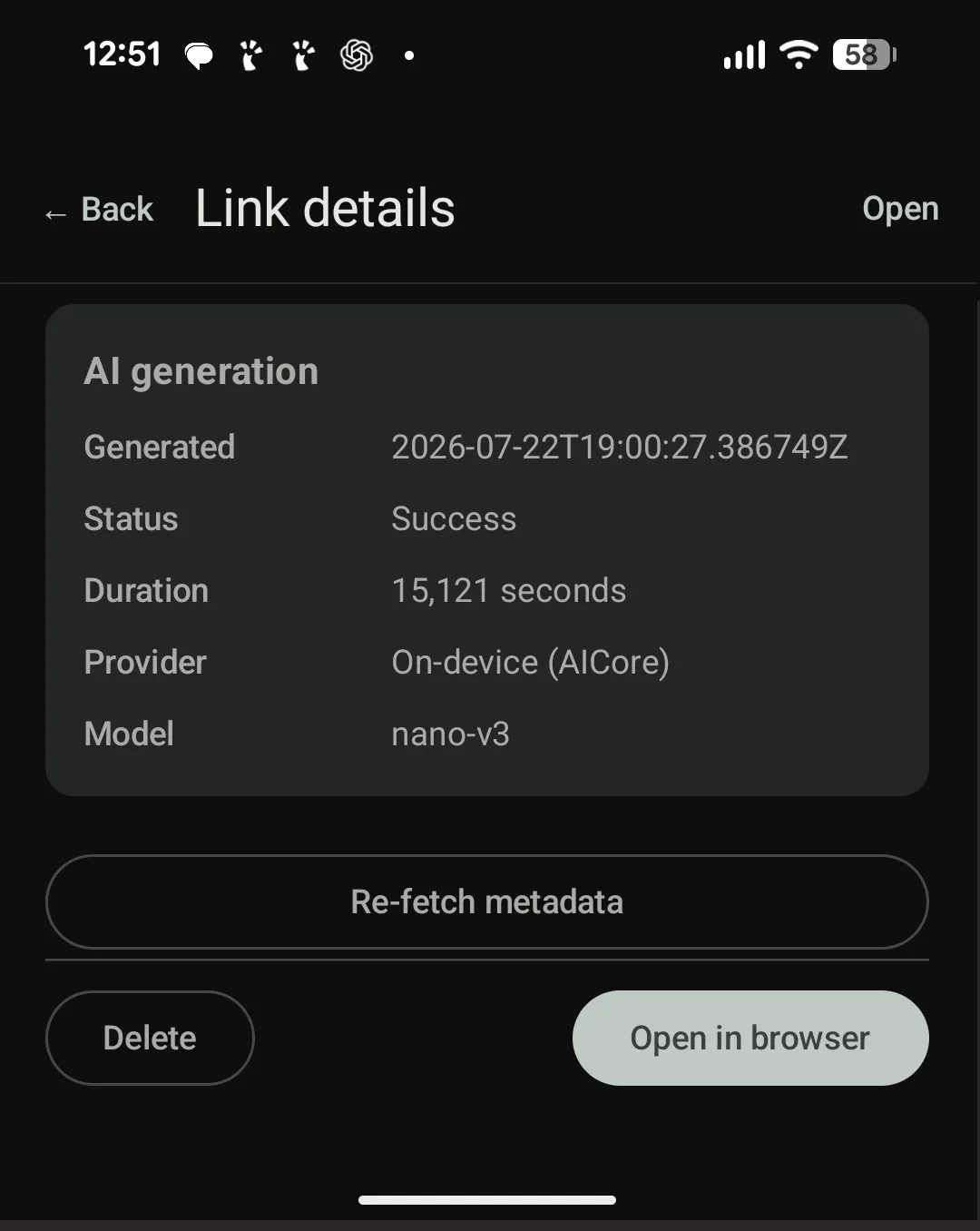
The screenshot at the top is a real result. A page published by Hannes Brecher was enriched in about 15.1 seconds. Kollect extracted five sensible tags, and the audit section records On-device (AICore) with the resolved nano-v3 model. For this narrow structured-extraction task, the small local model works remarkably well.
There is one Android restriction which shapes the implementation: AICore inference must happen while Kollect is the top foreground application. WorkManager can upload queued entries and OpenRouter can enrich them in the background, but Android rejects the on-device generative-AI call from a background worker. In AICore mode, sharing a link brings Kollect to the foreground while enrichment runs. That is a platform constraint I am happy to accept for a roughly 15-second, private, effectively free model call.
Device support also matters. The Pixel 10 Pro supports this Prompt API path. My Fairphone 6 currently reports Gemini Nano as unavailable and is not on Google’s supported-device list, so OpenRouter remains the practical fallback there. “On-device AI” is not yet a generic Android capability simply because a device runs Android 16.
Secrets and failure records
The Android version protects both the Kollect server token and the optional OpenRouter key with AES-GCM keys held by Android Keystore. The on-device mode needs no model-provider credential at all.
I also made AI generation auditable rather than silently overwriting metadata. Every entry can carry:
- the UTC generation timestamp
- success or failure status and an error message
- elapsed time
- provider (
openrouteroraicore) - the actual model name
Those are the fields visible in the screenshot. They are useful while developing, but they also answer a future question that otherwise becomes surprisingly difficult: where did this summary come from?
Failures do not throw the link away. Kollect keeps the entry, records the error, and lets me retry. On-device generation has a five-minute timeout, model availability and download states produce explicit messages, and malformed model output remains an enrichment error rather than corrupting the collection.
What this setup does and does not buy me
The largest benefit is not disk space. The Android SDK, Gradle caches, and emulator images consume essentially the same bytes wherever I put them. The benefit is a clean ownership boundary.
Everything Android-shaped belongs to kollect-android. If I stop mobile development, I can remove the Distrobox and its custom home without wondering which packages, environment variables, dotfiles, SDK revisions, and signing keys were added to Fedora over the previous year. If the toolchain gets into a strange state, recreating the environment is a contained operation rather than surgery on the host.
There are trade-offs. A stateful Distrobox is not a hermetic CI image, and this particular setup is documented rather than fully declarative. Hardware acceleration and GUI forwarding depend on host integration. The container shares the Fedora kernel, and, again, it must not be mistaken for a hostile-code sandbox.
For interactive development, those are good trade-offs. I get a normal shell, a normal Gradle workflow, wireless access to my phone, and a real emulator window. Fedora stays a workstation instead of becoming the accumulated history of every toolchain I have ever tried.
And the application produced by that container now uses the phone in exactly the same spirit: the capable hardware already in my pocket performs a small, well-defined job locally instead of sending it to a cloud service by default. The development stack is contained, the model is on-device, and the result remains ordinary data on a server I control.
That combination feels right for Kollect: a small application, a deliberately narrow AI feature, and no more infrastructure than the problem actually needs.
Comments
You can use your Mastodon or other ActivityPub account to comment on this article by replying to the associated post.
Search for the copied link on your Mastodon instance to reply.
Loading comments...