
- Sun 10 May 2026
- 14 min read
- Linux
- #distrobox, #podman, #containers, #linux, #fedora, #rhel, #silverblue, #kinoite, #atomic, #btrfs, #vscode, #development
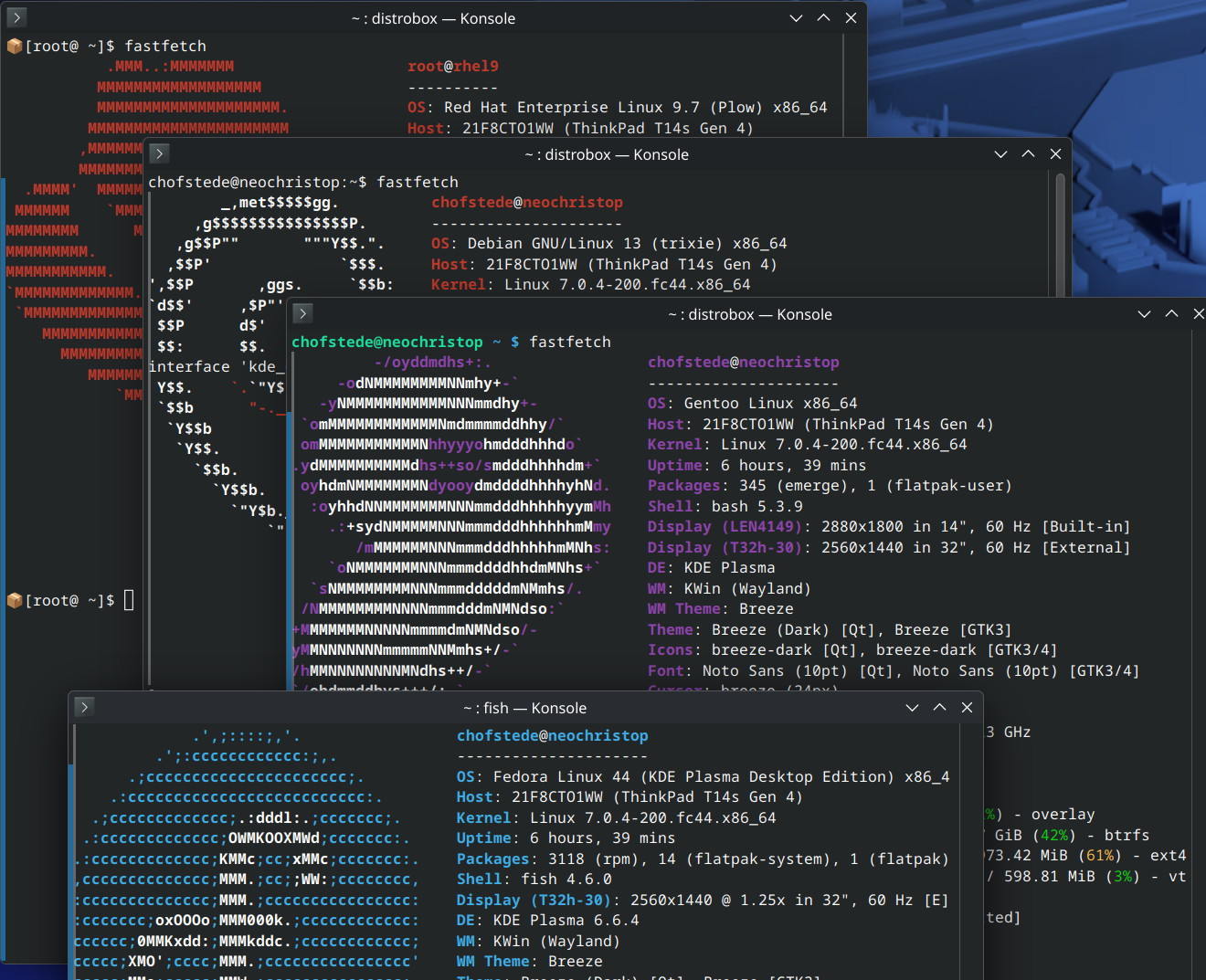
Table of Contents
Most developers already solve environment contamination manually: Python venvs, custom toolchain directories, shell glue, version managers, and pages of setup notes. Distrobox replaces much of that with a simpler idea: run the toolchain in another Linux distribution container that behaves like a normal shell session.
It is a thin wrapper around Podman (it can also drive Docker, but we don’t use the Docker word here) that creates long-lived, tightly integrated containers, with your home directory mounted in, your user mapped through, and the desktop bus wired up so that GUI applications and editors just work. A Fedora laptop with an Arch development environment for one project, a RHEL 9 environment for another, and an Ubuntu environment for the binary the vendor only ships as a .deb becomes a fairly normal setup rather than a heroic one.
Unlike a VM, a Distrobox container shares the host kernel, so startup is effectively instant and memory overhead is small. You get userspace separation, not hardware virtualization. Conceptually it sits between a chroot (same kernel, almost no isolation, painful to set up) and a full VM (separate kernel, real isolation, real overhead): same kernel, useful userspace separation, and a shell session that feels native.
This article is the case I’d make to a colleague who has heard of Distrobox but hasn’t pulled the trigger yet, plus the patterns I actually use day to day.
What Distrobox Actually Does
Strip the marketing layer off and Distrobox is a shell script (a substantial one, but still a shell script) that runs podman create with a long list of flags you would not enjoy typing by hand. Those flags are what make a Distrobox container behave like a development sandbox instead of a server workload:
- Your host
$HOMEis bind-mounted into the container at the same path. Files you edit in the container are the same files on the host. - Your user is mapped into the container with the same UID and GID, so file ownership is consistent across the boundary.
/dev,/tmp, the user runtime directory, the X11 and Wayland sockets, and the user systemd session are passed through.- Common host paths that matter for desktop integration (
/run/user/<uid>,/etc/hosts, the keyring socket) are wired up so that GUI applications, GPG, SSH agents and so on transparently see the host versions. - Distrobox can run a lightweight init or, if you ask for it, a full systemd session inside the container, so the box behaves more like a persistent user environment than a disposable
podman run --rmshell.
In other words, it is not an ephemeral container that throws away state when you exit. It is a long-lived container with your identity inside it. Closer in spirit to a chroot or a VM than to a podman run --rm one-off.
Concretely, the basic workflow is:
# create a Fedora 43 box called "fedora-dev"
distrobox create --name fedora-dev --image registry.fedoraproject.org/fedora-toolbox:43

# step into it
distrobox enter fedora-dev

# inside, you are <your-username> on Fedora 43, with $HOME mounted
sudo dnf install -y rustup gcc-c++ openssl-devel
rustup default stable
cargo build
Exit, come back tomorrow, and the box is still there with the same Rust toolchain. List your boxes with distrobox list, remove one with distrobox rm <name>, upgrade what’s inside with distrobox upgrade <name> (which runs the distribution’s package manager non-interactively).
Why I Use It
Multiple Distributions
The headline feature is also the most useful one in practice. On a single Fedora workstation I have, at various times, run:
fedora-toolbox:43for the default development environment.registry.access.redhat.com/ubi9/ubifor testing playbooks against a RHEL 9 control node.registry.access.redhat.com/ubi10/ubifor the same against RHEL 10.docker.io/library/archlinuxfor a project where someone insisted on an AUR dependency.quay.io/toolbx/ubuntu-toolbox:24.04for one vendor binary shipped only as a.deb.registry.opensuse.org/opensuse/distrobox:tumbleweedto reproduce a Tumbleweed bug report.
Each one is a separate box with its own dnf / apt / pacman / zypper. None of them touch the host’s package database. None of them care that the host is Fedora.
The list of “supported” base images is long but unfussy: anything with a working package manager and a reasonable init can be made to work, and the project documentation catalogues which images Distrobox knows how to bootstrap automatically.
Per-Project Toolchains
This is where Distrobox earns its keep on a daily basis. Each project gets a box. The box gets exactly the toolchain that project needs, pinned to the distribution where that toolchain is least painful (Arch for bleeding-edge, RHEL for “this customer is on RHEL”, Ubuntu for “this vendor only tests on Ubuntu”). When the project ends, distrobox rm and the entire toolchain is gone with it. No “I think I can uninstall this now” archaeology, no pip uninstall chains, no leftover systemd units.
There is a real productivity payoff to being unafraid to throw an environment away. I create boxes more readily now than I ever created venvs, because the cost of recreation is measured in a single distrobox create plus whatever your dnf install line is.
VSCode Integration is Excellent
This is the one I genuinely did not expect to like as much as I do. VSCode’s Remote Containers / Remote SSH stack treats a Distrobox container as a first-class remote target. From the host:
distrobox enter fedora-dev -- code .
VSCode launches on the host (with all your host-level settings and accounts) but the language servers, debuggers, build tools and integrated terminal all run inside the container. The C++ extension finds the container’s gcc. The Python extension finds the container’s interpreter. The Rust analyzer runs against the container’s cargo. No “Dev Containers” devcontainer.json ceremony required, no rebuilds when you change a setting; it is just a remote, and the remote happens to share your home directory so saving a file is instantaneous.
Worth being honest about the trade-off here. Unlike Dev Containers, the environment is stateful and long-lived by default, so you do not get the strict reproducibility guarantees of a devcontainer.json-driven build. You are choosing convenience and integration over a hermetic, repo-pinned environment. For a project where reproducibility is the goal (a CI image, an Ansible Execution Environment, a shipping artifact), build a real OCI image. For everyday development, the convenience usually wins.
For me this killed the last argument for installing development toolchains on the host at all.
Atomic Desktops: Mutability Where You Need It
If you are running an Atomic distribution (Fedora Silverblue, Kinoite, Sericea, Onyx, or Fedora CoreOS / IoT for the server case), Distrobox stops being a nice-to-have and becomes the intended path for development work. I covered the broader Atomic story in Universal Blue and Atomic Desktops; the short version is that the host filesystem is read-only and assembled from an OSTree commit, so you do not install development packages on it. You install them inside a Distrobox container, which is mutable, snapshottable, and disposable.
The mental model that finally clicked for me on Silverblue: the host is the appliance; Distrobox boxes are the workstations. You stop treating the host as a place where things accumulate, and you stop being precious about any single box.
rpm-ostree layering is still there as an escape hatch, but every package you layer is one more thing you are signing up to maintain across upgrades. Distrobox lets you keep the layering set as small as it should be: usually just shell, editor, and the handful of host tools that genuinely need to be on the host.
What Actually Stays on the Host
A reasonable question once you start moving toolchains into boxes: what is the host for, then? My layered-on-the-host set on Silverblue and Kinoite is short and stable:
- The shell and core terminal tooling (
fish/zsh,tmux,git). - The editor frontend (
code,neovim), even though the language servers and build tools live in the boxes. - A browser, where it is not already a Flatpak.
podmananddistroboxthemselves (these come on the base image on Atomic spins anyway).- The virtualization stack if I run VMs (
virt-manager,libvirt). - A small amount of desktop glue (
gnome-tweaks, codecs, drivers that genuinely need host kernel access).
That is roughly it. Compilers, language runtimes, database clients, infrastructure tools, anything project-shaped, lives in a box. The host stays close to the upstream image, which is the entire point of an Atomic distribution.
RHEL Userspace on Fedora
This is the trick that surprised me the first time it worked. On a Fedora host that is itself registered with subscription-manager, you can create a Distrobox container from a Red Hat UBI image, and the resulting container behaves much like a regular RHEL userspace with access to the standard RHEL repositories. No flags, no manual bind mounts:
# one-time, on the host
sudo dnf install -y subscription-manager
sudo subscription-manager register

# then, as your normal user
distrobox create --name rhel10 --image registry.access.redhat.com/ubi10/ubi
distrobox enter rhel10
sudo dnf install -y ansible-core gcc make tmux
The reason this just works is that Fedora ships Podman with a default in /usr/share/containers/mounts.conf that propagates the host’s RHEL entitlements into every container automatically:
$ cat /usr/share/containers/mounts.conf
/usr/share/rhel/secrets:/run/secrets

$ ls -l /usr/share/rhel/secrets
etc-pki-entitlement -> ../../../../etc/pki/entitlement
rhsm                -> ../../../../etc/rhsm
redhat.repo         -> ../../../../etc/yum.repos.d/redhat.repo
Those symlinks point at the host’s /etc/pki/entitlement, /etc/rhsm, and redhat.repo. Podman binds the whole tree into the container at /run/secrets, RHEL’s subscription-manager plugin for dnf knows to look there, and the container’s dnf quietly starts seeing the host’s BaseOS, AppStream and CodeReady repositories. Distrobox inherits this for free because it is just podman create with extra mounts; it doesn’t fight the default.
The userspace is RHEL, the package set is RHEL’s, and the kernel is whatever the host runs. That is enough to reproduce most customer issues, build against the same library versions production will run, or run ansible-navigator inside the same OS your control plane uses.
If you do not have a host subscription, UBI on its own is still useful (it will get you ansible-core, python3, the standard build toolchain), it just won’t pull from the full repository set. On a non-Fedora-derivative host that doesn’t ship the same mounts.conf default, you can either drop in an equivalent file yourself, register the container directly with subscription-manager inside it, or pass the entitlement directories in by hand.
A Few Patterns Worth Knowing
Exporting Applications and Binaries to the Host
A box that you can only use by running distrobox enter is fine for shell work, but for desktop apps it would be tedious. Distrobox solves this with distrobox-export:
# inside the box
distrobox-export --app gimp           # adds GIMP to the host's application menu
distrobox-export --bin /usr/bin/cargo --export-path ~/.local/bin
The exported launcher is just a shim that calls distrobox enter <name> -- <command>. Your desktop sees it as a normal .desktop file or a normal binary on $PATH, and clicking the icon enters the right container automatically. This is the bit that makes having the Inkscape from one box and the Krita from another feel transparent rather than fiddly.
Init Files and Reproducible Boxes
distrobox create accepts --init-hooks and --pre-init-hooks for one-off creation-time setup, but the more useful pattern for me has been an assemble-style manifest:
# ~/.config/distrobox/distrobox.ini
[fedora-dev]
image=registry.fedoraproject.org/fedora-toolbox:43
additional_packages="git tmux gcc rustup"
init_hooks="rustup default stable"

[rhel10]
image=registry.access.redhat.com/ubi10/ubi
additional_flags="--volume /etc/pki/entitlement:/etc/pki/entitlement:ro --volume /etc/rhsm:/etc/rhsm:ro"
additional_packages="ansible-core git tmux"
distrobox assemble create
Now a fresh laptop is one distrobox assemble create away from having every box I rely on, with the right packages pre-installed. This is what I sync between machines, not the boxes themselves.
Btrfs Subvolumes for Per-Box Snapshots
If your containers/storage lives on Btrfs (the default on modern Fedora and Atomic spins), Podman uses the overlay driver on top of it, and the entire container graph sits inside a subvolume tree at ~/.local/share/containers/storage/. Two consequences worth knowing:
- You can take a
btrfs subvolume snapshotof the whole container store before a major change (a system upgrade, an experimentaldnf installspree inside a box) and roll back if it goes wrong. - The lightweight version of this, which is what I actually do most days, is
Timeshift-style hourly snapshots of~/.local/share/containers/. Disk is cheap; an evening of lost configuration inside a box is not.
If you want per-box granularity (snapshotting one important box without touching the rest), that gets into containers.conf and Podman’s additionalimagestores, which is its own small adventure. Worth the effort for the long-lived RHEL box you do not want to rebuild, probably not worth it for the throwaway boxes that make up most of the list.
Nesting and Rootful Boxes
Two common gotchas:
- Nested containers. Running Podman or building OCI images inside a Distrobox box works, but the inner Podman needs the right namespaces. The most reliable path I have found is to pass
--unshare-netns --unshare-ipcat create time and to use thevfsstorage driver for the inner Podman (setstorage.driver = "vfs"in the box’s~/.config/containers/storage.conf). It is slower than overlay, but it sidesteps the rootless overlay-on-overlay problem. For “build and test a container image” workflows where speed matters, just run Podman on the host and use the box for the toolchain. - Rootful boxes.
distrobox create --rootruns the container as the host’s root user. You almost never want this for development; it exists for cases where the workload genuinely needs root capabilities. For the curious: it interacts cleanly withsudo, but you lose some of the seamless home-directory integration.
Where Distrobox Stops Being the Right Tool
Distrobox is for development environments and developer-adjacent workflows. It is not what I reach for when I want:
- Production workloads. Use Podman directly, with Quadlets, or Kubernetes, or whatever your platform of choice is. A Distrobox container has too many host things mounted into it to be a sensible production unit.
- Reproducible CI. Use
ansible-builderand an Execution Environment, or a regular OCI build, where the artifact is the image. Distrobox is for stateful, interactive boxes, the opposite of what you want in a CI runner. - Strong isolation. Distrobox shares your home directory with the box. A compromised box can read your
~/.sshand your browser profile. If you need to sandbox something hostile, use a VM or a properly locked-down rootless container, not Distrobox.
Within the development niche it is aimed at, I struggle to think of a tool I’d rather have on a Linux laptop right now. Especially on Atomic systems, where it stops being a productivity nicety and becomes the way you do work.
Further Reading
- Distrobox project site
- Distrobox compatibility matrix (which images Distrobox knows how to bootstrap)
- Toolbx, the older Fedora project Distrobox was inspired by; if you only ever use Fedora-flavoured boxes on Fedora, it is a smaller, simpler alternative.
- Universal Blue and Atomic Desktops, for the Atomic side of the story.
- Podman in Production, for the engine underneath.
Comments
You can use your Mastodon or other ActivityPub account to comment on this article by replying to the associated post.
Search for the copied link on your Mastodon instance to reply.
Loading comments...