I have a very predictable failure mode when reading the web. I open an interesting article, decide I will come back to it later, and leave the tab open. Then I do the same thing another twenty times. The tabs stop being a reading list and become archaeological layers.
Browser bookmarks never fixed this for me. They are good at preserving a URL, but a URL and a title are not enough to answer the question I actually have two weeks later: why did I save this? Read-it-later services answer more of that question, but most of them turn a small personal collection into another account, another cloud database, and often another web application.
So I built Kollect.
Kollect is a small native KDE Plasma 6 link collector. I paste a URL, and it immediately files the link into the current ISO week. In the background it fetches the page and asks an OpenRouter model to extract a useful title, publication date, author, tags, a primary topic, and a short summary. The result is a collection I can skim later instead of a graveyard of titles I no longer recognise.
This is not a product announcement. I have not published the application or its source, and there is no download link hiding at the end of this article. It is a personal 0.1 application built around my own workflow. But the design came together cleanly enough that it is worth documenting, especially because it combines several things I care about: a genuinely native Linux desktop, boring local files, optional self-hosting, secrets in KWallet, and distribution-native packaging.
Table of Contents
- Table of Contents
- What using it looks like
- A native Plasma application, on purpose
- Local-first means ordinary files
- Enrichment without turning the app into a chatbot
- Secrets belong in KWallet
- One interface, two storage backends
- The optional server
- Packaged as a Fedora application, not a build directory
- Things I deliberately did not build
- The part I like most
What using it looks like
The main interaction is intentionally uneventful. Paste or type a link into the field and press Enter. That is it.
There are a few other paths because the best capture tool is the one that does not interrupt what I am doing:
Ctrl+Shift+Vadds whatever URL is currently on the clipboard.- A URL can be dragged and dropped anywhere onto the window.
kollect https://example.net/articleadds a URL passed on the command line.- The desktop file registers Kollect as an HTTP and HTTPS URL handler, so it can receive links from other desktop applications.
The entry appears immediately with a pending indicator. Metadata fetching is asynchronous, so a slow website or API call does not freeze the interface. When enrichment completes, the raw URL turns into a recognisable headline with a topic and tags. If fetching fails, the entry remains in the collection, changes to an error state, and can be retried from the context menu.
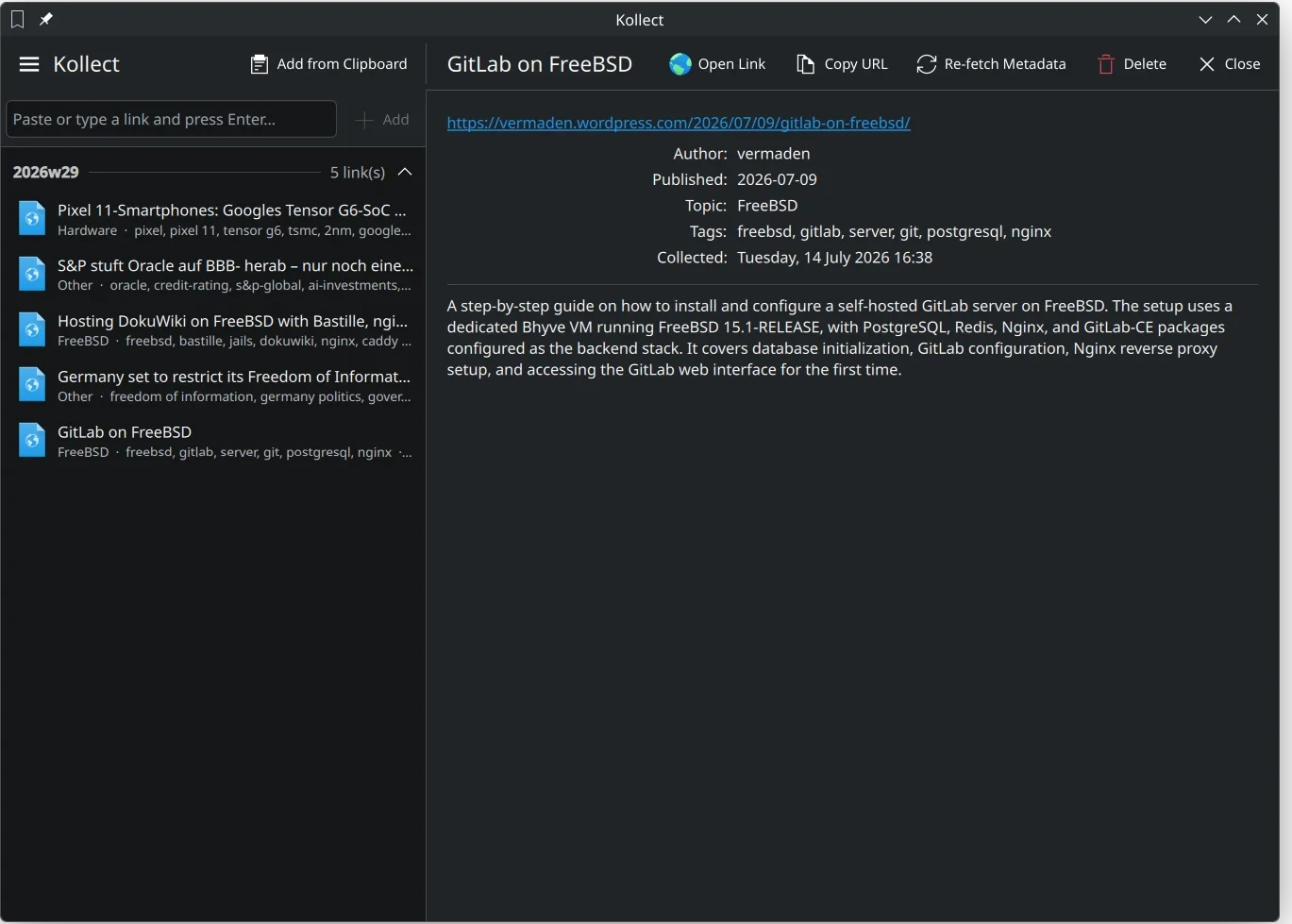
Links are grouped into folders such as 2026w29. The current week is expanded by default, older weeks are collapsed, and both weeks and entries are sorted newest first. Clicking an entry opens the detail page shown in the screenshot: the original URL, author, publication date, topic, tags, collection time, and summary. From there I can open the page, copy its URL, re-fetch metadata, or delete the entry.
That last part matters. Kollect does not try to become a browser. It remembers and organises links, then hands them back to the browser when I actually want to read them.
A native Plasma application, on purpose
Kollect is not an Electron application, a local web server with a tray icon, or a Python GUI wearing a vaguely native stylesheet. The desktop client is C++20 with Qt 6, KDE Frameworks 6, QML, and Kirigami.
The executable owns the application logic and exposes one KollectApp object to QML. The interface is split into three small QML files:
Main.qmlcontains the application window, global drawer, capture field, weekly list, drag-and-drop area, and delete confirmation.DetailPage.qmlrenders one selected entry and its actions.SettingsDialog.qmlconfigures OpenRouter and the optional sync server.
Kirigami provides the application structure, actions, responsive pages, form layout, inline messages, passive notifications, spacing, and icon integration. Qt Quick Controls uses org.kde.desktop, so widgets follow the active Plasma style rather than drawing a separate visual universe inside the window. The application uses the system icon theme and standard KDE shortcuts such as the Preferences, Close, and Quit keys.
This buys more than appearance. The global drawer behaves like a KDE global drawer. Actions can move between the toolbar and overflow areas as space changes. Labels are selectable where that is useful. Notifications use the expected Plasma presentation. The result feels at home on my desktop because it is built out of the same primitives as the rest of the desktop.
The C++ side follows the usual Qt model/view boundary. LinkModel is a QAbstractListModel which presents both week headers and entries to the QML ListView. Roles expose the title, URL, topic, tags, timestamp, state, and summary. A store emits entryAdded, entryUpdated, entryRemoved, or reloaded, the model rebuilds or updates the relevant row, and QML reacts. The view does not need to know whether that store is a directory on disk or an HTTP API.
That separation became the key to the entire design.
Local-first means ordinary files
The default backend is LocalLinkStore, and it stores the collection here:
~/.local/share/kollect/
├── 2026w28/
│   └── example-org-an-interesting-article.toml
└── 2026w29/
    ├── vermaden-wordpress-com-gitlab-on-freebsd.toml
    └── lwn-net-articles.toml
There is one directory per ISO week and one TOML document per link. A real entry looks roughly like this:
url = "https://vermaden.wordpress.com/2026/07/09/gitlab-on-freebsd/"
added_at = "2026-07-14T16:38:21"
status = "done"
headline = "GitLab on FreeBSD"
date = "2026-07-09"
tags = ["freebsd", "gitlab", "server", "git", "postgresql", "nginx"]
topic = "FreeBSD"
author = "vermaden"
summary = "A step-by-step guide to installing and configuring a self-hosted GitLab server on FreeBSD. The setup uses a dedicated bhyve VM and a PostgreSQL, Redis, Nginx, and GitLab-CE backend stack."
This is deliberately not a single opaque database. I can inspect the files with less, search them with rg, copy one entry, synchronise the directory with any file tool, put it in a private Git repository, or write a conversion script ten years from now without first reconstructing an abandoned application’s database schema.
The file name is derived from the host and the last meaningful URL path segment, normalised to a lowercase slug and capped at 80 characters. If two links in a week produce the same slug, Kollect adds -2, -3, and so on. Duplicate URLs are rejected across the whole collection before a file is created.
Writes go through QSaveFile. That gives the local backend an important property for almost no complexity: a new document is written and committed atomically instead of truncating the existing file in place. A crash during a metadata update should not leave half a TOML document behind. Deleting the final entry in a week also removes the now-empty week directory.
The state machine is tiny and visible in the data:
pending  ->  done
   |
   +----> error  ->  pending (manual re-fetch)
The URL is persisted in pending state before any network request begins. Metadata is helpful, but it is not allowed to decide whether the link itself survives.
Enrichment without turning the app into a chatbot
The AI part of Kollect is intentionally narrow. There is no chat panel and no prompt box. A model is used as a structured metadata extractor because web pages are inconsistent and because a useful two-to-four sentence reminder is hard to derive from <meta> tags alone.
For each queued entry, Kollect performs two network operations:
- It fetches the page with Qt’s network stack, follows redirects only when they do not downgrade security (Qt’s NoLessSafeRedirectPolicy), and reads at most 2 MiB. A 30-second timeout covers both this request and the OpenRouter call that follows.
- It removes scripts, styles, SVG, templates, comments, and HTML markup, decodes entities with
QTextDocument, normalises whitespace, and keeps at most 14,000 characters of readable text.
That text and the URL go to OpenRouter’s chat-completions endpoint. The request demands one JSON object with exactly the fields Kollect understands: headline, date, tags, topic, author, and summary. In production I use the Chinese MiniMax M3 model under the OpenRouter identifier minimax/minimax-m3. It is more than capable enough for website summaries and, as of July 14, 2026, costs $0.30 per million input tokens and $1.20 per million output tokens. The model is a normal setting and can be replaced without rebuilding the application. Kollect also requests JSON response formatting and defensively extracts the outermost { ... } span because models occasionally wrap JSON in a Markdown fence despite being told not to.
Jobs run through a simple in-process queue, one at a time. That avoids a burst of page downloads and API calls when I paste several links in quick succession. It also makes error handling predictable: finish or fail one entry, then schedule the next job on the Qt event loop.
There is an obvious privacy boundary here which should not be hand-waved away. Local storage does not mean offline processing. Enrichment sends the link and extracted page text to OpenRouter and whichever model provider handles the selected model. Anyone using this design should make that decision consciously and should not feed it private pages or sensitive intranet URLs. Without an API key, the link is still collected, but enrichment ends in an error state.
Secrets belong in KWallet
Kollect needs two credentials: the OpenRouter API key and, when server mode is enabled, a bearer token. On Plasma, both belong in KWallet.
The client talks directly to org.kde.kwalletd6 over D-Bus, opens the user’s network wallet asynchronously since that call may display an unlock dialog, and stores passwords under a dedicated Kollect folder. Loading is additionally deferred until the Qt event loop is running, so no secret can be reported before the rest of the application has connected to the corresponding signals. Metadata jobs and remote requests wait until the corresponding secret has been resolved instead of racing application startup.
Non-secret settings live in ~/.config/kollectrc through KConfig: model name, server URL, username, and whether the remote backend is enabled. An older API key found in that config is migrated into KWallet the first time a wallet becomes available and then removed from the config file.
There are pragmatic fallbacks. If KWallet is unavailable, secrets can be stored in the config file, and the OpenRouter key can come from OPENROUTER_API_KEY. That is useful in unusual sessions and during development, but KWallet is the intended path on a normal Plasma desktop.
One interface, two storage backends
I originally needed Kollect on one machine, so local TOML was the right starting point. Then came the predictable next requirement: the same collection on more than one workstation.
I did not want to destroy the local design by making the server mandatory. Instead, LinkStore defines the operations the rest of the application needs, while two implementations provide persistence:
QML  <->  LinkModel  <->  KollectApp
                \             /
                 \           /
                  LinkStore
                 /         \
        LocalLinkStore   RemoteLinkStore
           TOML files       JSON/HTTP
At startup, KollectApp reads the configuration and constructs exactly one backend. Everything above it stays the same. Adding an entry, updating metadata, deleting it, detecting duplicates, sorting weeks, and feeding the view all use the shared abstraction.
The remote backend is deliberately small. Once a token is available, it loads the user’s complete collection with GET /entries. An entry update is a full-document PUT to /entries/{week}/{entry_id}, and deletion uses the corresponding DELETE. The JSON representation carries the same fields as the TOML representation, so switching storage does not change what an entry means.
Server mode also has a one-time Upload Local Collection action. It reads the existing TOML backend, skips URLs or IDs already present remotely, and pushes the rest. Local files are left untouched.
It is important to call this what it is: an alternative remote store, not bidirectional offline synchronisation. In server mode the server is the source of truth and the client needs a network connection. There is no conflict-resolution algorithm, offline write journal, or background merge between TOML and SQLite. Building those features would be possible, but they would turn a clean storage switch into a distributed-systems project. For my use, an honest online backend is the better tradeoff.
The optional server
The server is a separate, compact Python application built with FastAPI, SQLAlchemy 2, Pydantic, and SQLite. Its complete public surface is five operations:
| Method | Path | Purpose |
|---|---|---|
POST |
/auth/login |
Exchange a username and password for a bearer token |
GET |
/entries |
Return the authenticated user’s collection |
PUT |
/entries/{week}/{entry_id} |
Create or replace a complete entry |
DELETE |
/entries/{week}/{entry_id} |
Delete one entry |
GET |
/healthz |
Liveness check without authentication |
User passwords are hashed with Argon2. Login creates a random 32-byte URL-safe token, returns it once, and stores only its SHA-256 hash in the database. A leaked SQLite file therefore does not directly reveal reusable bearer tokens. Every entry is keyed by user, week, and entry ID, and a uniqueness constraint prevents the same user from collecting one URL under multiple IDs. Different users are isolated and may independently save the same URL.
Administration is intentionally CLI-only. The server package provides commands to create users, change passwords, and list accounts. I do not need an admin web interface for a private service with a handful of users, and not building one means there is no admin web interface to secure.
The API tests cover the parts that would hurt if they broke: failed login, missing and invalid tokens, the full CRUD round trip, duplicate URL conflicts, and isolation between two users.
Deployment is equally unsurprising. A small python:3.12-slim image installs the server package, runs as UID 1000, and keeps SQLite under /data. A rootless Podman Quadlet binds it to 127.0.0.1:8000, stores data in a named volume, restarts on failure, and can start with the user’s systemd session. If I expose it beyond localhost, it goes behind a TLS-terminating reverse proxy because the bearer token is an HTTP header, not magic.
Packaged as a Fedora application, not a build directory
I run Fedora on my Plasma desktops, so Kollect is packaged as an RPM. This sounds like a finishing detail, but it changes how an application feels in daily use. A program launched out of ~/src/project/build/ is still a project. A program installed through RPM, visible in the application launcher, tracked by the package database, and removable cleanly is part of the system.
The package uses Fedora’s CMake macros and declares the actual build stack:
- CMake, GCC C++, and Extra CMake Modules
- Qt 6 base and declarative development packages
- KDE Frameworks 6 KConfig, KCoreAddons, and KI18n development packages
- Kirigami and
qqc2-desktop-styleas explicit QML runtime requirements
That last point is easy to miss. RPM dependency generation sees linked ELF libraries rather well, but QML imports loaded at runtime are not always inferred. Declaring Kirigami and the desktop Qt Quick style explicitly prevents the classic result where the package installs successfully and the application immediately fails because a QML module is absent.
The RPM installs the kollect executable and org.kde.kollect.desktop, then validates the desktop file during %check. The build helper derives the version from the spec, creates a clean source archive from the current Git HEAD, and hands that tarball to rpmbuild. The package is therefore reproducible from committed source rather than whatever untracked experiment happens to be lying in the worktree.
For development, the underlying build remains conventional:
cmake -B build -DCMAKE_BUILD_TYPE=RelWithDebInfo
cmake --build build -j"$(nproc)"
./build/kollect
For daily use, I install the RPM. KDE gets a proper desktop entry, %u URL handling, the standard bookmarks icon from the current icon theme, and a binary under the normal system prefix.
Things I deliberately did not build
Small applications stay pleasant when they are allowed to have boundaries. Kollect 0.1 does not have browser extensions, full-text article archiving, reading progress, a mobile client, collaborative lists, server-side metadata workers, or magical offline conflict resolution.
It also does not currently extract metadata locally. The model call is useful, but it introduces cost, network dependence, and the privacy boundary described above. A future local model or deterministic extractor could fit behind the existing MetadataFetcher interface, but I would only add it when it improves the actual workflow rather than the feature list.
The server is optional because a server should remain optional for a link collector. The TOML backend is not a demo mode that exists until a user signs up. It is the simplest complete version of the application and the one with the best long-term ownership story. Remote storage solves a real multi-machine problem, but it is allowed to remain an add-on.
The part I like most
Kollect is not technically enormous. That is exactly why I like it.
It takes one recurring irritation, too many tabs and too little context, and gives it a narrow desktop-shaped solution. The interface is native to Plasma. The default data format is readable without Kollect. Writes are atomic. Secrets use the desktop wallet. The AI model has one constrained job. The remote service can be self-hosted, but the application does not require it. Fedora gets a real package rather than a curl | bash installer.
Most importantly, I know where the data is and what every moving part does. If I stop maintaining the client tomorrow, the local collection remains a directory of TOML files. If I stop running the server, SQLite remains a documented database full of ordinary rows. There is no export button I need to trust and no service whose business model has to survive longer than my bookmarks.
That is the kind of personal software I want more of: small, native, inspectable, and built to solve the problem in front of me without trying to own everything around it.
Comments
You can use your Mastodon or other ActivityPub account to comment on this article by replying to the associated post.
Search for the copied link on your Mastodon instance to reply.
Loading comments...