
A while back I put RHEL on a ZFS root, declared it cursed, and the homelab VM lived to tell the tale. That one worked, which is the dangerous kind of outcome, because it teaches you the wrong lesson. The wrong lesson is “the kernel does not care what filesystem holds root, so anything is possible if you disable enough checks.”
This is the sequel where the kernel reminds me that it absolutely does care, thank you very much, and that “anything is possible” has an asterisk the size of a merge window.
This time the target was bcachefs. The plan was simple: get bcachefs running on a fresh RHEL 10 box, write a smug little post about subvolumes and snapshots, go to bed. What I got instead was a four hour speedrun through every layer of the out-of-tree kernel module experience, a defeat so total I had to switch distributions, and this post, which is less “how to” and more “post-mortem.”
Let me be clear from the top, in the grand tradition of these articles: this was a bad idea. Not “edgy homelab fun” bad like the ZFS thing, which at least booted. This was “fundamentally trying to bolt a filesystem that tracks the bleeding edge of mainline onto a distribution whose entire value proposition is that it never moves” bad. I knew that going in. I did it anyway. I tried REALLY hard. The kernel said no.
What bcachefs Is, and Why You’d Want It
Before the carnage, the pitch, because bcachefs genuinely is interesting.
bcachefs grew out of bcache, the block-layer SSD cache that has been in the Linux kernel for over a decade. Kent Overstreet took the same B-tree machinery and grew it upward into a full copy-on-write filesystem. The selling point is that it folds the features people reach for ZFS and Btrfs to get into a single, more uniform design:
- Subvolumes and snapshots that are cheap and first-class, not bolted on
- Transparent compression (LZ4, gzip, zstd) per file or per filesystem
- Copy-on-write for atomic updates and consistent snapshots
- Multi-device placement, replication, and caching/tiering-oriented designs for combining fast and slow storage in one filesystem
- Full data and metadata checksumming, with optional encryption
The part worth emphasizing is how it tries to deliver these. bcachefs combines subvolumes, snapshots, compression, and copy-on-write in a design that is meant to stay fast under heavy load. Sustained performance under write pressure is a sensitive comparison point: snapshot-heavy, write-heavy Btrfs workloads have historically produced enough fragmentation and write-amplification complaints to make it one. bcachefs was built from its caching roots to keep the allocator and the B-trees healthy when the I/O does not stop. Whether it fully delivers on that promise is a topic for benchmarks and not for a homelab VM that never got far enough to write a single byte, but that is the ambition, and it is a good one.
So why is it such a nightmare to install on RHEL? For that you need the politics.
The Current Situation: bcachefs Lives Outside the Tree
bcachefs was merged into the mainline Linux kernel in 6.7, in early 2024. For a while you could build a sufficiently recent kernel with CONFIG_BCACHEFS_FS and go. That particular convenience did not last.
What preceded the end was a long, increasingly public series of disagreements between Kent Overstreet and Linus Torvalds, mostly about merge-window discipline. Linus runs the kernel on a strict rhythm: features land during the two-week merge window, and after that you send bug fixes, not new code. bcachefs is young and moving fast, and Kent repeatedly wanted to push substantial changes during the stabilization phase, arguing that a young filesystem needs its fixes in users’ hands now. Linus disagreed, loudly, more than once.
So bcachefs was marked externally maintained in Linux 6.17. In Linux 6.18, its in-tree code was removed entirely: ongoing development had moved to an external DKMS module, and keeping a stale copy inside the kernel would only create version confusion.
That last fact is the whole problem. “Build against whatever kernel you happen to be running” sounds wonderfully portable until you remember that Linux does not promise a stable internal API for arbitrary out-of-tree filesystems. Helpers get renamed, signatures change, structures get reorganized, and code inside the kernel tree is updated alongside those changes in the same commit so nobody notices. External code gets to discover them at compile time, usually at the least convenient possible hour.
RHEL 10 is built on a 6.12 kernel line. bcachefs DKMS development is chasing much newer upstream internals. You can see where this is going.
The Patient
[root@testvm2 ~]# uname -a
Linux testvm2 6.12.0-211.18.1.el10_2.x86_64 #1 SMP PREEMPT_DYNAMIC ... x86_64 GNU/Linux

[root@testvm2 ~]# cat /etc/os-release
PRETTY_NAME="Red Hat Enterprise Linux 10.2 (Coughlan)"
RELEASE_TYPE=stable
A clean, fully subscribed RHEL 10.2. RELEASE_TYPE=stable. The system is, at this moment, working perfectly. Remember that.
There is no bcachefs-tools in the RHEL or EPEL repositories, which is the first hint from the universe. There is a Copr repo (ngompa/bcachefs) that packages it nicely, but Copr builds per Fedora release. It has fedora-41, fedora-44, rawhide. It does not have epel-10, because nobody sane builds bcachefs for an enterprise kernel.
I am not sane on Friday evenings, so I pointed RHEL at the Fedora 41 packages anyway:
dnf copr enable -y ngompa/bcachefs fedora-41-x86_64
sed -i 's/$releasever/41/g' /etc/yum.repos.d/*ngompa*bcachefs*.repo
First dependency wall: nothing provides libsodium.so.26()(64bit). That is a Fedora soname that RHEL does not ship, so on went EPEL to satisfy it. Already I am stitching together three distributions’ worth of packages, which should have been the moment I stopped. It was not.
dnf install -y bcachefs-tools
This pulls in bcachefs-tools-1.32.1-1.fc41 and dkms-bcachefs-1.32.1-1.fc41. Fedora 41 packages, on a RHEL 10 kernel, built by DKMS on the fly. What could go wrong.
Why It Failed
Everything. Specifically, three things, each one a complete reason on its own.
1. API Drift, or: Whack-a-Mole With the Kernel
The DKMS post-install build did not even try at first. The package ships a BUILD_EXCLUSIVE directive in dkms.conf, which is the maintainer’s polite way of saying “do not build me on a kernel like this one.” The package knows. I commented it out, because of course I did:
sed -i 's/.*BUILD_EXCLUSIVE.*/#&/g' /usr/src/bcachefs-1.32.1/dkms.conf
dkms build -m bcachefs -v 1.32.1
And then I met the kernel’s internal API, one missing symbol at a time:
util.h:643:9: error: implicit declaration of function 'TYPEOF_UNQUAL'
util.h:692:16: error: implicit declaration of function 'cmp_int'; did you mean 'smp_init'?
TYPEOF_UNQUAL and cmp_int are helpers that exist in newer kernels and not in RHEL’s 6.12. Fine, I thought, I will just define them myself:
sed -i '...#ifndef TYPEOF_UNQUAL\n#define TYPEOF_UNQUAL(x) __typeof_unqual__(x)\n#endif...' \
    /usr/src/bcachefs-1.32.1/src/fs/bcachefs/util/util.h
Build again. New error, deeper in:
journal_overlay.c:737: error: implicit declaration of function 'sort_r_nonatomic'
Patch that. Build again:
node_scan.c:398: error: implicit declaration of function 'sort_nonatomic';
                 did you mean 'sort_r_nonatomic'?
This is the API drift treadmill. Every fix reveals the next missing symbol, because the module was written against a kernel that has these helpers and RHEL’s was branched before they existed. I was not porting bcachefs to RHEL. I was reimplementing six months of mainline kernel evolution by hand, in sed, at 8pm.
Then I hit the wall that ended this branch of the attempt:
checksum.c: error: passing argument 1 of 'chacha_init' from incompatible pointer type
  chacha.h: note: expected 'u32 *' but argument is of type 'struct chacha_state *'
checksum.c: error: storage size of 'chacha_state' isn't known
checksum.c: error: implicit declaration of function 'chacha_zeroize_state'
This is not a missing helper. The kernel’s ChaCha crypto library was redesigned. The new API takes a struct chacha_state; RHEL’s 6.12 still has the old one that takes a bare u32 *. bcachefs 1.32 expects the new shape. You cannot #define your way around a struct that does not exist. This is a genuine ABI mismatch between two points in kernel history, and no amount of header forgery fixes it. The frozen enterprise kernel and the bleeding-edge module had drifted past the point of reconciliation.
2. Dependency Hell
Step back and count what I was already juggling: a Fedora 41 userspace tool, a Fedora 41 DKMS module, an EPEL libsodium, all running on a RHEL 10 kernel, with the package’s own “do not build here” guard rail sawn off. None of these components agreed on what kernel they were targeting. The $releasever rewrite, the soname mismatch, the BUILD_EXCLUSIVE override: each one is a small lie I told the package manager so it would keep going. Dependency resolution is the one part of an enterprise distro that is supposed to protect you from exactly this, and I had spent the evening systematically defeating it.
3. Kernel Version Mismatch (the Hail Mary)
If the problem is “RHEL’s kernel is too old for this module,” the obvious fix is a newer kernel. So I went to ELRepo and pulled kernel-ml, a mainline build, version 7.0.10:
dnf --enablerepo=elrepo-kernel install -y kernel-ml kernel-ml-devel kernel-ml-headers
Which immediately produced its own genre of pain. ELRepo’s mirrorlist timed out (switch to baseurl). Then kernel-ml-headers conflicts with the stock kernel-headers on hundreds of files:
file /usr/include/linux/fs.h from install of kernel-ml-headers-7.0.10-1.el10.elrepo
  conflicts with file from package kernel-headers-6.12.0-211.18.1.el10_2
…repeated for what felt like every header in the tree. Removing the stock kernel headers and development packages on a running enterprise box to shoehorn in mainline ones is precisely the kind of thing the protected main branch of life is supposed to prevent. I did it anyway, booted into 7.0.10, and rebuilt bcachefs full of hope.
The hope lasted exactly one compile unit longer than before:
printbuf.h:250: error: implicit declaration of function 'hex_asc_hi'
Add #include <linux/hex.h>. Build again. It got much further this time, dozens of object files, and then:
compress.c:626: error: implicit declaration of function 'mempool_init_kvmalloc_pool';
                did you mean 'mempool_init_kmalloc_pool'?
Even on a 7.x kernel, the packaged 1.32.1 source still referenced helpers this particular build did not expose (with a quiet pahole version differs warning alongside it, the debug-info tooling waving a small flag that this build environment was increasingly improvised). “Newer” was not the same as “matching.” The DKMS source expected a particular range of upstream kernel internals, and ELRepo’s mainline rebuild was close but still outside that range. Close does not compile.
That was it. That was the evening.
The Surrender, and the Two-Minute Victory
I gave up on RHEL. Officially. Honorably. I had patched headers, forged macros, swapped kernels, and erased system packages, and the score was Kernel 1, Christian 0.
So I spun up a Fedora 44 VM, which is the distribution this software is actually built and tested for, and did the boring version:
dnf copr enable ngompa/bcachefs
dnf install bcachefs-tools
The Copr repo has a fedora-44 branch, so there is no $releasever surgery. The package it installs is bcachefs-tools-1.38.3 with a matching dkms-bcachefs-1.38.3, packaged for Fedora 44 and successfully built against the kernel my Fedora VM was actually running (7.0.10-201.fc44). Matched versions. No drift. The DKMS build completed cleanly, no sed, no header archaeology, first try.
There was exactly one speed bump, and it is a good educational one:
[root@testvm3 ~]# modprobe bcachefs
modprobe: ERROR: could not insert 'bcachefs': Key was rejected by service
Reflexively, like every sysadmin who has been burned, I reached for the SELinux off switch:
[root@testvm3 ~]# setenforce 0
[root@testvm3 ~]# modprobe bcachefs
modprobe: ERROR: could not insert 'bcachefs': Key was rejected by service
Still no. Because it is not SELinux. dmesg spells it out:
secureboot: Secure boot enabled
Kernel is locked down from EFI Secure Boot mode
“Key was rejected by service” is Secure Boot refusing to load a module signed by a Machine Owner Key it has never been told to trust. The fix is to either enroll the DKMS-generated MOK or, in a throwaway VM, just turn Secure Boot off in the firmware and reboot. (setenforce 0 did nothing, naturally, because reaching for SELinux when the problem is Secure Boot is the Linux equivalent of jiggling a light switch during a power cut.)
~ took 4m4s ❯ # Secureboot Disabling Noises ...
[root@testvm3 ~]# modprobe bcachefs
[root@testvm3 ~]#
Silence. The beautiful silence of a module that loaded. Then:
[root@testvm3 ~]# bcachefs format /dev/sdb1
  ...
  Version: need_discard_by_journal_seq (1.38)
  initializing new filesystem
  going read-write
  fs initialized, journal seq 5
And, after a brief intermission where I tried to mount the root disk by mistake (/dev/sda1: invalid_sb_layout), fat-fingered the device node (/dev/sdab: No such file or directory), and finally typed it correctly:
[root@testvm3 ~]# mount -t bcachefs /dev/sdb1 /mnt
[root@testvm3 ~]#
Mounted. A real bcachefs filesystem, on the distribution that builds it, in about two minutes of actual work. The four hours on RHEL produced nothing but a long make.log and humility.
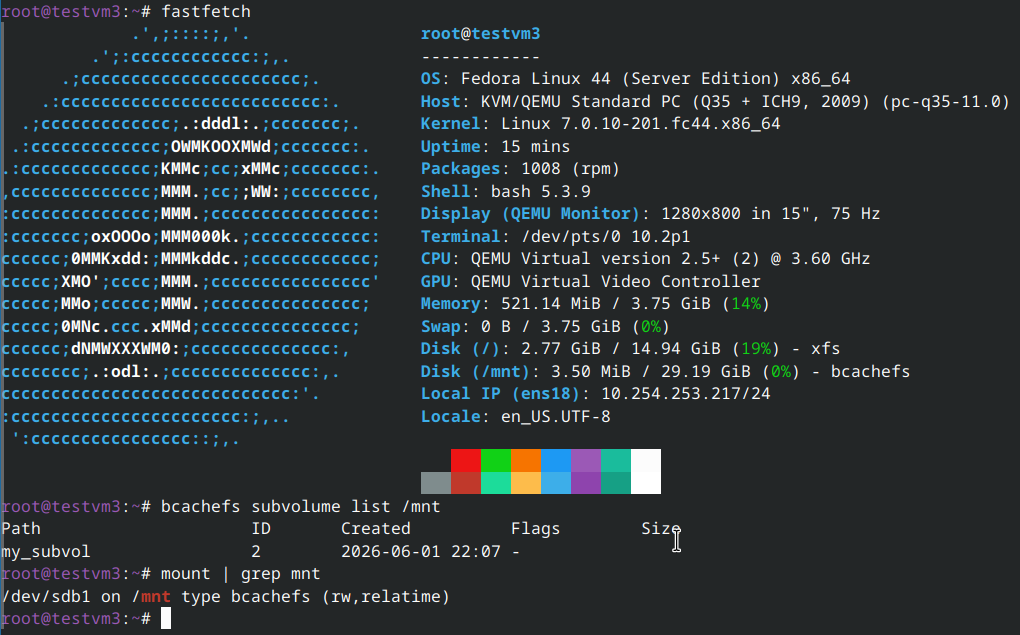
The Honest Assessment
The contrast is the entire lesson. On Fedora it took two commands and one Secure Boot detour, because I was using packages built for the distribution and kernel family they were intended to run on. On my RHEL 10.2 attempt, the same idea turned into a porting exercise: the DKMS source expected upstream kernel interfaces that the RHEL kernel did not provide, and swapping in a newer kernel still did not produce a matching build environment.
That is not a knock on either project. RHEL provides a deliberately conservative, supportable kernel platform and preserves the compatibility guarantees needed by supported workloads. bcachefs, in its current out-of-tree form, is developing against much newer kernel internals. One wants controlled change; the other currently needs rapid change. My evening was what happens when you introduce them without a chaperone.
If you want supported advanced local storage on RHEL, Stratis is the respectable answer for data volumes: pools, thin provisioning, snapshots, caching and encryption, with XFS underneath and documentation that does not begin with “first, disable the guard rails.” It is not currently a supported root-filesystem manager, so it would not reproduce my cursed ZFS-root experiment. That is probably a feature.
If you want bcachefs specifically, run it where its packaging and kernel expectations actually line up: a current Fedora system, Arch, or another sufficiently current environment. Let the filesystem and kernel grow together instead of arranging a blind date between a fast-moving DKMS module and an enterprise kernel whose job is to be boring.
Conclusion
The ZFS experiment worked because I managed to provide a compatible filesystem module early enough for the kernel to mount root. The bcachefs experiment failed because I could not even build the code I wanted the kernel to load. Two filesystems, two completely different lessons, one homelab VM count that is now, mercifully, even.
bcachefs is good technology with an unfortunate current address: out in the cold, out of the tree, where every kernel that is not the newest one is a fresh fight. RHEL is good technology built specifically to never be the newest anything. Putting them together is like introducing your most punctual friend to your most chaotic one and expecting a calm dinner.
I tried REALLY hard. The kernel said no. Honestly, this time, the kernel was right.
References
- bcachefs.org
- LWN: bcachefs coverage (mainline inclusion through external maintenance and removal)
- ngompa/bcachefs Copr repository
- Stratis Storage Management
- Red Hat: Managing layered local storage with Stratis
- DKMS and Secure Boot module signing (MOK)
The VM survived, the dignity did not, and somewhere a make.log is still scrolling. The things we do for a blog post.
Comments
You can use your Mastodon or other ActivityPub account to comment on this article by replying to the associated post.
Search for the copied link on your Mastodon instance to reply.
Loading comments...