- Sat 30 May 2026
- 19 min read
- Linux
- #proxmox, #hetzner, #vxlan, #corosync, #opnsense, #bgp, #networking, #virtualization, #self-hosting
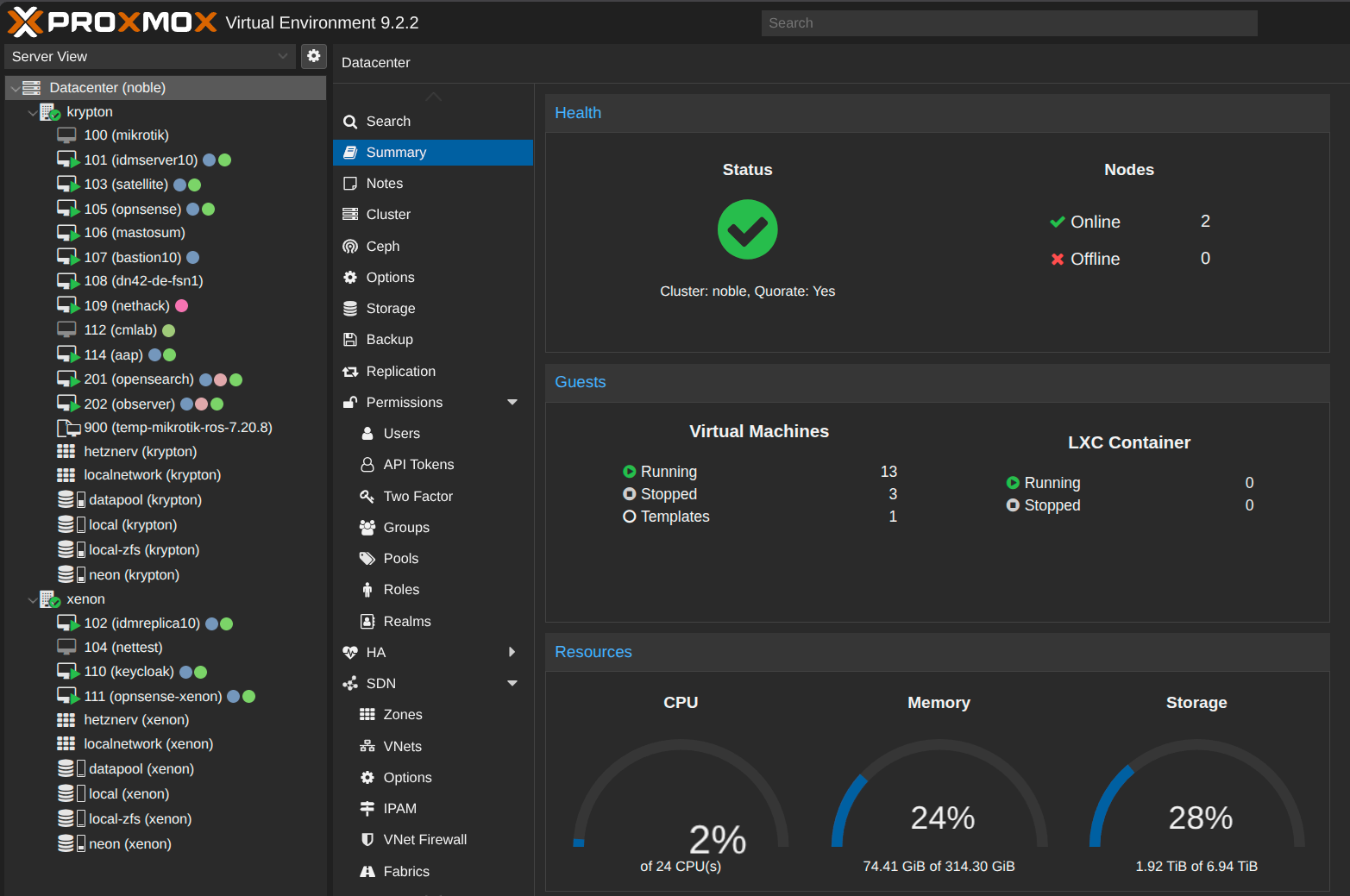
Table of Contents
I have written a fair amount on this blog about FreeBSD, jails, and running my own AS. What I have never written about is the layer underneath a good chunk of it: a small Proxmox VE cluster built from two cheap Hetzner dedicated servers, sitting in two different datacentres, glued together over Hetzner’s vSwitch fabric into a single quorate cluster. This article is the tour.
The guiding principle is the same one I apply everywhere: spend as little money as possible, understand every moving part, and avoid anything I cannot debug at 3 a.m. There is no enterprise SAN here, no fibre channel, no four-figure switch. Just two commodity boxes, a handful of VLANs, and Proxmox doing what it does well.
The Big Picture
The cluster is called noble, and the two nodes are krypton and xenon. Yes, they are noble gases. I needed a naming scheme and that one is hard to run out of.
The two nodes are not in the same rack, the same row, or even the same datacentre. krypton lives in one Hetzner location, xenon in another city entirely. They are stitched together purely over the network: Hetzner’s vSwitch lets you tag a VLAN onto a dedicated server’s uplink and have it appear, at layer 2, on any other server you attach to the same vSwitch, regardless of where it physically sits. That single feature is what makes a geo-distributed two-node cluster on cheap hardware possible at all - as long as the latency between the sites stays low and stable, which is the caveat the rest of this article keeps coming back to.
            Internet (IPv4 + my own IPv6 / AS201379)
                 |                          |
        +--------+--------+        +--------+-----------+
        |    krypton      |        |     xenon          |
        |  (location A)   |        |  (location B)      |
        |                 |        |                    |
        |  OPNsense VM    |<==iBGP (v6)==>| OPNsense VM |
        |  Proxmox VE     |        |  Proxmox VE        |
        +--------+--------+        +--------+-----------+
                 |                          |
                 +======= Hetzner vSwitch ======+
                 |   4001  cluster / corosync   |
                 |   4002  replication          |
                 |   4003  VXLAN underlay       |
                 |   4000  Hetzner Cloud uplink |
                 |   + firewall sync            |
                 +==============================+
                                |
                        VXLAN id 1000
                  one stretched L2 for the VMs

         QDevice (QNetd) on a separate cheap VPS  --> 3rd vote
Three votes, two nodes, one external arbiter. Everything the VMs see as “the network” is an overlay that floats on top of this, so a guest does not know or care which physical box it currently runs on.
What this is, and what it is not
Before anyone copies this wholesale, be clear about what the design does and does not give you:
- It is not synchronous storage. Replication is asynchronous, so a failover loses whatever was written since the last sync interval.
- It is not zero-data-loss, push-button HA. Proxmox HA can restart guests on the survivor, but only the data that was already replicated comes with them.
- It depends on low, stable inter-site latency. Corosync wants something that behaves like a LAN. If the path between the sites degrades, the cluster suffers, full stop.
- It is not redundant against every Hetzner failure. Both nodes, both uplinks, and the vSwitch fabric are all Hetzner. A large enough Hetzner network event takes the whole thing down regardless of how clever the topology is.
With those caveats stated up front, here is how each piece works.
The Hardware
Both nodes are ordinary Hetzner dedicated servers - the kind you get from the regular lineup or the server auction for tens of euros a month. Nothing exotic. Looking at the datacentre summary, the whole cluster adds up to 24 CPU threads, around 314 GiB of RAM, and roughly 1.9 TiB of usable storage, and at the moment it idles at about 2% CPU and a quarter of its memory while running thirteen VMs. That is a lot of headroom for the price of two mid-range boxes.
There is no shared storage. Each node has its own local ZFS pool, and VM disks are kept in sync between the nodes with Proxmox’s built-in ZFS replication. This is the deliberately un-fancy choice: shared storage is the part of a cluster most likely to take everything down with it, and I would rather have two independent pools and asynchronous replication than one expensive single point of failure.
The vSwitch Fabric
Hetzner’s vSwitch is the backbone here. You enable a vSwitch in the Robot panel, assign it a VLAN ID, and then tag that VLAN on the server’s physical interface. Anything you put on that VLAN reaches every other server attached to the same vSwitch. The one catch is the MTU: the vSwitch eats into the standard 1500-byte frame, so everything riding on it has to run at MTU 1400.
Rather than dump everything onto one flat VLAN, I split traffic by purpose. Each job gets its own VLAN and its own little /24:
| VLAN | Subnet | Purpose |
|---|---|---|
| 4000 | (bridged) | Uplink to Hetzner Cloud |
| 4001 | 172.16.1.0/24 | Proxmox cluster / corosync |
| 4002 | 172.17.1.0/24 | Storage replication |
| 4003 | 172.18.1.0/24 | VXLAN underlay |
OPNsense’s state synchronisation rides its own separate vSwitch segment as well, parallel to the four above. I am deliberately not giving its addressing here because it is the one piece you should size to your own firewall pair rather than copy from mine.
On xenon (node ID 2), the host side looks like this:
auto enp35s0.4001
iface enp35s0.4001 inet static
        address 172.16.1.1/24
        vlan-raw-device enp35s0
        mtu 1400
# Hetzner vSwitch (Proxmox Cluster)

auto enp35s0.4002
iface enp35s0.4002 inet static
        address 172.17.1.1/24
        vlan-raw-device enp35s0
        mtu 1400
# Hetzner vSwitch (Proxmox Replication)

auto enp35s0.4003
iface enp35s0.4003 inet static
        address 172.18.1.1/24
        vlan-raw-device enp35s0
        mtu 1400
# Hetzner vSwitch (Proxmox VXLAN VM Network)
krypton (node ID 1) is the mirror image of this on the 172.x.1.2 addresses. The 4000 VLAN is handled slightly differently: it is bridged into vmbr4000 rather than given an IP, because its job is to extend a layer-2 segment to machines over in Hetzner Cloud, not to terminate on the host.
Splitting the networks like this makes the design far easier to reason about: corosync, replication, the VXLAN underlay, and the Cloud uplink each get their own VLAN, their own addressing, their own firewall policy, and their own troubleshooting path. What it does not do is magically create separate physical wires. All of these VLANs ride the same server uplink - Hetzner’s vSwitch is a tagging-and-tunnelling feature on the one physical NIC, not extra cabling - so a big enough zfs send or live migration can still contend with corosync’s heartbeat on that shared link unless you rate-limit or prioritise it.
That matters because Proxmox expects corosync to behave like a LAN: low latency, low jitter, reliable delivery. The textbook guidance is to keep the corosync round-trip well under a few milliseconds. So the honest version of this advice is not “give corosync its own wire” but “give corosync its own VLAN for clarity and filtering, then go measure the path.”
Here is where I have to be honest rather than flattering, because my cluster does not meet Proxmox’s documented latency target at all. The two nodes sit in Nuremberg and Helsinki, and the corosync path between them looks like this:
[root@krypton ~]# ping -c5 172.16.1.1
64 bytes from 172.16.1.1: icmp_seq=1 ttl=64 time=25.2 ms
64 bytes from 172.16.1.1: icmp_seq=2 ttl=64 time=25.2 ms
64 bytes from 172.16.1.1: icmp_seq=3 ttl=64 time=25.2 ms
64 bytes from 172.16.1.1: icmp_seq=4 ttl=64 time=25.1 ms
64 bytes from 172.16.1.1: icmp_seq=5 ttl=64 time=25.1 ms

rtt min/avg/max/mdev = 25.069/25.150/25.234/0.065 ms
That is roughly 25 ms round-trip, well outside Proxmox’s documented expectation of a sub-5 ms cluster network. I am publishing it because it is the real architecture I run, not because it is the conservative design Proxmox recommends.
In practice, this particular path has remained extremely stable, with very little observed jitter, and the cluster has behaved well under my workloads. That is an operational observation, not a guarantee: a different inter-site path, more congestion, packet loss, or a different workload could make the same design unreliable.
The lesson is therefore not that 25 ms is safe. The lesson is that, if you deliberately step outside the documented design envelope, you need to measure the actual path under replication and migration load, monitor corosync closely, and accept that you own the resulting failure modes.
Solving the Two-Node Quorum Problem
Two-node clusters have a famous flaw: quorum. A cluster needs a strict majority of votes to stay live and avoid split-brain. With two nodes you have two votes, and as soon as one node drops, the survivor only has one vote out of two - not a majority - so it refuses to do anything. The very failure you built the cluster to survive takes the cluster down.
Proxmox’s answer is a QDevice: a lightweight external arbiter that holds a third vote. I run a corosync-qnetd daemon on a separate, cheap VPS that has nothing else to do with the cluster, and both nodes talk to it. Now there are three votes. If one node dies, the survivor plus the QDevice make two votes out of three, which is a majority, and the cluster keeps serving.
The result, from krypton:
[root@krypton ~]# pvecm status
Cluster information
-------------------
Name:             noble
Transport:        knet

Votequorum information
----------------------
Expected votes:   3
Highest expected: 3
Total votes:      3
Quorum:           2
Flags:            Quorate Qdevice

Membership information
----------------------
    Nodeid      Votes    Qdevice Name
0x00000001          1    A,V,NMW 172.16.1.2 (local)
0x00000002          1    A,V,NMW 172.16.1.1
0x00000000          1            Qdevice
The QDevice itself reports how it breaks a tie:
[root@krypton ~]# corosync-qdevice-tool -s
Qdevice-net information
----------------------
Cluster name:           noble
QNetd host:             203.0.113.175:5403
Algorithm:              Fifty-Fifty split
Tie-breaker:            Node with lowest node ID
State:                  Connected
The Fifty-Fifty split algorithm is exactly what you want for two nodes across two sites. If the vSwitch link between the nodes breaks but both are still alive and both can still reach the QNetd VPS, the QDevice hands its vote to exactly one partition - here, the node with the lowest ID - so one side stays quorate and the other gracefully steps down. No split-brain, no two nodes both convinced they are the survivor.
Putting the QNetd box on a completely separate provider is intentional. Its whole value is being an independent witness, and an arbiter that shares a failure domain with the thing it is arbitrating is no arbiter at all.
The Overlay Network: VXLAN
Here is the interesting part. The nodes are in different datacentres, so there is no shared physical LAN I can simply bridge a VM onto. I want a VM on krypton and a VM on xenon to sit on the same layer-2 segment as if they were plugged into the same switch. That is what Proxmox SDN with VXLAN gives me.
VXLAN wraps ethernet frames inside UDP and ships them between the nodes. I run a single VXLAN tunnel (VNI 1000) over the dedicated 4003 underlay VLAN, and present it to the VMs as one VLAN-aware bridge:
# /etc/network/interfaces.d/sdn  (on xenon)
auto vxlan_mainvx
iface vxlan_mainvx
        vxlan-id 1000
        vxlan_remoteip 172.18.1.2
        mtu 1332

auto mainvx
iface mainvx
        bridge_ports vxlan_mainvx
        bridge_stp off
        bridge_fd 0
        bridge-vlan-aware yes
        bridge-vids 2-4094
        mtu 1332
krypton is identical except its vxlan_remoteip points back at 172.18.1.2‘s counterpart. Each node tunnels to the other’s underlay address, and the mainvx bridge is where guest NICs land.
Then there is the MTU bookkeeping, which is the thing everyone gets wrong the first time. Hetzner recommends an MTU of 1400 on vSwitch VLAN interfaces. VXLAN adds 50 bytes of encapsulation overhead on top of that, so 1350 is the calculated upper bound for traffic inside the overlay. I deliberately set both mainvx and vxlan_mainvx to 1332, leaving a little extra margin in my particular setup.
That 1332 is conservative, not magical - another deployment may run perfectly at the full 1350. The rule that actually matters is the one underneath the numbers: the guest-facing MTU has to fit inside the smallest MTU along the entire encapsulated path, or large packets fail in far more confusing ways than small pings ever will. That is the “small pings work, large transfers hang” class of bug, and it is always an MTU that does not add up.
Because the bridge is VLAN-aware with bridge-vids 2-4094, I can carve the stretched segment into as many tagged VM networks as I like, all riding the single tunnel.
Firewalling: One OPNsense per Node
Each node runs its own OPNsense VM as the firewall and router for everything behind it. On krypton, the host’s public bridge is explicitly shared with OPNsense:
auto vmbr0
iface vmbr0 inet static
        address 192.0.2.115/26
        gateway 192.0.2.65
        bridge-ports enp4s0
        bridge-stp off
        bridge-fd 0
#OPNSense WAN - Proxmox LAN
(The public addresses throughout this article are replaced with documentation-range examples - 192.0.2.0/24, 198.51.100.0/24, 203.0.113.0/24 and 2001:db8::/32 - so substitute your own.)
The two firewalls are not islands. A dedicated vSwitch segment carries OPNsense’s state synchronisation (pfSync) between them, and the pair runs an iBGP session so that my own IPv6 space (the prefixes I announce from AS201379, which I have written about in other posts) is distributed across both sites. IPv6 is, to me, the real network: every VM gets globally routable addresses out of my own space, and iBGP makes sure both nodes know how to reach all of it no matter which one a VM lives on.
It is worth being precise about what actually fails over here, because pfSync alone does not move traffic: it synchronises firewall state, while BGP convergence redirects routed traffic. Each site announces routes independently; when one OPNsense VM disappears, its BGP sessions drop, its routes are withdrawn, and traffic reconverges through the surviving firewall.
In principle, synchronised state gives established connections a chance to survive that routing change. In practice, survival still depends on the traffic returning through a firewall with matching state and on the surrounding NAT and routing behaviour. There is no CARP virtual IP in this design: failover is driven by routing, not by a shared layer-2 address.
IPv4 gets the treatment it deserves at this point in history. I genuinely do not care about legacy IP for outbound any more, so on xenon I do not bother routing a public range to it. The host just NATs:
auto vmbr1
iface vmbr1 inet static
        address 172.19.1.2/24
        bridge-ports none
        post-up iptables -t nat -A POSTROUTING -s '172.19.1.0/24' -o vmbr0 -j MASQUERADE
        post-down iptables -t nat -D POSTROUTING -s '172.19.1.0/24' -o vmbr0 -j MASQUERADE
# NAT
Inbound, SSH and the Proxmox web UI terminate on the host so I can still manage it when the OPNsense VM is down or misconfigured. All other inbound TCP is DNATed straight to the OPNsense VM:
post-up   iptables -t nat -A PREROUTING -i vmbr0 -p tcp -m multiport ! --dports 22,8006 -j DNAT --to-destination 172.19.1.1
post-down iptables -t nat -D PREROUTING -i vmbr0 -p tcp -m multiport ! --dports 22,8006 -j DNAT --to-destination 172.19.1.1
Two things this rule does not do, on purpose. It only matches -p tcp, so any UDP service I wanted behind OPNsense would need its own equivalent rule - this example is TCP-only. And I have left out the corresponding forwarding and filter policy, because the part worth showing is the boundary itself, not a full firewall ruleset.
That recovery path - management ports living on the host, outside the firewall VM - is convenient, but it is a security trade-off, not a best practice to copy blindly. Exposing the Proxmox web UI is not something you do openly: those management ports are restricted separately, with the Proxmox cluster/host firewall locking them down to a management allowlist rather than treating them as general internet-facing services. The design goal is that host management stays reachable independently of the firewall VM, and stays locked down.
Replication and Migration
With separate pools and the 4002 replication VLAN in place, Proxmox keeps each VM’s disk replicated to the other node on a schedule. The payoff is twofold. Live migration between two boxes in different cities is genuinely fast, because only the delta since the last replication run has to move. And if a node falls over, a recent copy of every VM is already sitting on its partner.
The guests I care about are configured as Proxmox HA resources, so that recovery is not a manual scramble: when a node is fenced, the HA manager restarts those VMs on the survivor automatically. This is worth stating clearly because replication on its own does not restart anything - it only places a copy on the other node. HA is the part that acts on that copy, and it only acts on the resources you have actually added to the HA manager.
Here is the catch that no amount of HA configuration removes: replication is asynchronous. When HA restarts a VM on the survivor, it boots from the last replicated snapshot, so anything written between that snapshot and the failure is gone. For my workloads - blogs, a few services, a Factorio server - a replication interval’s worth of potential loss is completely acceptable, and the operational simplicity I get in return is worth far more than synchronous shared storage would be. Know your own tolerance before you copy mine.
Failure Modes
The point of all this is what happens when something breaks. Here is how the cluster behaves for the failures I actually planned for:
| Failure | What happens |
|---|---|
| One node dies | Survivor + QDevice = 2 of 3 votes, so the cluster stays quorate. HA-managed VMs restart on the survivor from their last replicated snapshot (async, so recent writes are lost). |
| QNetd VPS dies (only) | Both nodes are still up and still see each other, so they hold 2 of 2 node votes and the cluster keeps running. You have simply lost the tie-breaker until QNetd returns, so now a node failure would be fatal - fix it promptly. |
| Inter-node vSwitch path dies | Both nodes alive but partitioned. Each can still reach QNetd, so the Fifty-Fifty split hands the vote to the lowest node ID; that side stays quorate, the other steps down. No split-brain. |
| One OPNsense VM dies | Its BGP sessions drop and routes withdraw; traffic reconverges through the surviving firewall. Because pfSync has copied connection state across, established sessions may survive where the reconverged traffic path and NAT state line up. |
| One local ZFS pool dies | Replicated copies exist on the partner, but automatic recovery depends on how the failure presents itself. If the node is fenced or the HA resource fails in a way HA can recover, the guest can be restarted from the replicated copy; a pool fault on an otherwise live node may still require operator intervention. |
Lessons Learned
Give corosync its own VLAN - and then go measure the path. A dedicated VLAN buys you clarity, filtering, and a clean troubleshooting story. It does not buy you a separate physical wire: on a Hetzner vSwitch everything still shares the one server uplink, so a big replication or migration transfer can still starve the heartbeat unless you rate-limit it. The reliability lever that actually matters is latency and jitter, so measure your inter-node RTT under load and keep it LAN-like.
A QDevice is mandatory for this design if the surviving node is expected to stay quorate after the other one fails. A two-node cluster can technically exist without one - it simply cannot deliver the failure behaviour this whole article promises. Put the QNetd arbiter on a different provider so it is a genuinely independent witness.
Do the MTU maths once, carefully. 1500 down to 1400 for the vSwitch, minus 50 bytes of VXLAN overhead, gives 1350 as the calculated overlay ceiling; I run 1332 for margin. Get it wrong and you will chase intermittent stalls for days. Get it right and you never think about it again.
The vSwitch makes location less visible to the guests - not irrelevant to you. Two boxes in two cities presenting one stretched L2 to the VMs is something that used to require expensive kit, and Hetzner hands it to you as a checkbox. But geography still matters profoundly underneath: it sets your corosync latency and defines your failure domains. The guests stop caring where they run; you never get to.
Decide what you actually care about. I care about IPv6 and about being able to manage the hosts. I do not care about inbound IPv4 to one node. Being honest about that let me replace a whole layer of routing with three lines of iptables.
Conclusion
None of this is exotic. It is two cheap servers, a layer-2 fabric I did not have to build, an overlay network, an external tie-breaker, and a firewall per node. But the sum is a resilient, geo-distributed virtualisation platform that remains cheap enough to run as a personal platform rather than an enterprise procurement exercise, and which I understand top to bottom because I assembled every piece myself.
That last part is the whole point. When something breaks at 3 a.m., I am not filing a support ticket and waiting. I am reading pvecm status, checking the vSwitch, and fixing it. Because I know exactly what every line of these configuration files does.
Comments
You can use your Mastodon or other ActivityPub account to comment on this article by replying to the associated post.
Search for the copied link on your Mastodon instance to reply.
Loading comments...