
- Fri 24 April 2026
- 28 min read
- Networking
- #dn42, #bgp, #networking, #ipv6, #mikrotik, #routeros, #wireguard, #freebsd, #bastille, #powerdns
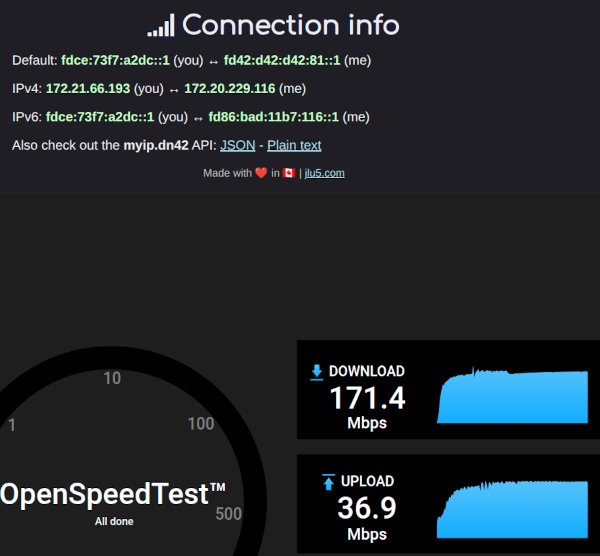
Table of Contents
After a few months of running AS201379 on the public internet, the obvious next experiment was DN42 - the parallel, hobbyist-run BGP network that mirrors the structure of the real internet but lives entirely on private address space, glued together by WireGuard tunnels. It runs the same protocols, presents the same operational challenges, and uses many of the same configuration patterns. The difference is that you can break things at three in the morning without anyone losing access to anything important.
The moment it felt real wasn’t a routing-table dump or a show ip bgp summary - it was an https:// URL that worked from somewhere it had no business working from. From a shell on the other side of the DN42 mesh:
chofstede@shell-de-fra1:~$ curl -I https://blog.chofstede.dn42
HTTP/1.1 200 OK
Server: nginx/1.28.3
Content-Type: text/html
Content-Length: 12204
Same content as the public blog at blog.hofstede.it, completely separate routing path, completely separate TLS chain - the certificate is signed by DN42’s internal CA, not Let’s Encrypt, and the request never traversed a single packet of the public internet. Every hop between that shell and my FreeBSD jail rode a WireGuard tunnel between hobbyists who had agreed, via flat files in a git repository, to forward each other’s packets.
The path is short:
chofstede@shell-de-fra1:~$ mtr -rw blog.chofstede.dn42
HOST: shell-de-fra1          Loss%   Snt   Last   Avg  Best  Wrst StDev
  1.|-- fd42:4242:2601:1011::1  0.0%    10    0.5   0.5   0.4   0.6   0.1
  2.|-- fd00:169:254:8::1       0.0%    10    1.8   1.8   1.6   2.3   0.2
  3.|-- router.chofstede.dn42   0.0%    10   25.2  24.9  24.0  26.1   0.6
  4.|-- dn42svc.chofstede.dn42  0.0%    10   25.9  26.6  24.5  32.7   2.6
Two of the four hops are mine: hop 3 is the MikroTik border router on my home network, hop 4 is the FreeBSD service jail behind it. Hops 1 and 2 belong to the remote shell’s operator and an intermediate DN42 peer - 25 ms across two WireGuard tunnels and a BGP-selected path through the mesh.
Note on addresses: DN42 resources are public by design - the registry is a git repository - so AS numbers, DN42 prefixes, and DN42 hostnames are shown as-is. The WireGuard underlay endpoints are part of the public peering information that DN42 operators exchange anyway, so they’re also real. Only the WireGuard public keys have been redacted.
At a Glance
The setup involves four parts:
- DN42 registry objects (AS, prefixes, route, mntner, DNS) submitted as a PR
- A MikroTik (RouterOS 7.22.1, running as a bhyve CHR) as the border router, with three WireGuard peerings
- BGP on RouterOS with import/export filters and a per-peer local-preference policy
- A FreeBSD bastille jail (
dn42svc) running PowerDNS authoritative forchofstede.dn42and nginx forblog.chofstede.dn42
This is a stub AS, not a transit. I announce my own prefixes, accept routes from peers, and forward traffic only between the DN42 mesh and my own native DN42 VLAN - never between two DN42 peers, and never between DN42 and the clearnet uplink. The import/export filters and the firewall policy below are written to enforce that explicitly.
What is DN42?
DN42 (“Decentralized Network 42”) is a virtual network operated by hobbyists. Participants normally self-allocate a private ASN from the DN42 native range, currently AS4242420000-AS4242423999, and reserve prefixes for themselves in the registry. DN42’s native IPv4 space is primarily 172.20.0.0/14; 172.31.0.0/16 is commonly used for transfer and peering links, and additional private ranges can appear through interconnects to networks like ChaosVPN. IPv6 uses the ULA range fd00::/8. Most links are WireGuard, GRE, or OpenVPN tunnels running over the regular internet. Routing is real BGP, with real route filters and registry-derived route objects that play the same operational role as RPKI ROAs. The registry itself is git-managed: every resource - ASNs, prefixes, DNS delegations, peer objects - is a flat file in a pull request.
The result is a fully functional parallel internet: it has its own root DNS (.dn42), looking glasses, IRC servers, IXPs, anycast services, and bridges to ChaosVPN and other hobby networks. Nothing in DN42 routes on the public internet, and nothing on the public internet routes into DN42.
Architecture
                    ┌──────────────────────────────────────────────────┐
                    │                    DN42 Mesh                     │
                    └──┬─────────────────────┬─────────────────┬───────┘
                       │                     │                 │
                  AS4242420207         AS4242423914       AS4242423035
                  (RoutedBits-FRA1)    (Kioubit-DE2)    (Lare-AS, preferred)
                       │                     │                 │
                  WireGuard               WireGuard         WireGuard
                  :51820 MTU 1360         :51822 MTU 1360   :51823 MTU 1420
                       │                     │                 │
                       └──────────┬──────────┴─────────────────┘
                                  │
                       ┌──────────┴──────────────────────────┐
                       │       MikroTik CHOFSTEDE-DN42-RTR   │
                       │       RouterOS 7.22.1, AS4242422539 │
                       │       172.21.66.193 / fdce:...::1   │
                       └──────┬───────────────┬──────────────┘
                              │               │
                       ether2 (WAN)        ether1 (DN42_LAN)
                              │               │
                       OPNsense Uplink     172.21.66.192/27
                       (192.168.2.0/24)    fdce:73f7:a2dc::/48
                                              │
                                  ┌───────────┴───────────────┐
                                  │   FreeBSD bastille jail   │
                                  │   dn42svc                 │
                                  │   172.21.66.194           │
                                  │   fdce:73f7:a2dc::194     │
                                  │                           │
                                  │   PowerDNS (authoritative)│
                                  │   nginx                   │
                                  └───────────────────────────┘
The MikroTik sits on the home LAN (ether2 to OPNsense for clearnet uplink) and originates the DN42 prefixes on ether1 - a dedicated VLAN that is the “native” DN42 segment. Anything attached to that VLAN gets a real, registry-allocated DN42 address, no NAT involved. The FreeBSD bastille jail on a small server is the first such resident: it gets its own address from the /27 and /48 and serves DNS and HTTP for the chofstede.dn42 zone.
Three WireGuard tunnels run from the MikroTik to other DN42 ASNs. BGP runs on top of those tunnels, exchanging the fd00::/8 and 172.20.0.0/14 family of routes that make up the mesh. The home LAN uses NAT44 and NAT66 to reach DN42 from regular consumer addressing - more on that later.
The Registry
DN42’s registry lives at git.dn42.dev. To get on the network, you fork it, add the objects describing yourself, and submit a Pull Request. A schema linter validates the PR; a small group of registry maintainers merges it. There are no fees and no contracts - just a maintainer object authenticated by a PGP key, and a self-allocated chunk of address space that doesn’t conflict with anything else.
The minimum set of objects for a routing-capable participant is six files. Mine looks like this:
data/mntner/CHOFSTEDE-MNT - the maintainer, authenticated by a PGP fingerprint:
mntner:             CHOFSTEDE-MNT
admin-c:            CHOFSTEDE-DN42
tech-c:             CHOFSTEDE-DN42
mnt-by:             CHOFSTEDE-MNT
auth:               pgp-fingerprint F797370E9131BB04D2D339304A64EF24AB2463EA
source:             DN42
data/aut-num/AS4242422539 - the ASN object:
aut-num:            AS4242422539
as-name:            CHOFSTEDE-AS
descr:              Christian Hofstede-Kuhn AS
admin-c:            CHOFSTEDE-DN42
tech-c:             CHOFSTEDE-DN42
mnt-by:             CHOFSTEDE-MNT
source:             DN42
data/inetnum/172.21.66.192_27 and data/inet6num/fdce:73f7:a2dc::_48 - the address blocks I’ll be announcing. The IPv4 /27 is small on purpose: DN42 strongly prefers IPv6, and a /27 is enough for “a research network” without tying up significant chunks of the shared /14.
data/route/172.21.66.192_27 and data/route6/fdce:73f7:a2dc::_48 - the route objects that authorize this AS to originate these prefixes:
route6:             fdce:73f7:a2dc::/48
descr:              DN42 v6 CHOFSTEDE
origin:             AS4242422539
max-length:         48
mnt-by:             CHOFSTEDE-MNT
source:             DN42
These play a similar operational role to RPKI ROAs on the public internet - they let peers build import filters that reject any prefix not authorized for a given origin AS - though the mechanism is registry objects validated by tooling, not cryptographically signed ROAs. Most DN42 operators run those filters.
data/dns/chofstede.dn42 - the DNS delegation. DN42’s recursive resolvers use this to forward queries for chofstede.dn42 to the listed nameservers:
domain:             chofstede.dn42
admin-c:            CHOFSTEDE-DN42
tech-c:             CHOFSTEDE-DN42
mnt-by:             CHOFSTEDE-MNT
nserver:            ns1.chofstede.dn42 172.21.66.194
nserver:            ns1.chofstede.dn42 fdce:73f7:a2dc::194
source:             DN42
The nameserver address is the FreeBSD jail. Once the PR was merged and the next registry sync ran, queries for anything under .chofstede.dn42 started landing on PowerDNS in that jail.
The whole submission was a single commit, signed with the PGP key referenced in the maintainer object. The registry’s CI ran the schema lint, a maintainer reviewed it, and the resources were live a few hours later.
The MikroTik Border Router
In this setup, the MikroTik isn’t a physical box - it’s a RouterOS CHR (Cloud Hosted Router) running as a bhyve guest on a FreeBSD 15 host called voyager. CHR is MikroTik’s virtualization-friendly RouterOS image, free up to 1 Mbit/s per interface and licensable for more.
The bhyve definition is small:
root@voyager:~ # cat /zroot/shuttle/routeros/routeros.conf
loader="uefi"
graphics="no"
cpu=1
memory="256m"

disk0_type="virtio-blk"
disk0_name="disk0.img"

network0_type="virtio-net"
network0_switch="vm-vlan42"   # DN42 (native)
network1_type="virtio-net"
network1_switch="vm-vlan20"   # IOT (upstream / OPNsense)
One vCPU, 256 MB of RAM, two virtio NICs bridged onto two FreeBSD VM-switch instances - one for the native DN42 VLAN, one for the upstream path to OPNsense. RouterOS sees these as ether1 and ether2 respectively, and the rest of the configuration is identical to what it would be on real hardware. The host runs:
root@voyager:~ # freebsd-version
15.0-RELEASE-p4
root@voyager:~ # vm list | grep routeros
routeros  default    uefi       1    256m    -    No       Running (61180)
That’s the entire hypervisor footprint of the DN42 border. A CHR VM gives me MikroTik’s mature BGP and firewall implementations without dedicating a piece of physical hardware to it, and the bhyve vm-bhyve workflow (one config file in ZFS, vm start routeros) is light enough that I treat the router like any other service on the host.
The router terminates the WireGuard tunnels, originates the DN42 prefixes, and bridges the native DN42 VLAN to the rest of the LAN with NAT. The total RouterOS configuration is around 100 lines.
Interfaces
Three WireGuard interfaces, one for each peer. The MTUs are deliberate: WireGuard adds 80 bytes of overhead over IPv4 underlay (60 over IPv6), so 1500 minus that is the largest tunnel MTU that won’t fragment. I chose 1360 as a conservative default that survives IPv4 underlays with PPPoE in the path, and 1420 for the Lare peering where the underlay is known-clean:
/interface wireguard
add listen-port=51820 mtu=1360 name=wg-peer1
add listen-port=51822 mtu=1360 name=wg-kioubit
add listen-port=51823 mtu=1420 name=wg-lare

/interface list
add comment="Uplink to OPNsense/Internet"        name=WAN
add comment="All WireGuard Peer Interfaces"      name=DN42
add comment="Native DN42 Subnets (VLAN 42)"      name=DN42_LAN
The interface lists are RouterOS’s way of grouping interfaces for firewall rules - “in-interface-list=DN42” matches any of the three tunnels at once, which keeps the firewall short.
The peer definitions specify which prefixes are allowed inside each tunnel. DN42’s address ranges are well-defined, so the AllowedIPs list is the same for every peer:
/interface wireguard peers
add interface=wg-peer1 name=peer1 \
    endpoint-address=2600:3c17::2000:83ff:fe31:43bc \
    endpoint-port=52539 persistent-keepalive=25s public-key="REDACTED" \
    allowed-address=172.20.0.0/14,172.21.0.0/16,172.22.0.0/15,172.31.0.0/16,fd00::/8,fe80::/10

add interface=wg-kioubit name=peer-kioubit \
    endpoint-address=2a01:4f8:c2c:3b65::1 \
    endpoint-port=20055 persistent-keepalive=25s public-key="REDACTED" \
    allowed-address=172.20.0.0/14,172.21.0.0/16,172.22.0.0/15,172.31.0.0/16,fd00::/8,fe80::/10

add interface=wg-lare name=peer-lare \
    endpoint-address=de01.dn42.lare.cc \
    endpoint-port=22539 persistent-keepalive=25s public-key="REDACTED" \
    allowed-address=172.20.0.0/14,172.31.0.0/16,fd00::/8,fe80::/10
fe80::/10 is in the AllowedIPs list because BGP IPv6 sessions run over link-local addresses on the WireGuard interface - without that, the BGP packets would be silently dropped by WireGuard’s own ACL. On RouterOS this list is not how routes are selected; BGP does that. It is just the WireGuard peer ACL specifying which source/destination addresses the tunnel may carry, and it has to be wide enough to cover everything BGP will install plus any link-local control traffic.
The IPv4 numbering for the tunnel endpoints is a small DN42 quirk: the link addresses are usually in the 172.31.0.0/16 “transfer” range. I assigned 172.31.255.1 and 172.31.255.2 to wg-kioubit and wg-peer1 respectively. Lare uses link-local for both v4 and v6 BGP, so no IPv4 transfer address is required there.
BGP
Three eBGP sessions, one per peer, plus a couple of route-map-style filter chains for hygiene. The full configuration:
/routing bgp instance
add as=4242422539 name=dn42-instance router-id=172.21.66.193

/routing bgp template
add afi=ip,ipv6 as=4242422539 name=DN42_v6_Template \
    nexthop-choice=force-self routing-table=main \
    output.network=DN42_my_space .network-blackhole=yes

/routing bgp connection
add name=routedbits-fra1-ipv6 instance=dn42-instance \
    afi=ipv6 connect=yes listen=yes templates=DN42_v6_Template \
    local.address=fe80::4242:4225:39%wg-peer1 .role=ebgp \
    remote.address=fe80::207%wg-peer1 .as=4242420207 \
    output.filter-chain=dn42-export .network=DN42_my_space \
    input.filter=dn42-import

add name=routedbits-fra1-ipv4 instance=dn42-instance \
    afi=ip as=4242422539 multihop=yes templates=DN42_v6_Template \
    local.address=172.21.66.193 .role=ebgp \
    remote.address=172.20.19.71 .as=4242420207 \
    output.filter-chain=dn42-export .network=DN42_my_space \
    input.filter=dn42-import

add name=kioubit-de2 instance=dn42-instance templates=DN42_v6_Template \
    local.address=fe80::ade1%wg-kioubit .role=ebgp \
    remote.address=fe80::ade0%wg-kioubit .as=4242423914 \
    output.filter-chain=dn42-export input.filter=dn42-import

add name=lare-dn42 instance=dn42-instance templates=DN42_v6_Template \
    afi=ip,ipv6 connect=yes listen=yes \
    local.address=fe80::4242:4225:39%wg-lare .role=ebgp \
    remote.address=fe80::3035:130%wg-lare .as=4242423035 \
    output.filter-chain=dn42-export .network=DN42_my_space \
    input.filter=lare-in
A few things deserve a closer look:
IPv6 BGP runs over link-local addresses on the tunnel. The fe80::4242:4225:39%wg-peer1 syntax is RouterOS’s zone-id notation. Encoding the AS number in the host part (4242:4225:39 ≈ 4242422539) is convention; it’s only meaningful to the operator.
IPv4 BGP needs multihop=yes and a static route to the peer. Unlike the IPv6 sessions where link-local works directly on the WireGuard interface, the IPv4 peers live in 172.20.0.0/14 and aren’t directly attached. The BGP daemon needs a route to the peer’s address before the session can come up, and multihop=yes is required because the TCP TTL would otherwise prevent a session that traverses any router in between (which the WireGuard tunnel technically does):
/ip route
add comment="Direct resolution for Lare"  dst-address=172.22.125.130/32 gateway=wg-lare
add comment="Direct resolution for Peer1" dst-address=172.20.19.71/32   gateway=wg-peer1
Each /32 pins the peer’s IPv4 address to the correct WireGuard interface, so the TCP session for IPv4 BGP knows where to go.
force-self is RouterOS’s next-hop-self. It ensures that routes I advertise carry my side of the session as the next hop, rather than preserving an unusable or ambiguous next-hop learned from somewhere else. With link-local eBGP this matters: a link-local address is meaningful only with the right interface scope and only for the directly attached neighbor, so forcing the next hop avoids any ambiguity in what the peer or downstream neighbors should resolve.
Filters
The dn42-export chain is short: only my own prefixes go out, everything else is rejected. The dn42-import chain accepts anything inside DN42’s address ranges (fd00::/8 with prefix length 44-64, 172.20.0.0/14 with prefix length 14-32) but explicitly rejects my own prefixes coming back from a peer - a basic anti-loop measure for cases where the prefix has propagated through the mesh and made its way back to me on a second peering:
/routing filter rule
add chain=dn42-export rule="if (dst in fdce:73f7:a2dc::/48 && dst-len == 48) { accept }"
add chain=dn42-export rule="if (dst in 172.21.66.192/27 && dst-len == 27) { accept }"
add chain=dn42-export rule=reject

add chain=dn42-import comment="Reject Own IPv6"  rule="if (dst in fdce:73f7:a2dc::/48) { reject }"
add chain=dn42-import comment="Reject Own IPv4"  rule="if (dst in 172.21.66.192/27) { reject }"
add chain=dn42-import comment="Accept DN42 IPv6" rule="if (dst in fd00::/8 && dst-len in 44-64) { accept }"
add chain=dn42-import                            rule="if (dst in 172.20.0.0/14 && dst-len in 14-32) { accept }"
add chain=dn42-import comment="Default Drop"     rule=reject
The Lare session uses a small wrapper on top of the import chain to give that peer’s routes a higher local-preference, then jumps into the standard import logic:
add chain=lare-in rule="set bgp-local-pref 200; jump dn42-import"
Lare sits in Frankfurt with low jitter and a peer-friendly operator, and consistently delivers the shortest paths to most other DN42 ASNs. Local-pref 200 vs. the default 100 makes its routes win whenever they’re available, which they almost always are. This is the same trick used on hobgp in Part 4 of the AS201379 series, applied here at a much smaller scale.
Finally, the BGP instance has two blackhole routes for the prefixes I originate, so packets to my own space don’t follow a default route back to the upstream when no more-specific route is in the table:
/ip route
add blackhole comment="DN42 IPv4 Aggregate Origin" dst-address=172.21.66.192/27

/ipv6 route
add blackhole comment="DN42 Aggregate Origin" dst-address=fdce:73f7:a2dc::/48
Firewall
The firewall is tighter than the public-internet equivalent because the threat model is different: every other DN42 participant is theoretically reachable, including the ones whose security posture is “I am running a hobby network at home.” So the rule of thumb is to allow only the specific things the router needs, and drop everything else by default.
The full filter is too long to reproduce; the key sections look like this:
/ip firewall filter
add chain=input  in-interface-list=DN42 protocol=tcp dst-port=179 action=accept \
                 comment="Accept BGP from DN42 (IPv4)"
add chain=input  in-interface-list=DN42 action=drop  comment="Drop input from DN42"

add chain=forward in-interface-list=DN42 out-interface-list=DN42_LAN action=accept \
                  comment="Allow DN42 Mesh to DN42_LAN"
add chain=forward in-interface-list=DN42_LAN out-interface-list=DN42 action=accept \
                  comment="Allow DN42_LAN to DN42 Mesh"
add chain=forward in-interface-list=DN42 protocol=icmp action=accept \
                  comment="Allow DN42 Transit ICMPv4"
add chain=forward in-interface-list=DN42 action=drop \
                  comment="Drop all IPv4 transit from DN42"
Three principles:
- Input is closed. The router accepts only BGP and ICMP from DN42; everything else - SSH, HTTP, Winbox - is silently dropped on the DN42 interfaces.
- Forwarding is symmetric and explicit. Traffic between the native DN42 LAN (
ether1) and the mesh is allowed in both directions. Everything else - including transit through my router for traffic that isn’t destined for my prefix - is dropped, so I’m not accidentally a transit AS. - WAN-to-DN42 leaks are explicitly blocked, both directions. The IPv6 chain has
drop chain=forward in-interface-list=DN42 out-interface-list=WANand the converse - belt-and-braces against any misconfiguration that would let DN42 traffic exit via the clearnet uplink, or vice versa.
MSS Clamping
The 1360-byte WireGuard MTU is small enough that any TCP session through the tunnel needs MSS clamping, otherwise large packets would either fragment or be silently dropped by Path MTU Discovery failures. RouterOS does this with mangle rules:
/ip firewall mangle
add chain=forward out-interface-list=DN42 protocol=tcp tcp-flags=syn \
    action=change-mss new-mss=1320  comment="Clamp MSS for DN42 (IPv4)"
add chain=output                    protocol=tcp tcp-flags=syn tcp-mss=!0-1320 \
    action=change-mss new-mss=1320  comment="Clamp BGP/Output MSS (IPv4)"

/ipv6 firewall mangle
add chain=forward out-interface-list=DN42 protocol=tcp tcp-flags=syn \
    action=change-mss new-mss=1300  comment="Clamp MSS for DN42"
add chain=output                    protocol=tcp tcp-flags=syn tcp-mss=!0-1300 \
    action=change-mss new-mss=1300  comment="Clamp BGP MSS Output"
I use 1320 for IPv4 and 1300 for IPv6 as conservative clamps for a 1360-byte tunnel. They sit below the tunnel MTU after the normal IP and TCP headers are accounted for, and they avoid relying on perfect Path MTU Discovery across a mesh of tunnels. The output chain rules also clamp the MSS of locally-originated TCP - that’s what makes BGP’s own session over the tunnel work without falling over on the first large UPDATE message.
NAT44 and NAT66
The home LAN is a normal consumer network - 192.168.x.x with DTAG IPv6 - and most things on it have no business being in DN42 directly. But it’s useful to be able to ssh into something at burble.dn42 from a laptop on the regular LAN, so the router NATs:
/ip firewall nat
add chain=srcnat out-interface-list=DN42 src-address=192.168.1.0/24 \
    action=src-nat to-addresses=172.21.66.193 \
    comment="NAT44 LAN to DN42"

/ipv6 firewall nat
add chain=srcnat out-interface-list=DN42 src-address=2003:a:1318:5800::/56 \
    action=src-nat to-address=fdce:73f7:a2dc::1/128 \
    comment="NAT66 LAN to DN42"
NAT66 is controversial on the regular IPv6 internet - the IETF has long preferred IPv6 designs that avoid address translation, while acknowledging limited mechanisms such as NPTv6 for specific multihoming and renumbering cases (see also RFC 7157 on multihoming without NAT). Inside DN42, where renumbering my entire home LAN into DN42 space would be both impractical and wasteful, source-NAT is the pragmatic answer. The home LAN keeps its DTAG addresses, and the router rewrites them to a single DN42-side address on egress. Connections initiated from the LAN work; nothing inbound is reachable, which is exactly what I want for hosts that aren’t supposed to be in DN42 in the first place.
For things that should be reachable from DN42, the answer is a different physical interface (the native DN42 VLAN on ether1) and an address from my actual /27 and /48 - no NAT, no rewriting.
The Native DN42 VLAN
ether1 is the dedicated native-DN42 segment. The router originates the prefix here, and any host that connects to this VLAN gets a real DN42 address. The configuration is unremarkable - it’s just an interface with two addresses:
/ip address
add address=172.21.66.193/27 interface=ether1 network=172.21.66.192

/ipv6 address
add address=fdce:73f7:a2dc::1/64 interface=ether1 advertise=no
advertise=no is deliberate. RouterOS’s IPv6 stack will, by default, send Router Advertisements with the address as the prefix, which would let any host SLAAC into it. That’s exactly what I want for the home LAN, but for the DN42 segment I prefer to assign addresses statically - I want to pick which addresses get registered in DNS, not whatever EUI-64 the host happens to compute.
The FreeBSD Service Jail
The first resident on the DN42 VLAN is a FreeBSD bastille jail named dn42svc. It runs PowerDNS authoritative for the chofstede.dn42 zone, plus nginx for blog.chofstede.dn42. The jail itself is unremarkable - it’s a vnet jail with one network interface (vnet0) bridged into the DN42 VLAN:
root@dn42svc:/ # ifconfig vnet0
vnet0: flags=1008843<UP,BROADCAST,RUNNING,SIMPLEX,MULTICAST,LOWER_UP> metric 0 mtu 1500
        description: jail interface for bridge42
        ether 58:9c:fc:10:27:50
        inet  172.21.66.194 netmask 0xffffffe0 broadcast 172.21.66.223
        inet6 fdce:73f7:a2dc::194 prefixlen 64
root@dn42svc:/ # ps aux | grep -E 'pdns|nginx'
root  97962  /usr/local/sbin/pdns_server --daemon --guardian
pdns  97963  /usr/local/sbin/pdns_server-instance (worker)
root  99953  nginx: master process /usr/local/sbin/nginx
www   99954  nginx: worker process
PowerDNS is authoritative for three zones:
root@dn42svc:/ # pdnsutil list-all-zones
chofstede.dn42
c.d.2.a.7.f.3.7.e.c.d.f.ip6.arpa
192/27.66.21.172.in-addr.arpa
The forward zone is the obvious one. The two reverse zones are interesting - DN42 supports both classless IPv4 reverse delegation (RFC 2317, via the 192/27.66.21.172.in-addr.arpa name) and standard IPv6 reverse - and DN42 recursive resolvers do the right thing as long as the name servers in your dns/ registry object answer for those zones.
nginx serves blog.chofstede.dn42 - the URL from the opening - on the same document root as the public site. Two virtual hosts, two certificates from two completely different CAs (Let’s Encrypt for blog.hofstede.it, the DN42 internal CA for blog.chofstede.dn42), one set of files. The DN42 cert is renewed by a small script that talks to the DN42 ACME-style endpoint described in the TLS howto; the public cert keeps doing what it has always done. Two front doors to the same building.
A RouterOS ND Quirk
There is one interesting edge case in this otherwise simple setup. The router’s IPv6 neighbor cache for the jail occasionally went stale, even though the jail was clearly up. ICMPv6 to fdce:73f7:a2dc::194 would briefly fail until something else triggered a fresh neighbor solicitation.
The fix is a static neighbor entry on the router:
/ipv6 neighbor
add address=fdce:73f7:a2dc::194 interface=ether1 mac-address=58:9C:FC:10:27:50 \
    comment="Static ND: RouterOS doesn't self-probe failed entries"
The comment is the answer: RouterOS’s neighbor discovery does not aggressively re-probe entries it has marked as failed, so a single missed neighbor advertisement during a busy moment can leave the entry in a state where the router will not retry on its own. A static entry sidesteps the problem entirely. This is the kind of small, undocumented behavior that you only discover by tcpdumping the link when something stops working, and it’s worth recording in the configuration file with a comment so the next debugger doesn’t have to rediscover it.
What This Looks Like From The Outside
Once everything was up, I checked the connection from outside DN42 by visiting one of DN42’s looking-glass services. The screenshot at the top of this article is from a remote DN42 node showing my IP, a working speed test (171/37 Mbps - my home uplink, with WireGuard overhead), and a peer view showing my AS in the BGP table. That’s a satisfying confirmation that the prefix made it across the mesh and that traffic from a remote DN42 node correctly returns through my router and arrives where it should.
For day-to-day verification, the looking glasses at lg.dn42.dev and lg.kioubit.dev are easier to use. They show the AS path of any prefix from their vantage point. Healthy paths through Lare or one of the other peers, no AS-path prepending, and no rejected route notifications: the network is in a stable state.
Lessons Learned
DN42 is a low-stakes way to actually use BGP. Reading about route-maps is one thing; getting an inbound filter wrong and watching peer convergence happen in real time is another. Nothing on the public internet was at risk for any of this, which made it easy to experiment.
The registry workflow is genuinely good. Maintaining a network resource as a file in a git repository, signed by a PGP key, reviewed by humans, is the kind of thing the public internet’s resource provisioning has been trying to evolve into for fifteen years. DN42 has been doing it from day one.
Link-local IPv6 BGP on a WireGuard interface just works. No transfer network, no manual address allocation between peers, no coordination on which side gets .1 and which side gets .2. Both sides pick a link-local address (often encoding their AS in the host part), put each other’s link-local in the BGP neighbor config with the right zone-id, and the session comes up. IPv4 BGP requires more work (multihop, static routes to the peer), which is one more reason to prefer v6 in DN42.
MSS clamping is not optional on a 1360-byte tunnel. Without it, large TCP transfers stall in non-obvious ways - the first few packets work, then everything pauses while the sender tries to figure out the path MTU and gives up. The tcp-mss=!0-1320 condition on the output rule is what makes the BGP session itself survive on the tunnel.
RouterOS BGP is workable for a small site. It’s verbose compared to FRR and the documentation is patchier, but the model is consistent: instance, template, connection, filter rules. Having a separate lare-in chain that bumps local-pref before jumping into the standard import chain is exactly the kind of composable filter design that makes per-peer policy easy.
CHR on bhyve is a perfectly serviceable border router. A 256 MB virtio guest with one vCPU is more than enough for DN42-scale traffic, and running the router as a bhyve VM on the same host as other jails means I get ZFS snapshots, easy backups, and the ability to spin up a second CHR for testing without touching hardware. The free CHR tier’s bandwidth cap matters for production transit but is irrelevant for a hobby AS - the router moves a few packets per second on a quiet day.
NAT66 is fine inside DN42, regardless of what RFC 7157 says. The constraints are different: there’s no scarcity argument against IPv6 NAT, but renumbering an entire home LAN into a hobby-network prefix has its own costs. The pragmatic answer is to NAT, give the segments that need real DN42 addresses a separate VLAN, and move on.
Interested in peering on DN42?
If you’d like to set up a WireGuard peering with AS4242422539 (fdce:73f7:a2dc::/48, 172.21.66.192/27) - either to test your own DN42 setup or just to add another peer to your mesh - send a mail to peering@hofstede.it or open an issue on the registry. I have spare WireGuard ports, and new DN42 operators are explicitly welcome.
Conclusion
A MikroTik in a corner of my flat now originates two prefixes into a continental hobby mesh, and a FreeBSD jail behind it serves DNS and HTTP under a .dn42 name. It is not reachable from the public internet, and that is the point: DN42 is close enough to the real routing table to teach the operational craft, but small enough that mistakes remain survivable.
DN42 is one of those projects where the best way to understand it is to join it. Reading about a parallel BGP network only takes you so far; setting up a node, watching your prefix appear in someone else’s looking glass, and pinging an anycasted shell on the other side of Europe is what makes it click. The whole thing is small enough to fit in a corner of a home network and large enough to teach you almost everything you’d want to know about running a real one.
References
- DN42 Wiki - the canonical entry point: how to register, how to peer, how to run a node
- DN42 Registry - the git repository where every resource lives
- DN42 Peer Finder - matchmaking service for new peers
- Kioubit’s Looking Glass - one of several DN42 looking glasses for verifying paths
- MikroTik RouterOS BGP - filter chains, connection templates, route-map equivalents
- RFC 2317 - classless IN-ADDR.ARPA delegation, used by DN42’s reverse-DNS scheme
- RFC 4193 - Unique Local IPv6 Unicast Addresses, the canonical reference for the
fd00::/8allocation DN42 lives in
Comments
You can use your Mastodon or other ActivityPub account to comment on this article by replying to the associated post.
Search for the copied link on your Mastodon instance to reply.
Loading comments...