- Sat 18 July 2026
- 13 min read
- FreeBSD
- #freebsd, #home-assistant, #bhyve, #jails, #zigbee2mqtt, #mqtt, #homematic, #matter, #thread, #iot
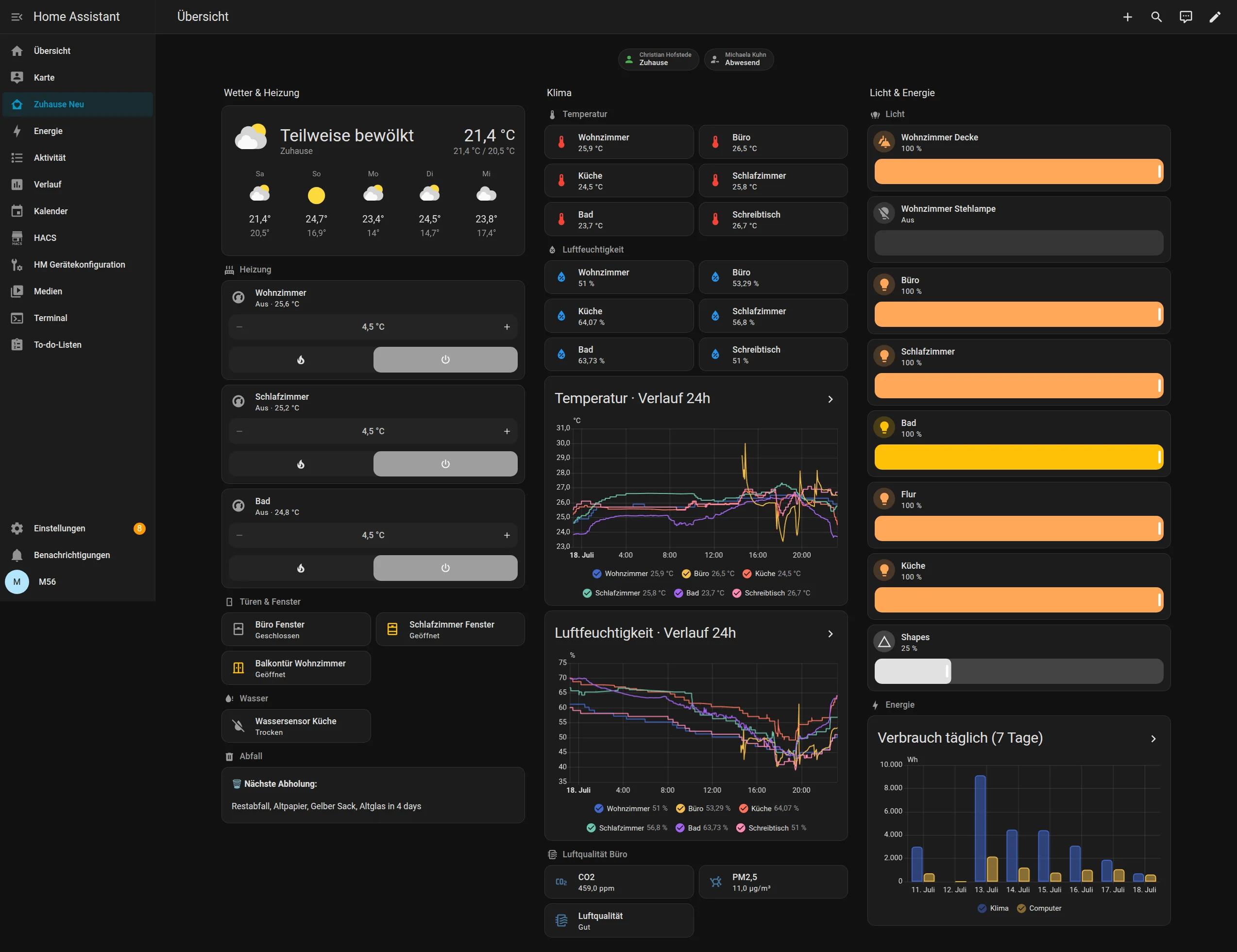
The useful part of a home automation dashboard is that it hides the plumbing. The screenshot above shows weather, heating, doors, windows, temperature, humidity, air quality, lights, and energy consumption. A light is a light, a thermostat is a thermostat, and a water sensor is either dry or it is about to make my evening substantially worse.
Behind that dashboard, however, are three quite different device ecosystems.
Most of the apartment uses Zigbee devices from Philips, IKEA, Xiaomi, Sonoff, and a few others. The heating and several door and presence sensors are Homematic or Homematic IP devices connected to an eQ-3 CCU3. The newest additions are IKEA Matter-over-Thread devices which, somewhat unexpectedly, use my Nanoleaf Shapes controller as their Thread border router.
Home Assistant ties all of this together. The slightly unusual part is where each component runs: Home Assistant OS lives in a bhyve virtual machine on my FreeBSD home server, while Zigbee2MQTT and Mosquitto run in a separate VNET jail on the host because bhyve does not offer the USB passthrough I would need for the ConBee II adapter.
This is not the architecture I would draw if every hypervisor feature were available. It is the architecture that works, survives upgrades, and has turned out to be pleasantly easy to reason about.
- The Shape of the Setup
- Home Assistant OS in bhyve
- The USB Problem Becomes a Jail
- Zigbee Is Still the Workhorse
- Homematic: The Older, Very Reliable Side
- Matter over Thread via a Nanoleaf Controller, Apparently
- The Dashboard Is an Interface, Not an Inventory
- Automations: Small Things That Remove Small Irritations
- What I Would Keep If I Rebuilt It
The Shape of the Setup
At a high level, the system looks like this:
                                +----------------------------+
                                | Home Assistant OS          |
                                | bhyve VM, 2 vCPU, 2 GiB    |
                                |                            |
                                | Home Assistant Core        |
                                | Matter Server              |
                                | dashboards + automations   |
                                +-----+-------------+--------+
                                      |             |
                                   MQTT|             |LAN
                                      |             |
            +-------------------------+             +------------------+
            |                                                            |
            v                                                            v
+-----------------------------+                         +-----------------------------+
| FreeBSD VNET jail           |                         | eQ-3 CCU3                   |
|                             |                         |                             |
| Mosquitto                   |                         | Homematic + Homematic IP    |
| Zigbee2MQTT                 |                         | BidCoS-RF + HmIP-RF         |
| ConBee II via host USB      |                         +-----------------------------+
+-------------+---------------+
              |
              | Zigbee
              v
  lights, switches, sensors,
  plugs, remotes, repeater

              IKEA Matter-over-Thread devices
                            |
                            | Thread
                            v
              +-----------------------------+
              | Nanoleaf Shapes controller  |
              | Thread border router        |
              +-----------------------------+
                            |
                            | IPv6 over LAN
                            +-----------------------> Home Assistant
There is no single “smart home protocol” here. Zigbee, Homematic, classic BidCoS-RF, Homematic IP, Matter, Thread, MQTT, and normal IP networking all participate. Home Assistant’s job is to turn those into one coherent set of entities and actions.
The current installation has 474 entities across seven areas. That number includes the usual supporting entities such as battery levels, firmware updates, event channels, radio diagnostics, and device configuration. The dashboard deliberately exposes only the useful surface.
Home Assistant OS in bhyve
Home Assistant itself runs as Home Assistant OS rather than as a Python environment or a manually managed container. On the FreeBSD host, the VM is intentionally small:
root@voyager:~ # vm list | grep kes
kes       default    uefi       2    2G      -    Yes [3]  Running (6256)
That is two virtual CPUs and 2 GiB of memory. At the time of writing it runs Home Assistant OS 18.1, Home Assistant Core 2026.7.2, and the 2026.07 supervisor. Home Assistant correctly identifies the virtualization platform as bhyve.
I like Home Assistant OS for this role because it gives the application the environment it expects. Core, the supervisor, the Matter server, backups, and upgrades all remain on the supported path. FreeBSD only has to provide a reliable VM, storage, and networking. I do not have to reproduce the Home Assistant appliance model out of hand-built containers.
The VM is also a useful failure boundary. Home automation software changes much faster than the FreeBSD host below it. Home Assistant can update on its own cadence without turning the home server into an experimental Python environment, while ZFS and the host’s normal backup strategy cover the VM from below.
There is one important limitation: USB.
The USB Problem Becomes a Jail
My Zigbee network uses a Dresden Elektronik ConBee II USB adapter. Passing that adapter directly into a bhyve guest is not straightforward, but exposing USB devices to a FreeBSD jail through devfs is. The practical solution is to move the part which needs the USB device out of the VM.
The z2m VNET jail sees the adapter directly:
root@voyager:~ # bastille cmd z2m usbconfig | grep -i con

[z2m]:
ugen0.3: <ZigBee gateway [ConBee II] Dresden Elektronik> at usbus0,
         cfg=0 md=HOST spd=FULL (12Mbps) pwr=ON (100mA)
Zigbee2MQTT talks to the ConBee II inside that jail. Mosquitto runs beside it, and Home Assistant connects to the broker over the LAN. The radio never needs to enter the VM:
ConBee II -> FreeBSD devfs -> Zigbee2MQTT -> Mosquitto -> Home Assistant
The relevant processes are exactly what I expect to see:
nobody  mosquitto -c /usr/local/etc/mosquitto/mosquitto.conf -d
z2m     daemon: /usr/local/bin/zigbee2mqtt-start
z2m     /usr/local/bin/node index.js
root    /usr/local/bin/caddy run --config /usr/local/etc/caddy
The jail has its own network stack, address, services, logs, and package lifecycle. From Home Assistant’s perspective, none of this is unusual: it sees a normal MQTT broker and devices discovered by Zigbee2MQTT. From FreeBSD’s perspective, the untrusted and comparatively fast-moving Node.js application is contained in a jail with only the USB and network access it actually needs.
This workaround turned into a design I now prefer. The radio layer does not have to share the Home Assistant lifecycle. Restarting or upgrading the VM does not detach the coordinator from the host, and Zigbee2MQTT remains an independently inspectable service. If Home Assistant disappeared tomorrow, the broker and Zigbee network would still be understandable from ordinary MQTT topics.
Zigbee Is Still the Workhorse
Zigbee makes up the majority of the installation. Home Assistant currently reports 24 devices through the MQTT integration, including the Zigbee2MQTT bridge and two Zigbee groups.
The device mix is exactly why I prefer an open coordinator over a stack of vendor bridges:
- Philips Hue bulbs and dimmer switches
- IKEA lights, a smart plug, motion sensor, remote, and signal repeater
- Xiaomi temperature and humidity sensors
- Sonoff temperature and humidity sensors
- the ConBee II coordinator itself
The three filament bulbs over the living-room ceiling are a Zigbee2MQTT group, as are the office lights. Home Assistant therefore gets one useful light entity for the room while the individual bulbs remain available when I need them. Brightness controls in the dashboard work the same way whether the tile targets one bulb or a group.
The mesh has also been boring in the best sense of the word. Mains-powered bulbs, plugs, and the IKEA repeater provide routing; battery-powered sensors and remotes can stay asleep most of the time. Zigbee2MQTT exposes firmware, battery, link, effect, and power-on behaviour entities without turning the normal dashboard into a device-management console.
MQTT is the seam that makes the FreeBSD split work. It is also a very good debugging boundary. When a device misbehaves, I can determine whether the radio event reached Zigbee2MQTT, whether the corresponding MQTT message exists, and whether Home Assistant consumed it. “The light does not work” becomes three small questions instead of one mysterious stack.
Homematic: The Older, Very Reliable Side
The second device family is eQ-3 Homematic. I use both classic Homematic and Homematic IP devices, connected to a CCU3 base station and integrated locally into Home Assistant.
Home Assistant currently sees 17 devices through the Homematic IP Local integration. Some are the CCU3 and its virtual receiver devices, while the physical collection includes:
- radiator thermostats in the living room, bedroom, and office
- door and window contacts
- an office presence sensor
- metering and switching plugs for the office computer, air conditioner, and television
- an older remote control
This is the unglamorous part of the smart home, and arguably the most important. Door contacts should report a door. Heating should continue to be heating. I do not need either category to become exciting.
The CCU3 is a separate appliance because that is what the Homematic ecosystem expects, and I am fine with that. Home Assistant talks to it locally, turns its devices into the same binary_sensor, climate, switch, and sensor entities used everywhere else, and leaves the radio-specific details at the integration boundary.
That normalization is visible on the dashboard. The heating tiles and door/window tiles do not advertise that they come from a completely different base station than the Zigbee lights next to them. They simply expose the controls and states I care about.
Matter over Thread via a Nanoleaf Controller, Apparently
The newest part of the system is also the one I did not originally plan.
I already had a Nanoleaf Shapes installation in the living room. At some point I discovered that its controller can act as a Thread border router. That meant I could add Matter-over-Thread devices without buying another dedicated radio or attaching another USB adapter to the Home Assistant machine.
The current Matter collection is three IKEA devices:
| Device | IKEA model | What Home Assistant gets |
|---|---|---|
| Office air-quality sensor | ALPSTUGA | temperature, humidity, CO2, PM2.5, air quality, and diagnostics |
| Desk switch | BILRESA | two button events, battery state, and Thread diagnostics |
| Kitchen water-leak sensor | KLIPPBOK | leak state, battery state, and Thread diagnostics |
Home Assistant’s Matter integration and Matter Server manage the devices, while the Nanoleaf controller provides the path from the Thread mesh to the normal IPv6 network. There is no ConBee II involved and no MQTT translation layer. Thread carries IPv6, the border router forwards it, and Matter provides the application protocol.
I expected this to be the fragile, standards-committee-shaped corner of the setup. So far it has worked remarkably well. The ALPSTUGA data feeds the office air-quality section of the dashboard. The BILRESA switch controls the office ceiling light. The KLIPPBOK sensor sits in the kitchen and has a dedicated water-leak alarm automation.
Most importantly, I did not have to replace the Nanoleaf system or buy a new border router. A controller already hanging on the wall turned out to have a second, genuinely useful job. Yes, that actually works. ^_^
This does not make me ready to replace every Zigbee device with Thread. Zigbee is mature, cheap, and already deployed throughout the apartment. Matter over Thread is simply another useful option, especially for devices which expose a good native Matter implementation.
The Dashboard Is an Interface, Not an Inventory
The “Zuhause Neu” dashboard is a storage-mode Lovelace dashboard using the modern sections layout. It has one overview with three columns:
- weather, heating, doors and windows, the kitchen water sensor, and rubbish collection
- temperature, humidity, 24-hour history, and office air quality
- lights and seven-day energy consumption
The cards are mostly built-in heading, tile, grid, history graph, weather forecast, and statistics graph cards. I use tile features for thermostat set points, heating modes, and light brightness. The result is not exotic, but it is responsive, easy to edit in Home Assistant, and does not depend on a large pile of custom frontend code.
More importantly, the dashboard does not attempt to display all 474 entities. A device might contribute a battery voltage, firmware update entity, Thread channel, restart counter, identify button, hardware error flag, and half a dozen configuration values. Those are useful when diagnosing the device. They are noise when I want to know whether the kitchen is leaking.
The main view therefore answers ordinary questions:
- Is anybody home?
- Is a door or window open?
- What is the temperature and humidity in each room?
- Is the office air still good?
- What are the lights doing?
- How much energy did the air conditioner and computer use?
Device administration remains in Home Assistant’s device and entity pages. The dashboard is allowed to be an interface.
Automations: Small Things That Remove Small Irritations
The installation currently has a dozen automations. They are not an attempt to make the apartment sentient. Most solve one narrow problem:
- turn the hall light on when the motion sensor fires, then turn it off after the hall is empty
- turn the office light on and off based on presence
- let the Matter desk switch control the Zigbee office ceiling light
- switch the heating off at night
- mirror the living-room ceiling state to the Nanoleaf Shapes
- send notifications for weak batteries
- raise an alarm when the kitchen water sensor detects a leak
That desk-switch automation is a good example of what Home Assistant buys me. A Matter-over-Thread button from IKEA controls a Zigbee group of Philips bulbs, with a Nanoleaf controller providing the Thread border router and a ConBee II in a FreeBSD jail providing the Zigbee coordinator. None of those vendors designed the complete path. Home Assistant makes it one event and one light action.
The useful smart home is mostly made of connections like that: small, local, comprehensible, and easy to override with a physical switch.
What I Would Keep If I Rebuilt It
If I started again, I would keep the important boundaries:
- Home Assistant OS in a VM. It gets the supported appliance environment; FreeBSD gets a clean guest boundary.
- The USB radio on the FreeBSD side. A jail is a natural place for a host-attached coordinator when the hypervisor cannot pass it through.
- MQTT between Zigbee2MQTT and Home Assistant. It is an open, observable interface rather than an internal implementation detail.
- The CCU3 as the Homematic radio authority. It is reliable, local, and already owns that ecosystem.
- The existing Thread border router. If the Nanoleaf controller already provides a healthy Thread network, adding another border router is not automatically an improvement.
- A deliberately selective dashboard. Device capabilities belong in the registry; daily decisions belong on the overview.
I would also keep the system local. Cloud services may add optional features, but lights, heating, sensors, dashboards, and automations should not depend on an external account remaining reachable. Every important integration in this article communicates on the local network.
The setup is not minimal. It contains a VM, a VNET jail, a USB coordinator, an MQTT broker, a CCU3, a Matter server, and a Nanoleaf border router. But each component has one clear responsibility, and each boundary uses a protocol I can inspect.
That is a trade I will happily make. The dashboard stays simple because the architecture underneath it is explicit. Three radio ecosystems, several vendors, and 474 entities end up looking like one home rather than a collection of incompatible product demos.
Comments
You can use your Mastodon or other ActivityPub account to comment on this article by replying to the associated post.
Search for the copied link on your Mastodon instance to reply.
Loading comments...