
- Sun 21 June 2026
- 20 min read
- FreeBSD
- #freebsd, #mastodon, #monitoring, #observability, #prometheus, #grafana, #loki, #jails, #ipv6
A while ago I migrated burningboard.net to a multi-jail FreeBSD setup: nginx, Puma, Sidekiq, and the database each in their own jail, with the host doing all the PF and routing. That post ended on the architecture. What it did not cover is the question that matters the morning after you put real users on a thing: is it actually healthy right now, and if it is not, will I find out before they do?
This is the observability half of that story. I run a completely separate machine whose only job is to watch the Mastodon host, plus a handful of other boxes in my network. It runs Prometheus for metrics, Loki for logs, Grafana to draw both, and Alertmanager to wake me up. None of it lives on the Mastodon host itself, because a monitoring system that shares a fate with the thing it watches is not a monitoring system, it is a single point of failure with extra steps.
I covered the in-the-moment FreeBSD troubleshooting toolkit (top, gstat, netstat, rctl) in an earlier article. This one is the opposite end: history, dashboards, and alerting. When something is on fire right now, you reach for top -SHPj. When you want to know what was on fire at 3am while you were asleep, you reach for this.
Table of Contents
- Table of Contents
- The shape of the stack
- Locking the exporters down at the AS perimeter
- Installing the stack on the monitor jail
- The exporters on burningboard
- Filling the gaps: the textfile collector
- Logs: Loki and Promtail
- One dashboard to rule them all
- Alerting: the part that actually wakes me up
- FreeBSD gotchas worth knowing
- Wrap-up
- References
The shape of the stack
Two machines matter here.
burningboard is the Mastodon host. It runs the jails and, alongside them, a set of Prometheus exporters: small daemons that expose metrics over HTTP. Exporters do not push anywhere; they sit and wait to be scraped.
observer is a small dedicated VM running a single Bastille jail called monitor. That jail holds the entire monitoring stack. It reaches out and pulls metrics from every exporter on a fixed interval.
                         ┌───────────────────────────────────┐
   AS201379 backbone     │  observer  ->  monitor jail       │
   2a06:9801:1c::/48     │   - Prometheus   (scrape + rules) │
        ▲                │   - Grafana      (dashboards)     │
        │ pull / scrape  │   - Loki         (log store)      │
        │                │   - Alertmanager (routing/notify) │
        │                └───────────────────────────────────┘
        │
 ┌──────┴────────────────────────────────────────────────────┐
 │  burningboard (Mastodon host)                             │
 │   node_exporter      :9100   host + textfile metrics      │
 │   jail_exporter      :9452   per-jail racct               │
 │   postgres_exporter  :9187   (database jail, via pf rdr)  │
 │   sidekiq_exporter   :9394   (sidekiq jail, via pf rdr)   │
 │   promtail           :9080   ships nginx logs to Loki     │
 └───────────────────────────────────────────────────────────┘
The whole thing is pull-based and pull-based only. Prometheus on the monitor jail decides when to scrape; the exporters have no idea Prometheus exists until it knocks. This is the single most important property for a comfortable life: I can restart, upgrade, or move the entire monitoring stack and the Mastodon host neither notices nor cares.
Locking the exporters down at the AS perimeter
This is the part people get wrong, so it goes first.
The exporters on burningboard expose raw, unauthenticated metrics. node_exporter will happily tell anyone who asks how much memory is free, which kernel you boot, and how many packages are pending a security update. None of that can be reachable from the open internet.
The tempting shortcut is to bind everything to a loopback or some unroutable private range and call it secure-by-accident. I do not do that. The exporters bind to a stable address from my own AS201379 GUA space (2a06:9801:1c::/48), carried on a loopback so it does not move when a physical interface does. That address is a real, globally routable IPv6 address, not a ULA. The host reaches the rest of the network over a gif(4) tunnel to my internal BGP router:
# /etc/rc.conf on burningboard (excerpt)

# Point-to-point tunnel to the internal router
ifconfig_gif0="tunnel 172.16.0.3 172.16.0.4 mtu 1480"
ifconfig_gif0_ipv6="inet6 2a06:9801:1c:fff3::2 2a06:9801:1c:fff3::1 prefixlen 128"

# Stable GUA (AS201379 space) the monitoring exporters listen on
ifconfig_lo1="inet6 2a06:9801:1c:4000::1 prefixlen 64"

# Reach the rest of the AS via the internal router
ipv6_static_routes="internal"
ipv6_route_internal="2a06:9801:1c::/48 2a06:9801:1c:fff3::1"

node_exporter_enable="YES"
node_exporter_listen_address="[2a06:9801:1c:4000::1]:9100"
jail_exporter_enable="YES"
jail_exporter_listen_address="[2a06:9801:1c:4000::1]:9452"
So binding is convenient, not protective. What actually keeps the rest of the internet out is the firewall at the edge of the autonomous system. I run a single perimeter firewall in front of the whole AS, and it has the final say on what is allowed in:
my_network_v6 = "2a06:9801:1c::/48"

# Allow only the monitoring host and its jail to reach the exporter ports
pass quick inet6 proto tcp \
    from { 2a06:9801:1c:2000::21, 2a06:9801:1c:2000::25 } \
    to $my_network_v6 port { 9100, 9342, 9187, 9394, 9452 } keep state

# Everyone else is dropped at the edge, before it reaches any host
block in quick proto tcp from any to any port { 9100, 9342, 9187, 9394, 9452 }
2a06:9801:1c:2000::21 is the observer host and ::25 is the monitor jail. Those two source addresses, and only those two, may open a connection to the exporter ports anywhere in the AS: node_exporter (9100), frr_exporter on the routers (9342), postgres_exporter (9187), sidekiq_exporter (9394), and jail_exporter (9452). The block in quick for the same ports from any to any catches everything else: a port scan from the outside is dropped at the perimeter and never forwarded to the host that would otherwise answer it.
I prefer this to per-host binding tricks for one reason: it is centralised and auditable. The policy for “who may scrape metrics in this network” lives in exactly one ruleset at one chokepoint, not smeared across the rc.conf of every host that happens to run an exporter. Stand up a new host, give its exporter the same GUA pattern, and it is already covered: reachable from the monitoring box and from nowhere else, without touching any firewall on the new host itself.
The two exporters that live inside jails (PostgreSQL in the database jail, Sidekiq in the sidekiq jail) are redirected onto the host’s address with a host-local PF rdr, so from Prometheus’s point of view every target is just a different port on 2a06:9801:1c:4000::1. That redirect is internal plumbing and entirely separate from the perimeter policy above.
Installing the stack on the monitor jail
Everything is in pkg. There is no need to compile anything or chase a Helm chart.
# inside the monitor jail
pkg install prometheus grafana loki alertmanager

sysrc prometheus_enable="YES"
sysrc grafana_enable="YES"
sysrc loki_enable="YES"
sysrc alertmanager_enable="YES"

service prometheus start
service grafana start
service loki start
service alertmanager start
The jail itself is a thin Bastille jail and publishes a couple of ports to the host so I can reach Grafana:
root@observer:~ # bastille list
 JID  Name     State  IP Address              Published Ports        Release
 1    monitor  Up     10.254.254.25           tcp/3000:3000,...      15.0-RELEASE-p10
                      2a06:9801:1c:2000::25
Grafana is on :3000, Prometheus on :9090, Alertmanager on :9093, Loki on :3100. Only Grafana is meant to be looked at by a human; the rest are plumbing.
The exporters on burningboard
Four exporters cover the bulk of the instance. All come from pkg, and Prometheus reaches every one of them on the loopback GUA 2a06:9801:1c:4000::1: the host exporters bind it directly, the jailed ones arrive through the rdr described above.
node_exporter(:9100) is the foundation: CPU, memory, load, filesystems, network counters. On FreeBSD it also serves as the host for my textfile collector, which I lean on heavily below.jail_exporter(:9452) readskern.racctand exposes per-jail CPU, memory, and process counts. It is the Prometheus version of therctl -huview I wrote about before. Worth its own line in the dashboard so I can see which jail is growing.postgres_exporter(:9187) runs against the Mastodon database. The two series I actually watch arepg_stat_database_numbackends(connection pressure) andpg_stat_database_deadlocks.sidekiq_exporter(:9394) is the one that matters most for a Mastodon instance. Sidekiq is where federation happens. If its queues back up, posts stop delivering and the instance feels broken long before anything actually errors.
A trimmed prometheus.yml showing the scrape jobs:
global:
  scrape_interval: 10s
  evaluation_interval: 10s

rule_files:
  - "alerts.yml"

alerting:
  alertmanagers:
    - static_configs:
        - targets: ["localhost:9093"]

scrape_configs:
  - job_name: node
    static_configs:
      - targets: ['[2a06:9801:1c:4000::1]:9100']
        labels:
          instance: 'burningboard.net'

  - job_name: jail_exporter
    static_configs:
      - targets: ['[2a06:9801:1c:4000::1]:9452']
        labels:
          instance: 'burningboard.net'

  - job_name: postgres_exporter
    static_configs:
      - targets: ['[2a06:9801:1c:4000::1]:9187']
        labels:
          instance: 'burningboard.net'

  - job_name: sidekiq_exporter
    static_configs:
      - targets: ['[2a06:9801:1c:4000::1]:9394']
        labels:
          instance: 'burningboard.net'
The same Prometheus also scrapes my mail server, my BGP routers (frr_exporter), and a couple of other hosts on the backbone, but those are off-topic here.
Filling the gaps: the textfile collector
Out of the box, the exporters leave real holes. FreeBSD’s node_exporter does not expose ZFS pool metrics natively the way the Linux build does. Nothing knows my Scaleway S3 media bucket exists. Nothing knows whether pkg audit is unhappy. And the most interesting numbers of all, the actual Mastodon statistics (users, toots, federated domains, monthly active users), live behind the instance API, not in any exporter.
The clean FreeBSD answer is the textfile collector. node_exporter can be told to read every *.prom file in a directory and serve its contents as if they were native metrics. You enable it with one argument:
# /etc/rc.conf on burningboard
node_exporter_args="--collector.textfile.directory=/var/tmp/node_exporter"
Create that directory yourself first (mkdir -p /var/tmp/node_exporter); node_exporter will not create it, and if it is missing the final mv in the script below fails and the custom metrics silently never appear.
Then you write a script that produces well-formed Prometheus text into that directory and run it on a schedule. Mine pulls four sources together and writes them as a single .prom file (Scaleway credentials redacted):
#!/bin/sh
# /usr/local/bin/mastodon_custom_metrics.sh

PROM_FILE="/var/tmp/node_exporter/mastodon_custom.prom"
TMP_FILE="${PROM_FILE}.$$"

# Scaleway credentials. Keep this file chmod 600 and out of version control.
SCW_SECRET_KEY="..."   # redacted
PROJECT_ID="..."       # redacted
BUCKET_NAME="..."      # redacted

# --- 1. Mastodon instance API ---
INSTANCE_JSON=$(curl -s "https://burningboard.net/api/v1/instance")
INSTANCE_V2_JSON=$(curl -s "https://burningboard.net/api/v2/instance")
USERS_TOTAL=$(echo "$INSTANCE_JSON"    | jq -r '.stats.user_count   // 0')
TOOTS_TOTAL=$(echo "$INSTANCE_JSON"    | jq -r '.stats.status_count  // 0')
DOMAINS_TOTAL=$(echo "$INSTANCE_JSON"  | jq -r '.stats.domain_count  // 0')
ACTIVE_MONTH=$(echo "$INSTANCE_V2_JSON"| jq -r '.usage.users.active_month // 0')

# Weekly activity (index [0] is the current week)
ACTIVITY_JSON=$(curl -s "https://burningboard.net/api/v1/instance/activity")
WEEKLY_REG=$(echo "$ACTIVITY_JSON"    | jq -r '.[0].registrations // 0')
WEEKLY_LOGINS=$(echo "$ACTIVITY_JSON" | jq -r '.[0].logins // 0')

# --- 2. Scaleway S3 media bucket (size + object count) ---
S3_JSON=$(curl -s -X POST \
  "https://api.scaleway.com/object-private/v1/regions/fr-par/buckets-info" \
  -H "X-Auth-Token: $SCW_SECRET_KEY" -H "Content-Type: application/json" \
  --data-raw "{\"buckets_name\":[\"$BUCKET_NAME\"],\"project_id\":\"$PROJECT_ID\"}")
S3_SIZE_BYTES=$(echo "$S3_JSON"   | jq -r ".buckets.\"$BUCKET_NAME\".current_size    // 0")
S3_OBJECT_COUNT=$(echo "$S3_JSON" | jq -r ".buckets.\"$BUCKET_NAME\".current_objects // 0")

# --- 3. FreeBSD package / security posture ---
PKG_UPDATES=$(pkg version -vRL= 2>/dev/null | grep -c "<")
PKG_AUDIT=$(pkg audit -Fq 2>/dev/null | grep -v "^$" | wc -l | tr -d ' ')
[ "$(freebsd-version -k)" != "$(uname -r)" ] && REBOOT_REQ=1 || REBOOT_REQ=0

# --- 4. ZFS pool metrics (not native on FreeBSD node_exporter) ---
ZPOOL_INFO=$(zpool list -H -p zroot 2>/dev/null)
ZPOOL_FREE=$(echo "$ZPOOL_INFO" | awk '{print $4}')
ZPOOL_FRAG=$(echo "$ZPOOL_INFO" | awk '{print $7}' | tr -d '%')
ZPOOL_CAP=$(echo  "$ZPOOL_INFO" | awk '{print $8}' | tr -d '%')

# --- Emit Prometheus text, then move atomically into place ---
cat <<EOF > "$TMP_FILE"
# --- ZFS ---
# HELP zfs_pool_free_bytes Free bytes in zpool
# TYPE zfs_pool_free_bytes gauge
zfs_pool_free_bytes{pool="zroot"} ${ZPOOL_FREE:-0}

# HELP zfs_pool_capacity_percent Capacity percentage
# TYPE zfs_pool_capacity_percent gauge
zfs_pool_capacity_percent{pool="zroot"} ${ZPOOL_CAP:-0}

# HELP zfs_pool_fragmentation_percent Fragmentation percentage
# TYPE zfs_pool_fragmentation_percent gauge
zfs_pool_fragmentation_percent{pool="zroot"} ${ZPOOL_FRAG:-0}

# HELP zfs_pool_health ZFS pool health (1=ONLINE, 0=otherwise)
# TYPE zfs_pool_health gauge
zfs_pool_health{pool="zroot"} $(zpool list -H -o health zroot | grep -q ONLINE && echo 1 || echo 0)

# HELP zfs_postgres_data_used_bytes Bytes used by the postgres_data dataset
# TYPE zfs_postgres_data_used_bytes gauge
zfs_postgres_data_used_bytes $(zfs get -Hp used zroot/postgres_data 2>/dev/null | awk '{print $3}')

# --- Mastodon (instance API) ---
# HELP mastodon_local_users_total Total local accounts
# TYPE mastodon_local_users_total gauge
mastodon_local_users_total ${USERS_TOTAL:-0}

# HELP mastodon_local_toots_total Total local statuses
# TYPE mastodon_local_toots_total gauge
mastodon_local_toots_total ${TOOTS_TOTAL:-0}

# HELP mastodon_known_domains Total federated domains
# TYPE mastodon_known_domains gauge
mastodon_known_domains ${DOMAINS_TOTAL:-0}

# HELP mastodon_active_month_users Monthly active users (MAU)
# TYPE mastodon_active_month_users gauge
mastodon_active_month_users ${ACTIVE_MONTH:-0}

# HELP mastodon_weekly_registrations Registrations in the current week
# TYPE mastodon_weekly_registrations gauge
mastodon_weekly_registrations ${WEEKLY_REG:-0}

# HELP mastodon_weekly_logins Logins in the current week
# TYPE mastodon_weekly_logins gauge
mastodon_weekly_logins ${WEEKLY_LOGINS:-0}

# --- Scaleway S3 media bucket ---
# HELP scaleway_s3_bucket_size_bytes Current size of the S3 media bucket
# TYPE scaleway_s3_bucket_size_bytes gauge
scaleway_s3_bucket_size_bytes ${S3_SIZE_BYTES:-0}

# HELP scaleway_s3_objects_total Number of objects in the S3 media bucket
# TYPE scaleway_s3_objects_total gauge
scaleway_s3_objects_total ${S3_OBJECT_COUNT:-0}

# --- FreeBSD package / security posture ---
# HELP freebsd_pending_pkg_updates Number of pending package upgrades
# TYPE freebsd_pending_pkg_updates gauge
freebsd_pending_pkg_updates ${PKG_UPDATES:-0}

# HELP freebsd_security_audits Number of vulnerable packages
# TYPE freebsd_security_audits gauge
freebsd_security_audits ${PKG_AUDIT:-0}

# HELP freebsd_reboot_required 1 if a kernel update is pending
# TYPE freebsd_reboot_required gauge
freebsd_reboot_required ${REBOOT_REQ:-0}
EOF

mv "$TMP_FILE" "$PROM_FILE"
Two details that are easy to get wrong and that matter:
- Write to a temp file and
mvit into place.node_exportermay read the directory at any instant. A half-written.promfile is a parse error and a gap in your graphs.mvon the same filesystem is atomic, so the reader always sees either the old file or the new one, never a torn one. - Always default to
0. Every value uses${VAR:-0}. Ifcurlto the Scaleway API times out, I want the metric to read0(and trip an alert), not vanish and silently leave a hole.
A cron entry runs it every five minutes:
*/5 * * * * root /usr/local/bin/mastodon_custom_metrics.sh
That five-minute cadence is deliberate. These are slow-moving numbers (a bucket’s object count and your MAU do not change second to second), and hammering the public instance API or the Scaleway control plane every ten seconds would be rude and pointless.
Logs: Loki and Promtail
Metrics tell you that something is wrong. Logs tell you what. For the log half I run Loki on the monitor jail and Promtail on the nginx jail.
Promtail tails the nginx access logs, does a little filtering, and pushes the survivors to Loki over the same AS201379 backbone:
# /usr/local/etc/promtail.yaml on the nginx jail
clients:
  - url: http://[2a06:9801:1c:2000::25]:3100/loki/api/v1/push

scrape_configs:
  - job_name: nginx
    static_configs:
      - targets: [localhost]
        labels:
          job: nginx
          host: burningboard.net
          __path__: /var/log/nginx/analytics*log
    pipeline_stages:
      - json:
          expressions:
            http_user_agent:
            request_uri:
      - drop:
          source: http_user_agent
          expression: "(bot|Bot|RSS|spider|crawler|Crawler|Inspect)"
      - drop:
          source: request_uri
          expression: "/(assets|img)/"
      - drop:
          source: request_uri
          expression: "(robots.txt|favicon.ico|index.php)"
The drop stages are the point. A Mastodon instance is crawled relentlessly by bots, link-preview fetchers, and RSS readers, and serves a flood of static assets. None of that is interesting when you are trying to read real human traffic, and all of it costs storage in Loki. Dropping it at the agent, before it ever crosses the network, keeps the log store small and the queries fast. nginx is configured to write JSON access logs, which is what lets Promtail parse http_user_agent and request_uri as structured fields instead of regex-wrestling a log line.
Loki itself runs in the simplest possible single-binary, filesystem-backed mode. For one Mastodon instance and a handful of hosts there is no reason to reach for object storage or a microservices deployment:
# /usr/local/etc/loki.yaml (excerpt)
auth_enabled: false
common:
  path_prefix: /var/db/loki
  storage:
    filesystem:
      chunks_directory: /var/db/loki/chunks
      rules_directory: /var/db/loki/rules
  replication_factor: 1
  ring:
    kvstore:
      store: inmemory
schema_config:
  configs:
    - from: 2020-10-24
      store: tsdb
      object_store: filesystem
      schema: v13
      index:
        prefix: index_
        period: 24h
In Grafana, Loki becomes a second data source next to Prometheus, and a LogQL query like {job="nginx"} |= "499" next to the request-rate graph turns “the dashboard went red” into “here are the exact requests that did it” without leaving the browser.
One dashboard to rule them all
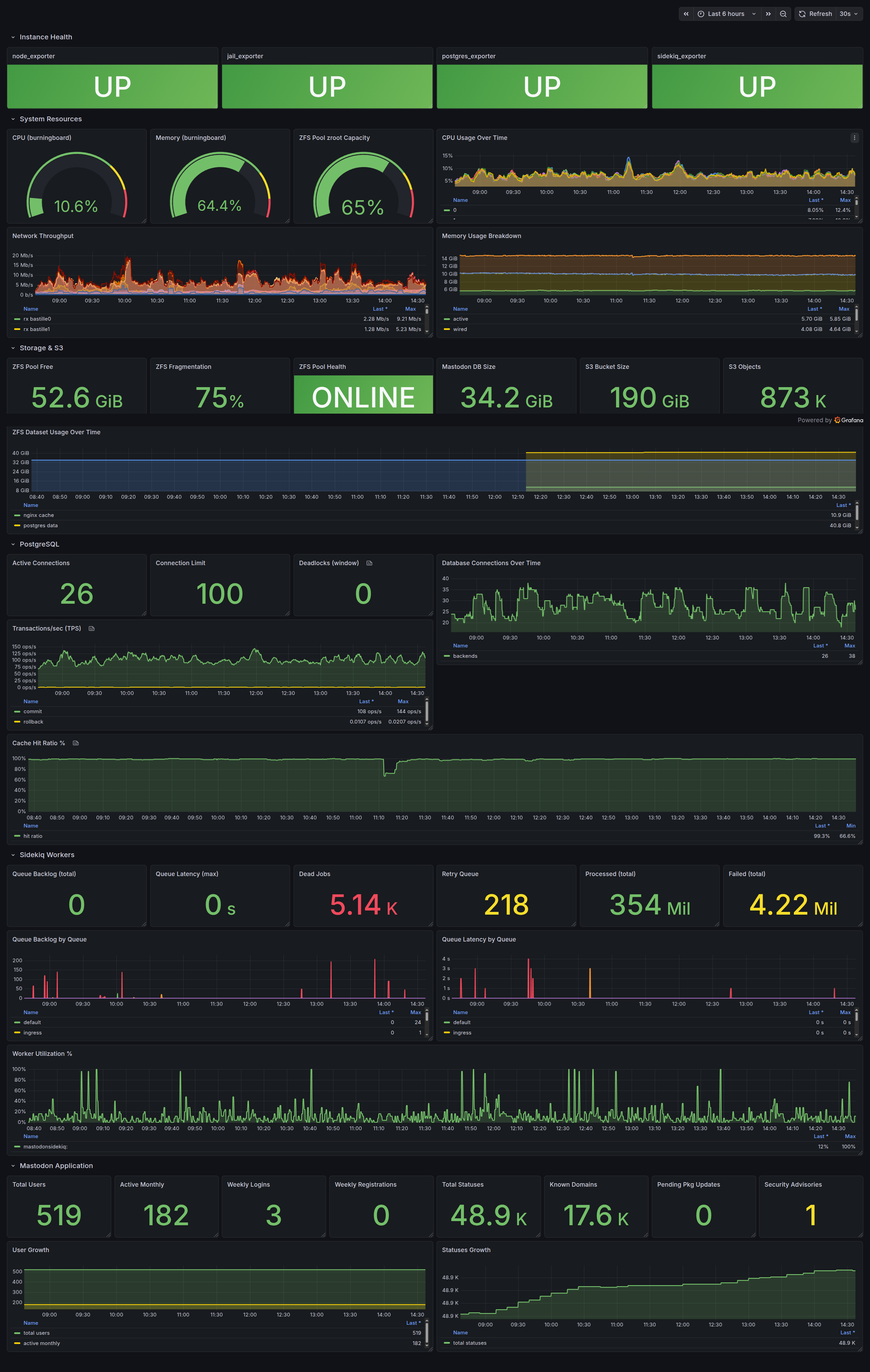
The screenshot at the top of this post is the dashboard I actually look at. It is deliberately one screen, organised top to bottom by how quickly I need the information:
- Top row, the health check. Four big
UP/DOWNpanels, one per exporter (up{job="..."} == 1). Green means Prometheus is successfully scraping. If any of these go red, nothing below them can be trusted, so they go first. - System resources. CPU, memory utilisation, and ZFS pool capacity as gauges, with time-series underneath. The gauges are for the glance; the graphs are for “when did this start.”
- Storage and I/O. ZFS free space and health, PostgreSQL data set size, and the S3 media bucket (size and object count) straight from the textfile metrics.
- PostgreSQL. Active connections against the
max_connectionsceiling, plus deadlocks. On a busy Mastodon instance the connection pool is the thing most likely to bite you. - Sidekiq and Mastodon. Queue backlog and latency, processed/failed job counters, and the human-facing numbers: local users, statuses, known instances, weekly logins and registrations. The red failed-jobs counter is the one panel I check first every morning. A flat failure count is fine; a climbing one means federation is unhappy.
The whole design philosophy is answer the binary question first. If the top row is green and the Sidekiq failure rate is flat, the instance is healthy and I can close the tab. Only when something is off do I start reading the detail panels underneath.
Alerting: the part that actually wakes me up
A dashboard you have to look at is not monitoring, it is a hobby. The point of the whole exercise is that I should not have to look. Prometheus evaluates a ruleset and hands firing alerts to Alertmanager, which routes them to email (and optionally a Telegram bridge).
A representative slice of alerts.yml:
groups:
  - name: node_exporter
    rules:
      - alert: NodeDown
        expr: up{job="node"} == 0
        for: 2m
        labels: { severity: critical }
        annotations:
          summary: "Node exporter unreachable: {{ $labels.instance }}"

  - name: disk_zfs
    rules:
      - alert: ZfsPoolLowSpace
        expr: zfs_pool_free_bytes < 10737418240   # < 10 GiB
        for: 5m
        labels: { severity: critical }
        annotations:
          summary: "ZFS pool <10 GiB free ({{ $labels.pool }})"
      - alert: ZfsPoolDegraded
        expr: zfs_pool_health != 1
        for: 0m
        labels: { severity: critical }

  - name: postgresql
    rules:
      - alert: PostgresConnectionsHigh
        expr: sum(pg_stat_database_numbackends{datname="mastodon"}) > 80
        for: 3m
        labels: { severity: warning }
        annotations:
          summary: "PostgreSQL connections approaching max (100)"

  - name: sidekiq
    rules:
      - alert: SidekiqQueueBacklog
        expr: sidekiq_queue_backlog > 100
        for: 10m
        labels: { severity: warning }
        annotations:
          summary: "Sidekiq backlog {{ $value }} on {{ $labels.queue }} - federation stuck"
      - alert: SidekiqLatencyHigh
        expr: sidekiq_queue_latency_seconds > 300
        for: 5m
        labels: { severity: warning }

  - name: mastodon
    rules:
      - alert: FreeBSDSecurityAudit
        expr: freebsd_security_audits > 0
        for: 6h
        labels: { severity: warning }
        annotations:
          summary: "Vulnerable packages on {{ $labels.instance }} ({{ $value }} CVEs)"
      - alert: S3MediaBucketEmpty
        expr: scaleway_s3_objects_total == 0
        for: 1h
        labels: { severity: critical }
        annotations:
          summary: "S3 media bucket reporting 0 objects - users will see broken media"
Every rule has a for: clause so a single bad scrape does not page me. NodeDown has to be true for two minutes; a backlog has to persist for ten. The thresholds encode hard-won opinions: 80 PostgreSQL connections is “pay attention,” 100 is “you are out.” A Sidekiq backlog over 100 sustained for ten minutes means workers cannot keep up with federation and someone is about to notice their posts are not landing.
Alertmanager handles the delivery and, crucially, the grouping and de-duplication so a flapping host does not bury me in mail:
route:
  receiver: email-admins
  group_by: ['alertname', 'instance']
  group_wait: 30s
  group_interval: 5m
  repeat_interval: 4h

receivers:
  - name: email-admins
    email_configs:
      - to: 'backups@linuxserver.pro'
        send_resolved: true
send_resolved: true is the underrated setting: I get a second mail when the condition clears, so an alert at 02:00 that resolves itself by 02:06 is visibly a transient, not a four-hour mystery I wake up to.
FreeBSD gotchas worth knowing
A few things cost me time, so they might save you some.
Verify metric names against your live Prometheus, not the docs. This is the big one. The Sidekiq backlog series is sidekiq_queue_backlog, not sidekiq_queue_enqueued. frr_bgp_peer_state == 1 means Established, not the IETF value of 6. I wrote a whole ruleset against names from blog posts and documentation, then watched half of it silently never fire because the series did not exist. Open the Prometheus expression browser, type the metric prefix, and confirm the series is real before you write an alert that depends on it. An alert on a nonexistent metric is worse than no alert: it gives you false confidence.
FreeBSD memory metrics are not the Linux ones. There is no node_memory_MemAvailable_bytes on FreeBSD. You get node_memory_size_bytes and the active/inactive/wired/cache breakdown, and you compute “available” yourself. My HostOutOfMemory rule carries both forms so the same ruleset works across my Linux and FreeBSD nodes.
ZFS is not exported natively. As covered above, the FreeBSD node_exporter build does not ship the ZFS pool collector the Linux one has. The textfile collector is the pragmatic fix, and it has the side benefit that I emit exactly the handful of zfs_pool_* series I care about rather than the firehose the native collector produces.
kern_securelevel="2" does not get in the way. The Mastodon host runs at securelevel 2, which is great for integrity and mildly alarming the first time you wonder whether an exporter will trip over it. It does not. node_exporter, jail_exporter, and a shell script writing to /var/tmp all operate well within what securelevel allows.
Wrap-up
The stack is, by design, unremarkable. Prometheus pulls, Grafana draws, Loki holds the logs, Alertmanager sends the mail. Every piece is in pkg, every config is a flat file under version control, and the whole thing runs in one Bastille jail on a machine that does nothing else. There is no agent mesh, no push gateway, no time-series database to babysit, and nothing on the Mastodon host that can take it down.
What makes it useful rather than just present is the unglamorous middle layer: a textfile collector that turns the Mastodon API, a Scaleway bucket, pkg audit, and zpool list into first-class metrics; Promtail dropping bot noise before it costs anything; and an alert ruleset whose thresholds are opinions I actually hold about when to care. That is the part you cannot install from a package.
The result is the same thing I want from all my infrastructure: I look at one green screen in the morning, and on the rare day it is not green, I already got the mail. Boringly reliable, which is exactly how I like it.
Comments
You can use your Mastodon or other ActivityPub account to comment on this article by replying to the associated post.
Search for the copied link on your Mastodon instance to reply.
Loading comments...