- Mon 03 August 2026
- 16 min read
- Linux
- #ansible, #ansible-automation-platform, #ansible-dev-tools, #vscode, #dev-containers, #podman, #rhel, #automation, #development
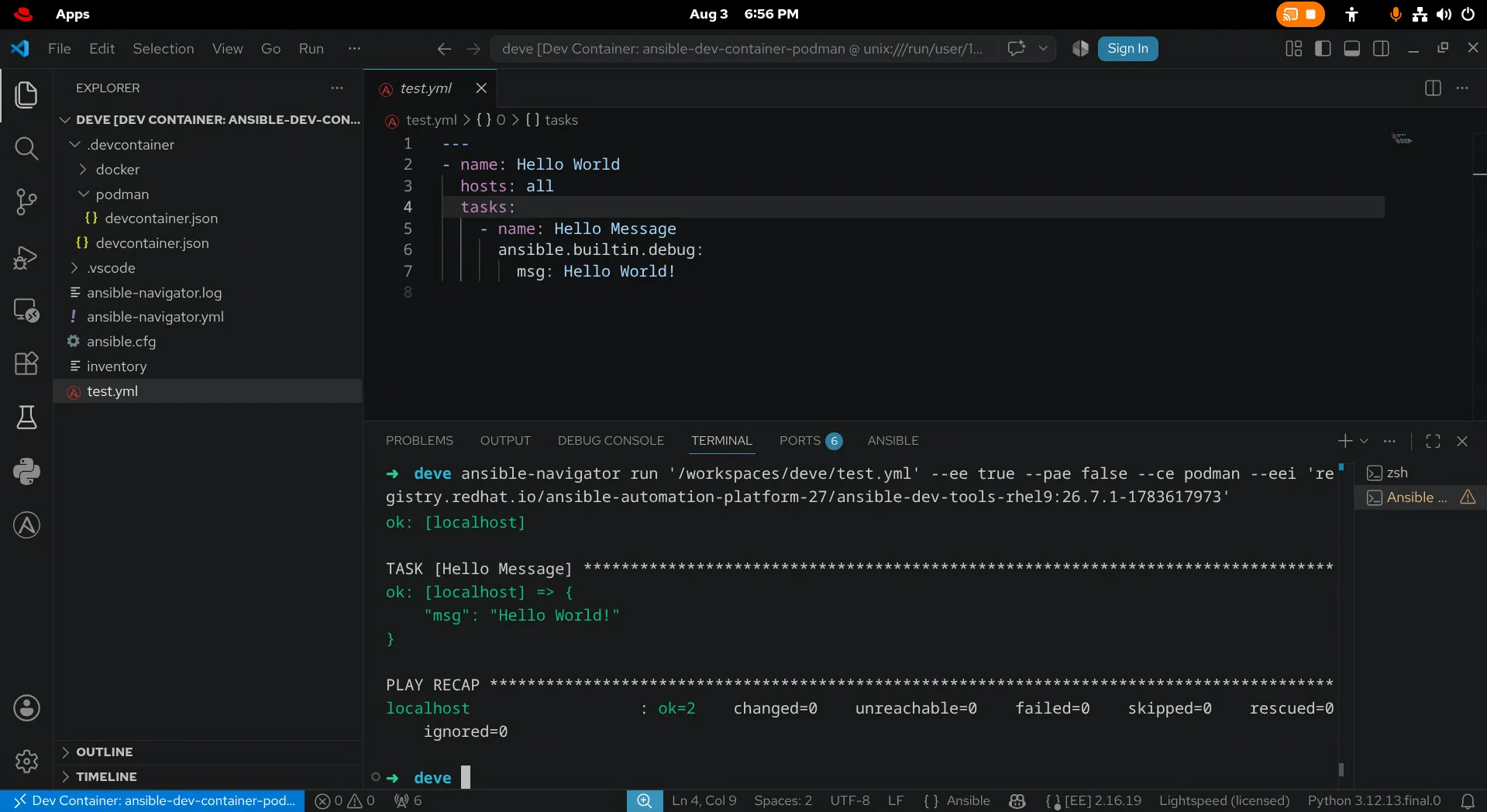
Table of Contents
- Table of Contents
- The Stack I Actually Use
- Dev Container and Execution Environment Are Different Jobs
- Host Preparation
- The devcontainer.json
- What Is Actually in the Image?
- Why This Is Better Than a Carefully Tended Venv
- Upstream Alternative: Community Ansible Dev Tools
- The Editor Is a Separate Choice
- A Practical Team Policy
- Further Reading
Ansible has a deceptively low barrier to entry. Install a Python package, write a YAML file, and you have automation. Six months later the same workstation has three Python virtual environments, two copies of ansible-core, collections in both the project and ~/.ansible, and an ansible-lint version that disagrees with CI. It still works, but nobody can say exactly why it works.
That is not a sane development environment.
For work intended for Red Hat Ansible Automation Platform, my preferred answer is a containerized workspace built from the same downstream, Red Hat-packaged toolchain that the organization has chosen to consume. The editor remains a normal desktop application. The Ansible tools, Python environment and supporting utilities live in a versioned OCI image. VS Code attaches the project to that container and Podman handles the lifecycle.
This is an opinionated setup, and I need to establish two boundaries before getting into it.
First, I work for Red Hat, but this article is my personal workflow and opinion. Consult the Red Hat Ansible Automation Platform documentation and your subscription terms for the authoritative product position.
Second, upstream and downstream are not synonyms:
- Upstream means community projects such as
ansible-core, Ansible Development Tools and their releases on PyPI or GHCR. They are excellent ways to develop, learn, contribute and follow current project work. - Downstream means the tested and packaged content delivered as part of Red Hat Ansible Automation Platform (AAP), with its product lifecycle, errata and support boundaries.
Enterprise customers who require Red Hat support should stay within the versions, repositories, images and documented combinations delivered for their AAP subscription. Replacing a downstream RPM or container with a newer upstream PyPI or GHCR build may be technically valid, but it changes the support conversation. “It is the same project” is not the same as “it is the supported product artifact.”
Side note: If you are new to Ansible automation, Red Hat AU294: Red Hat Enterprise Linux Automation with Ansible is an excellent course for getting started. I can highly recommend it.
The Stack I Actually Use
As of 3 August 2026, my workstation stack is:
- Host OS: Red Hat Enterprise Linux 10.2 (Coughlan), using the default desktop.
- Editor: Microsoft Visual Studio Code, installed from Microsoft’s RPM repository.
- Editor integration: Dev Containers and Python from Microsoft, plus Ansible from Red Hat. Python and Ansible are activated in the remote container workspace; the Ansible extension is also available locally to scaffold the Dev Container configuration.
- Container runtime: Podman from RHEL.
- Development image:
registry.redhat.io/ansible-automation-platform-27/ansible-dev-tools-rhel9:26.7.1-1783617973.
The last item is the important one. The image contains the Ansible content development toolchain as Red Hat-packaged RPMs, including ansible-core, ansible-builder, ansible-creator, ansible-lint, ansible-navigator, ansible-runner and ansible-sign. Pulling it requires authentication to registry.redhat.io and appropriate AAP subscription entitlements.
That full tag is a snapshot of the image I tested for this article, not a promise that it will remain the recommended build forever. Before standardizing it across a team, select the tag for your AAP release from the Red Hat Ecosystem Catalog or the current AAP documentation, test it, and pin it deliberately. A floating latest tag is convenient for discovery; an exact build tag is better for a tested configuration, and a manifest-list digest is the strongest team contract when immutable reproducibility is required.
There is one subtle support distinction in this stack. RHEL, Podman and the downstream Ansible content are Red Hat deliverables. Visual Studio Code, the Python extension and the Dev Containers extension are Microsoft deliverables installed from Microsoft’s channels. The Ansible extension is published by Red Hat. I therefore call this a downstream-first Ansible environment, not a magically single-vendor-supported desktop stack. The important part is that the Ansible binaries that produce, lint, build and run content come from the downstream product ecosystem.
Dev Container and Execution Environment Are Different Jobs
Container terminology becomes muddy quickly, so it is worth stopping here.
A Dev Container is the interactive workspace in which I edit and test content. VS Code installs its remote server and selected extensions in it, mounts the repository, opens an integrated terminal and manages the container as part of the workspace lifecycle.
An Ansible Execution Environment (EE) is an OCI image used as an Ansible control node when automation runs. It contains ansible-core, ansible-runner, collections and their Python and system dependencies. ansible-builder builds it; ansible-navigator and AAP can run it.
The ADT image provides the development tools and can run Ansible content during development, but I do not treat it as the project’s production runtime. For AAP, the project-specific EE should be built from the base image documented for the selected AAP and ansible-core release. For most custom EEs in AAP 2.7, Red Hat recommends the appropriate ee-minimal image. ee-supported is the alternative when its broader curated set of content and dependencies fits the use case. The AAP 2.7 execution environment image guide is the authority for selecting the image and tag.
I therefore develop inside the Dev Container and test my content with the project-specific EE that will eventually run it. The first standardizes the developer tooling; the second standardizes the automation runtime. The documented ee-minimal or other appropriate EE base is the build foundation for that runtime.
That separation matters. A role may lint perfectly in the ADT workspace and still need an EE containing kubernetes.core, a vendor SDK or an operating-system package that the generic development image does not ship.
Host Preparation
Podman is part of the supported RHEL container-tools stack. Install it from RHEL rather than adding an unrelated container repository:
sudo dnf install container-tools
podman --version
Red Hat documents Podman as a container-platform option for this AAP development workflow. The Microsoft Dev Containers extension reaches it through its Docker-compatible CLI integration: Microsoft describes Podman 5 and later as mostly Docker-CLI compatible, while noting that alternative compatible CLIs are not formally supported by the extension itself. Those are different support statements, and both matter.
On this workstation I select Podman explicitly in the VS Code user settings:
{
  "dev.containers.dockerPath": "podman"
}
That is the setting documented by Microsoft for Podman. It tells Dev Containers which CLI to invoke; the Podman-specific devcontainer.json still defines how this particular workspace is launched.
I use rootless Podman for the workspace. The downstream image is authenticated content, so log in before launching VS Code:
podman login registry.redhat.io
podman pull \
  registry.redhat.io/ansible-automation-platform-27/ansible-dev-tools-rhel9:26.7.1-1783617973
The order is not superstition. VS Code needs access to the existing Podman registry credentials when it opens the container. If the container later needs to pull another authenticated EE, authenticate from its integrated terminal as well; the inner Podman has its own authentication context unless you explicitly share one.
Microsoft publishes stable VS Code RPMs for RHEL-family systems from its own repository. I install code there and then add these extensions from the Visual Studio Marketplace:
ms-python.python
ms-vscode-remote.remote-containers
redhat.ansible
The Microsoft Linux installation documentation contains the current repository setup. I prefer following it instead of copying repository bootstrap commands into an article that will outlive them.
The devcontainer.json
The Red Hat Ansible extension can generate the Dev Container configuration: open the Ansible activity view, choose Devcontainer under Ansible Development Tools, select the downstream image, and then reopen the workspace in the Podman configuration. The AAP 2.7 Ansible Development Tools installation guide documents the supported installation paths and current requirements.
Here is the configuration behind the screenshot, cleaned up so the image reference is on one line and with the Python extension declared explicitly:
{
  "name": "ansible-dev-container-podman",
  "image": "registry.redhat.io/ansible-automation-platform-27/ansible-dev-tools-rhel9:26.7.1-1783617973",
  "containerUser": "root",
  "runArgs": [
    "--cap-add=CAP_MKNOD",
    "--cap-add=NET_ADMIN",
    "--cap-add=SYS_ADMIN",
    "--cap-add=SYS_RESOURCE",
    "--device",
    "/dev/fuse",
    "--security-opt",
    "seccomp=unconfined",
    "--security-opt",
    "label=disable",
    "--security-opt",
    "apparmor=unconfined",
    "--security-opt",
    "unmask=/sys/fs/cgroup",
    "--userns=host",
    "--hostname=ansible-dev-container"
  ],
  "customizations": {
    "vscode": {
      "extensions": [
        "ms-python.python",
        "redhat.ansible",
        "redhat.vscode-redhat-account"
      ]
    }
  }
}
The Dev Containers extension is the local user-interface extension that orchestrates the connection, so it is not in the container-side customizations.vscode.extensions list. Python and Ansible can be installed in the local VS Code profile, but their workspace-facing components need to run where Python, Ansible and the project files live. Declaring them in customizations installs and activates them in the remote container workspace. The Ansible extension must also be available locally if you want to use its activity view to scaffold the Dev Container in the first place. The Red Hat Authentication extension is useful for Red Hat service sign-in but does not replace podman login for the registry pull.
Save the file as .devcontainer/podman/devcontainer.json. In VS Code, run Dev Containers: Reopen in Container and select the Podman definition. VS Code creates the container, attaches the workspace and installs the declared remote extensions. VS Code manages the generated container as part of the workspace lifecycle and starts or recreates it when required.
Those Privileges Are Not Decorative
The configuration grants SYS_ADMIN, exposes /dev/fuse, disables seccomp filtering and SELinux label separation for the container, and runs its user as root. This generated configuration is deliberately permissive to support nested Podman and Execution Environment builds. Not every project necessarily requires every capability, device, namespace option or security exception in that baseline.
It also means the Dev Container should not be treated as a strong security sandbox for hostile code. Rootless Podman still limits the container to the privileges of the invoking host user, but these capabilities, devices and security exceptions deliberately weaken several layers of isolation. Use it for repositories you trust. Do not open unreviewed code and assume the container protects the host. If a project does not need nested container builds, reduce the capabilities and security exceptions, then verify that its actual workflow still functions. Standardization should include the threat model, not just the tool versions.
The apparmor=unconfined option is relevant on AppArmor hosts. RHEL uses SELinux, where label=disable is the material setting. Keeping both in a cross-platform generated file is practical, but they do not describe the same security mechanism.
What Is Actually in the Image?
Once VS Code has opened the workspace, its integrated terminal is already inside the container. There is normally no reason to chase the generated container name with podman exec, but the host can confirm that it is running:
podman ps --format 'table {{.ID}}\t{{.Image}}\t{{.Status}}\t{{.Names}}'
For the image used here, shell completion shows the expected commands:
ansible-builder       ansible-doc           ansible-navigator     ansible-sign
ansible-config        ansible-galaxy        ansible-playbook      ansible-vault
ansible-connection    ansible-inventory     ansible-pull
ansible-console       ansible-lint          ansible-runner
ansible-creator
The RPM query is even more useful because it proves that these are productized packages rather than a mystery venv assembled by pip:
ansible-creator-26.6.1-2.el9ap.noarch
ansible-sign-0.1.6-1.el9ap.noarch
ansible-builder-3.1.1-3.1.el9ap.noarch
ansible-dev-environment-26.6.1-1.el9ap.noarch
ansible-core-2.16.19-1.el9ap.noarch
ansible-lint-26.6.0-1.el9ap.noarch
ansible-navigator-26.6.0-2.el9ap.noarch
ansible-dev-tools-26.7.1-1.el9ap.noarch
ansible-dev-tools+server-26.7.1-1.el9ap.noarch
The versions are intentionally not all identical. The ADT image is an integrated deliverable composed of multiple independently versioned components. The image tag identifies the tested assembly; it does not imply that every RPM inside has the same version number.
For a quick health check I use:
ansible --version
ansible-lint --version
ansible-navigator --version
ansible-builder --version
rpm -qa 'ansible*' | sort
Then I lint and run a trivial playbook before doing real work:
---
- name: Verify the development workspace
  hosts: localhost
  gather_facts: false
  tasks:
    - name: Report a working Ansible environment
      ansible.builtin.debug:
        msg: Hello from the Ansible Dev Tools container
ansible-lint test.yml
ansible-navigator run test.yml --mode stdout
The screenshot at the top shows exactly that boundary working: VS Code is attached to the Dev Container, the Ansible language tooling understands the playbook, and ansible-navigator runs it through Podman.
Why This Is Better Than a Carefully Tended Venv
A Python virtual environment is useful, but it only owns Python packages. An Ansible development workflow also depends on collections, RPMs, container tooling, compiler libraries, CA trust, shell utilities and editor-side language services. A README full of installation commands describes an environment; a pinned OCI image is an environment.
The downstream ADT image gives a team several useful properties:
- One tested tool assembly. Developers do not independently choose incompatible versions of
ansible-core,ansible-lint,ansible-builderandansible-navigator. - A clean host. RHEL needs Podman and the editor, not a growing pile of project-specific Python packages.
- Cheap onboarding. Clone, authenticate, reopen in the container and start working.
- Visible upgrades. Changing the image tag is a reviewable repository diff instead of silent workstation drift.
- Alignment with the product ecosystem. The tools that validate and package enterprise automation are the downstream artifacts associated with AAP.
The strongest benefit is not that containers are fashionable. It is that the environment becomes a versioned team decision.
There are still limits. The Dev Container does not make project dependencies disappear, it does not replace a purpose-built EE, and it does not guarantee that content is correct. Pin collections, lint in CI, test against the intended managed nodes, and run the same project EE in development and automation controller. A standardized mistake is still a mistake; it is merely easier to reproduce.
Upstream Alternative: Community Ansible Dev Tools
Not every project needs, or has access to, AAP content. The direct upstream equivalent is:
ghcr.io/ansible/community-ansible-dev-tools:latest
The Ansible Project documents this image specifically for VS Code Dev Containers and for Podman-based development. It is Fedora Minimal based and contains the upstream ADT packages. Replace the image value in the same devcontainer.json, or let the Ansible extension generate an upstream configuration.
For experiments and community work, latest is convenient. For a shared or long-lived project, pin a release tag or, where exact reproducibility matters, an image digest. The upstream ADT image documentation explains the published tag semantics; in particular, latest, main and devel carry different stability expectations.
This is a first-class upstream project workflow. It is not the downstream AAP image and should not be described as product-supported simply because many of the package names are familiar. Conversely, “not the downstream product artifact” does not mean “bad” or “unsafe.” It means that its release and support contract is the community project’s contract.
The same rule applies to pip install ansible-dev-tools. It is the documented upstream Python installation path and an excellent option for a venv-based community environment. It is not a substitute for AAP-packaged RPMs when downstream supportability is the requirement.
The Editor Is a Separate Choice
The provenance decision does not dictate the editor. VS Code is not the only editor capable of a good Ansible experience. I maintain nvim-ansible, a Neovim configuration with completion, linting, diagnostics, syntax highlighting and Ansible-aware documentation.
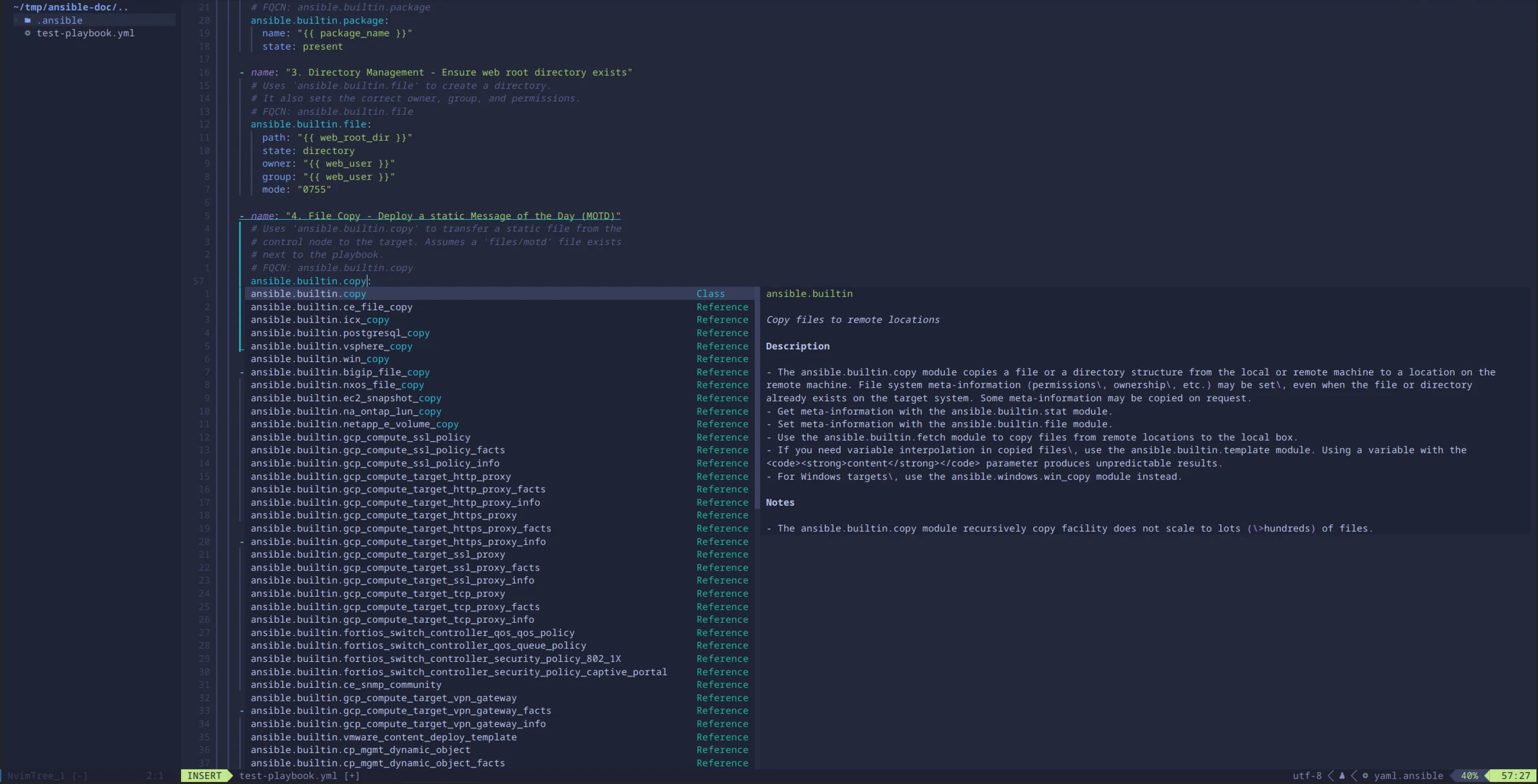
This community configuration can sit on top of upstream Ansible tools from a venv or container, and it can equally well talk to a downstream toolchain if the language-server and executable paths are configured accordingly. The editor choice and the artifact provenance are separate decisions.
I prefer VS Code plus Dev Containers for a team because the onboarding path is exceptionally short and the Red Hat Ansible extension can scaffold the workspace. I prefer Neovim when I want a terminal-native environment I understand down to the last mapping.
A Practical Team Policy
If I were standardizing this beyond my own workstation, I would put the following in the repository:
- A reviewed
.devcontainer/definition with an exact ADT build tag or, where immutable reproducibility is required, a manifest-list digest. - A documented upstream or downstream provenance decision. Do not mix the two accidentally.
- A project-specific
execution-environment.yml, based on the appropriate documented EE base, plus pinned collection and Python requirements. - CI jobs that run
ansible-lintand tests using the agreed image versions. - A scheduled upgrade pull request rather than silent use of floating tags.
- A short security note explaining why the nested-Podman capabilities are present.
For an AAP customer, I would also map the ADT and EE versions to the organization’s supported AAP release and lifecycle before rollout. “Newest” is not automatically “correct,” especially when automation controller, certified collections and managed-node Python support all impose compatibility boundaries.
That is my definition of sane: boring setup, explicit provenance, reviewable upgrades and no ambiguity about whether a component came from the Ansible Project or the Red Hat product.
Further Reading
- Developing automation content with Red Hat Ansible Automation Platform
- Red Hat Ansible Development Tools installation guide for AAP 2.7
- AAP 2.7 execution environment image and
ansible-coreselection guide - Ansible VS Code extension: Dev Containers
- Upstream Ansible Development Tools container image
- Ansible Development Tools package overview
- RHEL 10 container tools documentation
- Microsoft’s VS Code installation instructions for Linux
- Microsoft’s Dev Containers documentation for Podman and alternative CLIs
- Reproducible Ansible with Execution Environments
Comments
You can use your Mastodon or other ActivityPub account to comment on this article by replying to the associated post.
Search for the copied link on your Mastodon instance to reply.
Loading comments...