- Sat 12 September 2026
- 12 min read
- Linux
- #linux, #rhel, #archlinux, #ansible, #ansible-automation-platform, #podman, #containers, #unsupported
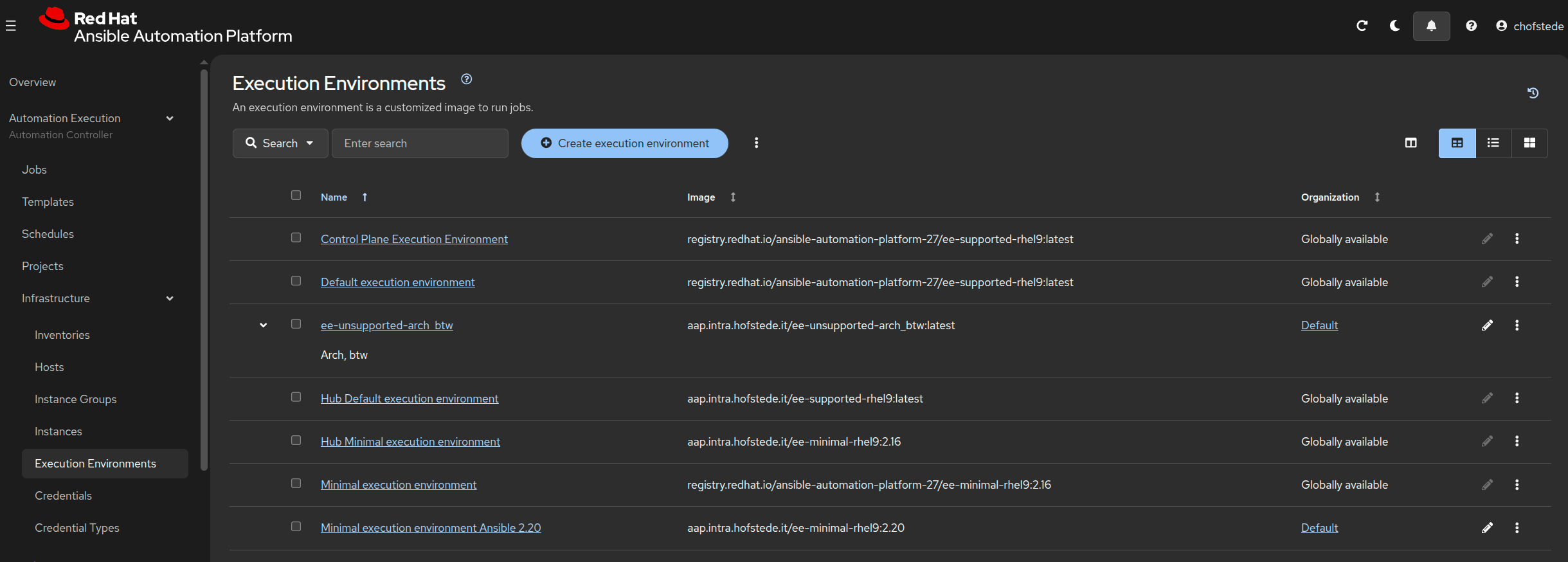
Table of Contents
Back in February, I put RHEL on a ZFS root filesystem. Apparently, getting that to boot did not satisfy my need to make perfectly respectable enterprise software participate in questionable activities.
This time, the question was: “An execution environment is just a container with Ansible in it. What happens if the container is Arch Linux?”
The answer is that it can run a job in Red Hat Ansible Automation Platform. The follow-up question should have been whether that was a good idea. Instead, I gave it SSH credentials and selected Patch RHEL Systems.
Let me be absolutely clear: this is unsupported. Please don’t try this at home, and definitely don’t turn it into something at work. This is a record of a homelab experiment, not an alternative deployment guide. Getting a green job status does not turn Arch Linux, some PyPI packages, and a shell script wearing a fake moustache into a supported AAP execution environment.
The image is called ee-unsupported-arch_btw. I feel the naming convention provides adequate evidence of premeditation.
The Proof It Works (For One Job, At Least)
The execution environment list at the top of this article shows it between entries that made better life choices.
The registry reference is:
aap.intra.hofstede.it/ee-unsupported-arch_btw:latest
Yes, latest. On a rolling distribution. We will return to that particular aggravating circumstance.
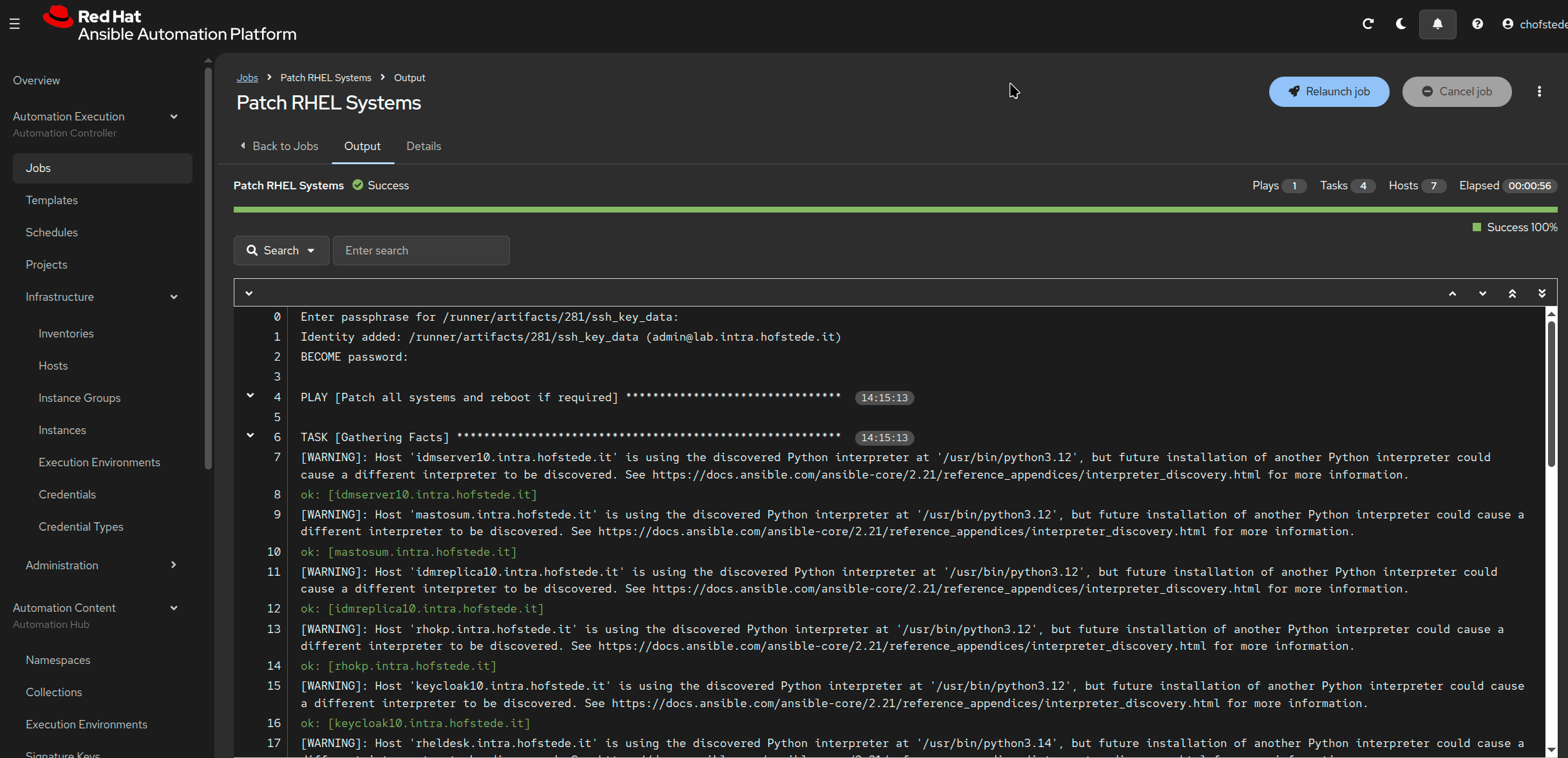
The job output shows Success, with one play, four tasks, seven hosts, and an elapsed time of 56 seconds:
And because a green bar alone doesn’t prove which image ran the job, here are the details:
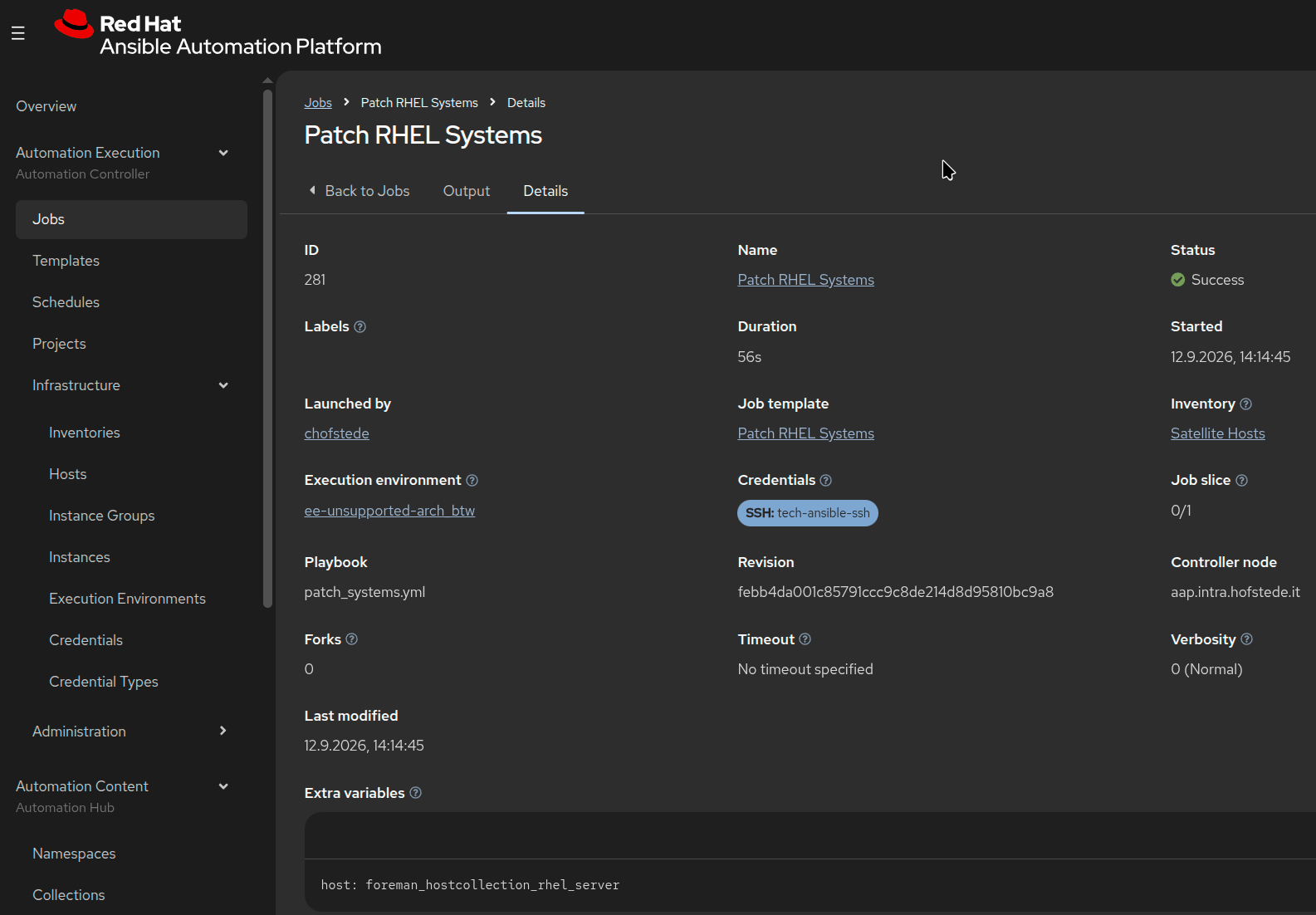
Job 281 ran patch_systems.yml against the Satellite Hosts inventory using ee-unsupported-arch_btw. The play was named “Patch all systems and reboot if required.”
The screenshots establish that this job completed successfully using that execution environment. They don’t establish that every host needed updates or rebooted, that every collection works, or that this arrangement will survive the next rebuild.
But yes: I used Arch, btw, to run my RHEL patching job through AAP.
Why This Is Even Possible
At its core, an Ansible execution environment is an OCI container image carrying ansible-core, ansible-runner, collections, and the Python and system dependencies needed by the automation. Ansible Builder documents these ingredients and the stages used to assemble them.
There is no tiny Red Hat engineer inside the container checking /etc/os-release before allowing Python to start.
In this experiment, the container supplies the control-side Ansible runtime. The managed RHEL hosts still have their own operating systems, package managers, and Python interpreters. Running Ansible from Arch doesn’t make a remote RHEL machine start installing RPM updates with pacman.
The interpreter discovery warnings visible in the job output concern Python on the managed hosts. They aren’t AAP discovering Arch in the execution environment and attempting to contact an adult.
The interesting part is how little the runtime needs to care about the distribution name once the required tools and dependencies are present. The terrible part is deciding that this observation constitutes an operational strategy.
The Experiment: A Containerfile With Intent
What follows is a reconstruction of this particular experiment. The snippets document the shortcuts that got one image through one job; they are not a supported build procedure or a reusable Arch execution environment template.
The build context contained a Containerfile and the familiar Ansible Builder _build directory: requirements files plus scripts such as assemble, check_ansible, install-from-bindep, and entrypoint.
The Containerfile kept the four stages: base, galaxy, builder, and final. So the overall structure looked reassuringly ordinary, provided you didn’t read the first line:
ARG EE_BASE_IMAGE="docker.io/archlinux:latest"
These are excerpts from the experiment, not a complete standalone recipe. The build also depended on those _build files. Copying the snippets into an empty directory will mostly reproduce disappointment.
Step 1: Install The Tools, Remove The Inhibitions
Naturally, the first run didn’t immediately go green. AAP launched the execution environment, only for dumb-init to report ssh-agent: No such file or directory. We had successfully packaged an automation runtime that couldn’t start the SSH agent needed for its credentials. Excellent work, everyone.
For this job, the credential setup needed ssh-agent inside the execution environment to load the supplied SSH key. The initial image didn’t have it: the minimal Arch base had left OpenSSH as an exercise for the reader. Once openssh was dragged into the base stage alongside tar and rsync, the job could finally get past credential setup and talk to the managed hosts.
The corrected base stage initialized the Arch package signing keyring and installed the baseline packages:
RUN pacman-key --init && \
    pacman-key --populate archlinux && \
    pacman -Syu --noconfirm --needed \
      base-devel \
      git \
      openssh \
      rsync \
      tar \
      python \
      python-pip \
      python-setuptools \
      python-wheel \
      ansible-core \
      ca-certificates && \
    pacman -Scc --noconfirm
That build installed Arch’s ansible-core 2.21.4 and Python 3.14.7. Those are the versions in this experiment’s log, not a promise about what a future build will pull.
For the remaining Python packages, the Containerfile announced its intentions early:
ENV PIP_BREAK_SYSTEM_PACKAGES=1
An environment variable whose name doubles as a confession.
Then it installed Runner and the init helper into the base stage:
RUN $PYCMD -m pip install --no-cache-dir ansible-runner 'dumb-init==1.2.5'
That produced ansible-runner 2.4.3. It also ensured that the later check_ansible script could find both Ansible and Runner and import their Python modules.
The build repeatedly printed pip’s warning about running as root and mixing with the system package manager. The warning was doing its job. I was doing something else.
Step 2: Give Pacman A Fake Identity
The most incriminating file in the image is /usr/local/bin/microdnf.
It is not microdnf.
Experimental shim, not a compatibility layer: the following is the exact impersonator used in this build. Do not copy it into a real execution environment and assume you have added Arch support to Ansible Builder.
#!/bin/sh
case "$1" in
    clean)
        exec pacman -Scc --noconfirm
        ;;
    install|update|upgrade)
        shift
        args=""
        for arg in "$@"; do
            case "$arg" in
                -y|--nodocs|--setopt=*|--enablerepo=*|--disablerepo=*) ;;
                *) args="$args $arg" ;;
            esac
        done
        exec pacman -S --noconfirm --needed $args
        ;;
    repoquery)
        shift
        exec pacman -Si "$@" >/dev/null 2>&1
        ;;
    *)
        exec pacman "$@"
        ;;
esac
The build argument pointed the helper scripts at this impersonator:
ARG PKGMGR="/usr/local/bin/microdnf"
When the final dependency installation ran:
/usr/local/bin/microdnf install -y curl
Pacman answered that curl was already installed. The build continued. Nobody asked to see microdnf’s passport.
This wrapper handles a small set of invocations well enough for this build. It does not translate RPM package names into Arch package names, reproduce repository selection, or implement DNF’s dependency semantics. Its update and upgrade branches simply run pacman -S, and its repoquery branch discards the output entirely.
It is roughly the package management equivalent of writing “ambulance” on a shopping trolley. Useful resemblance, limited guarantees.
Step 3: Let Pip Think About What We’ve Done
The Galaxy stage installed amazon.aws 11.4.0. Dependency introspection then combined the collection requirements with the user requirements, including boto3, botocore, and aiobotocore.
Pip responded by reviewing a substantial portion of their release history.
INFO: pip is looking at multiple versions of aiobotocore to determine which version is compatible with other requirements. This could take a while.
It did take a while. Eventually the resolver settled on boto3 and botocore 1.43.75, with aiobotocore 3.9.1.
Then the final stage resolved the requirements again. The cache saved downloads, but apparently not the opportunity for reflection.
The build technically worked, but not quite for the reasons the stage names suggested.
Despite the directory name /output/wheels, the scripts found zero top-level *.whl files there. Instead of installing a prepared set of wheel files from the builder stage, the final stage installed from the requirements file again. The extra fallback install then found those requirements already satisfied. The image built, but this run did not demonstrate an offline handoff of a fixed set of Python packages between stages.
The Containerfile also included:
RUN /output/scripts/install-from-bindep || true
That particular invocation succeeded in the supplied build. The || true would also have allowed a failure to pass unnoticed at that layer, which is a rather generous interpretation of dependency management.
Step 4: Put On The Runner Uniform
The final stage created /runner, adjusted permissions, and created a runner user with UID 1000 and group 0. It finished with:
LABEL ansible-execution-environment=true
USER 1000
ENTRYPOINT ["/opt/builder/bin/entrypoint", "dumb-init"]
CMD ["bash"]
The label is metadata. It is not a certificate of good behaviour.
The image built successfully and pushed to the private registry. An interactive run confirmed what was inside. Abbreviated from the terminal output:
[runner@60a6dd752943 runner]$ cat /etc/os-release
NAME="Arch Linux"
PRETTY_NAME="Arch Linux"
ID=arch
BUILD_ID=rolling
VERSION_ID=20260906.0.587075

[runner@60a6dd752943 runner]$ ansible --version
ansible [core 2.21.4]
  python version = 3.14.7 (main, Aug 10 2026, 07:46:56) [GCC 16.1.1 20260728] (/usr/bin/python)

[runner@60a6dd752943 runner]$ ansible-runner --version
2.4.3
Arch Linux. Ansible. Runner. A working image and no remaining excuse to pretend this happened accidentally.
Why This Is A Bad Idea
The support boundary hasn’t moved. This is an unsupported experiment. Registering the image in AAP, storing it in a private registry, and running a successful job do not make its contents Red Hat-delivered or supported. The unsupported in the name continues to apply after the green tick appears.
Rebuildable does not mean reproducible. archlinux:latest can select a different base image, pacman -Syu pulls the rolling repositories’ current packages, and loosely constrained Python dependencies leave pip to make fresh decisions. On a later uncached rebuild, the same Git commit can produce a different Python, a different Ansible, and a different dependency set. The change request says “rebuild the image.” The result may include an unplanned runtime upgrade. A built image doesn’t spontaneously update itself; the surprise arrives when you try to recreate it. latest is a tag, not a reproducibility strategy.
The package manager is lying about its qualifications. The wrapper was sufficient for the calls seen here. Another collection might need differently named packages, repository options, or query output that it doesn’t provide. A successful curl check is not a package manager compatibility suite.
The build contains several escape hatches. System-wide pip installs are explicitly enabled, collection GPG verification is disabled in the Galaxy command, and some commands have || true attached. These are properties of this Containerfile, not requirements for building execution environments. Arch’s package keyring was still initialized and used; that is separate from collection signature verification.
The final image inherits the toolchain. Because final starts from base, it inherits base-devel and the other baseline packages. Four build stages don’t automatically produce a minimal runtime image. In this case, the compiler came along to witness the offence.
One successful job is one successful job. It doesn’t validate all collections, other inventories, future Python versions, upgrades, or a different execution node. The seven hosts in the screenshot were test subjects, not a certification programme.
The Proper Approach
For actual AAP work, use the documented execution environment base and component versions for your AAP release. Start at the Red Hat Ansible Automation Platform documentation, select the version you operate, and follow its execution environment guide. Use the appropriate ee-minimal image where that guide recommends it as the foundation for custom content, keeping control over the dependencies you add.
Keep the definition and dependencies under version control, build with Ansible Builder, test the resulting image with your automation, and promote the tested artifact deliberately. Adding custom content still means paying attention to that content’s compatibility and support boundaries.
I even wrote about sane Ansible development environments recently. The existence of that article makes this one harder to explain as an honest misunderstanding.
The Honest Assessment
The experiment worked because the essential runtime was there: an OCI container with ansible-core, ansible-runner, and the dependencies needed by this job. Ansible could run, reach the managed hosts, and execute the playbook. The distribution inside the container did not prevent that particular workflow.
That is an interesting technical observation. It provides absolutely no reason to adopt this configuration.
Please don’t use this article as a deployment guide. Use the documented AAP execution environments for the infrastructure you care about, and leave the counterfeit microdnf in the evidence locker.
My RHEL systems have now been maintained by Arch Linux through Red Hat Ansible Automation Platform.
The job took 56 seconds. Explaining myself will take considerably longer.
Comments
You can use your Mastodon or other ActivityPub account to comment on this article by replying to the associated post.
Search for the copied link on your Mastodon instance to reply.
Loading comments...