Table of Contents
- Table of Contents
- The Machine Today
- Graphics and the Desktop
- Wi-Fi: What “5 GHz Works” Means
- Video Decoding: I Checked the Decoder
- Bluetooth Audio to the MUVO
- The Webcam: One Zoom Call, No Drama
- Power: About 3 W at Idle
- ZFS, PF and a Private VM Network
- Chezmoi: Familiar Dotfiles, FreeBSD-Specific Behavior
- A Rust OpenPGP Card Stack for SSH and Git
- Agents on the Laptop
- If You Are Setting Up Your Own T480
I wrote about power tuning my ThinkPad T480 on FreeBSD last year. That was the article you write when a laptop is still a project: get the graphics driver loaded, persuade the wireless card to connect, measure battery drain, repeat. My T14s later became my main writing machine, but the T480 stayed on my desk. Recently I brought it back into regular use.
The interesting thing now is how uninteresting it feels. I log in to Xfce, join my 5 GHz network, watch a video in Firefox or Chromium, sit through a Zoom call, send audio to my Bluetooth speaker, sign a Git commit with my card and work with coding agents. It all runs on FreeBSD. There are machine-specific details behind that sentence, so this is both a status report and a set of notes for another T480 owner.
The short version: FreeBSD 15.1-RELEASE-p4, Xfce 4.20, Intel graphics, an AX210 Wi-Fi card, and an idle CPU-package reading around 3 W in powermon. It is a perfectly usable laptop for what I do, and it has been crazily stable.
The Machine Today
| Component | What is in this T480 |
|---|---|
| CPU | Intel Core i7-8550U, four cores and eight threads |
| Memory | 32 GiB |
| Graphics in use | Intel UHD Graphics 620 with i915kms and Xorg |
| Other GPU | NVIDIA GeForce MX150, present but not used by this desktop |
| Wireless | Intel AX210 with iwlwifi |
| Storage | NVMe SSD, ZFS root |
| Sound | FreeBSD OSS, PulseAudio and virtual_oss for Bluetooth |
| Desktop | Xfce 4.20 on X11, started by SDDM |
| System | FreeBSD 15.1-RELEASE-p4 |
That is not new hardware. It does not need to be. The keyboard, ports and repairability are still good reasons to keep a T480 around, and the four-core Intel CPU remains plenty for browsers, terminals, writing and development.
These are the relevant installed packages, grouped by job rather than copied from the machine’s several-hundred-line pkg info output:
| Job | Packages installed here |
|---|---|
| Desktop and graphics | xfce, sddm, xorg-server, drm-latest-kmod, gpu-firmware-intel-kmod-kabylake, xf86-input-libinput |
| Wireless | wifi-firmware-iwlwifi-kmod-ax210, iwmbt-firmware |
| Browsers and video | firefox, chromium, libva-intel-media-driver, libva-utils, mesa-dri, mpv |
| Webcam | webcamd, v4l-utils |
| Bluetooth and sound | virtual_oss_bluetooth, pulseaudio, pavucontrol |
| Card, Git and dotfiles | pcsc-lite, ccid, pinentry-gtk2, git, chezmoi |
| Work | codex, crush, fish, neovim, tmux, rust, go, powermon |
The OpenPGP Card tools are not in that list: on this machine they live under ~/.cargo/bin. More on those below.
Graphics and the Desktop
The Intel GPU is the useful one here. The MX150 appears on the PCI bus, but my Xfce session runs on the UHD 620 with i915kms. The installed drm-latest-kmod and matching Intel Kaby Lake firmware provide the kernel side. The relevant part of /etc/rc.conf is:
kld_list="i915kms coretemp cpuctl cuse nullfs"
dbus_enable="YES"
sddm_enable="YES"
seatd_enable="YES"
seatd is installed and enabled because I also keep a Wayland session available. This Xfce desktop is X11. Xorg has a short Intel device file under /usr/local/etc/X11/xorg.conf.d/20-modesetting.conf:
Section "Device"
    Identifier "Intel Modesetting"
    Driver "modesetting"
    Option "AccelMethod" "glamor"
    Option "DRI" "3"
EndSection
There is a separate libinput file for touchpad tapping and natural scrolling. Those are preferences, not prerequisites for FreeBSD graphics. The FreeBSD Handbook’s Xorg chapter is the better starting point for a fresh installation. Use the driver and kernel-module packages that match your release. In particular, do not paste my entire kld_list into a new system: nullfs, cuse and the CPU modules have jobs specific to my setup.
One boot setting deserves its own warning. My /boot/loader.conf contains:
zfs_load="YES"
compat.linuxkpi.i915_disable_power_well="0"
hw.pci.do_power_nodriver="3"
hw.pci.do_power_suspend="1"
The Intel display power-well value is retained because it has been necessary for reliable display and suspend behavior on this laptop. The PCI settings are an established, fairly aggressive policy for unclaimed devices, not general T480 defaults. I would test one change at a time on another machine and keep a boot environment before experimenting with loader settings. Notice what is absent: I do not load i915kms twice from both loader and rc.conf, and NVMe is already in this GENERIC kernel.
Wi-Fi: What “5 GHz Works” Means
The wireless card is an AX210. Its firmware comes from wifi-firmware-iwlwifi-kmod-ax210, and the package also owns a small file under /boot/loader.conf.d/. I leave that package-owned file alone. My network setup in /etc/rc.conf is:
wlans_iwlwifi0="wlan0"
create_args_wlan0="wlanmode sta regdomain ETSI country DE"
ifconfig_wlan0="WPA DHCP"
ifconfig_wlan0_ipv6="inet6 accept_rtadv"
I am in Germany, hence the regulatory domain and country. Use the values appropriate to your location. The network credentials live in the wireless supplicant configuration, not in this article.
At the time I checked, ifconfig wlan0 showed an associated connection on channel 36, 5180 MHz, VHT/80, 802.11ac. That is a working 5 GHz connection. It does not establish 6 GHz or Wi-Fi 6 operation merely because the card’s product name says Wi-Fi 6E. When diagnosing this, look at the negotiated channel and media line, not the card’s marketing name:
ifconfig wlan0
sysctl net.wlan.devices
I have resisted adding speculative iwlwifi power-save knobs. If wireless or idle power goes odd, I first check the actual connection, route, CPU idle state and busy processes. The FreeBSD networking chapter covers the normal wlan/WPA/DHCP setup in more detail.
Video Decoding: I Checked the Decoder
Video playback was the last browser detail I wanted to settle properly. Intel’s i915kms gives me /dev/dri/renderD128, and the installed libva-intel-media-driver exposes H.264, HEVC and VP9 decoding through VA-API. It does not expose AV1 decoding on this GPU. A first check is:
vainfo --display drm --device /dev/dri/renderD128
That only says what the driver can decode. It does not say what a browser did decode. I learned this with Chromium: chrome://gpu looked happy, while an H.264 test video still used FFmpegVideoDecoder in software. On this installation, Chromium’s VA-API setup did not choose the working render node until I started it with:
chrome --render-node-override=/dev/dri/renderD128
For normal use I put that flag in a per-user chromium-browser.desktop override under ~/.local/share/applications, leaving the package’s launcher untouched. Its relevant line is:
Exec=/usr/local/bin/chrome --render-node-override=/dev/dri/renderD128 %U
After fully quitting and relaunching Chromium from that menu entry, chrome://media-internals reported VaapiVideoDecoder and kIsPlatformVideoDecoder: true for a controlled 720p H.264 clip. Sending a URL to an already-running Chromium process would not prove that the new flag took effect. If the DRM device number changes, the launcher needs another look.
Firefox has its own set of preferences in my normal profile: VA-API enabled, AV1 disabled, and hardware video decoding and WebRender forced on. about:support reports EGL, DMABUF and the expected decode capabilities. More decisively, a disposable Firefox profile using those video settings played the same local H.264 clip while its decoder log reported successful VA-API initialization and decoded frames. That is the difference between “supported” and “used”.
So both browsers decode H.264 in hardware. One caveat matters in practice: a site can choose AV1, which this UHD 620 cannot decode in hardware. The codec, not just the browser, determines the result.
Bluetooth Audio to the MUVO
My Creative MUVO 2c works as a Bluetooth speaker, but its route to Xfce’s volume control is longer than the route on many Linux desktops:
Bluetooth controller → paired MUVO → FreeBSD Bluetooth audio
    → virtual_oss (/dev/dsp9) → PulseAudio OSS sink → Xfce applications
The paired device has a local name in /etc/bluetooth/hosts. I am leaving hardware addresses and pairing material out of the article, since pairing is specific to your own speaker. On this machine, /etc/rc.conf contains:
hcsecd_enable="YES"
virtual_oss_configs="muvo"
virtual_oss_muvo="-S -C 2 -c 2 -r 48000 -b 16 -s 16ms -R /dev/null -P /dev/bluetooth/muvo -d dsp9"
virtual_oss itself is part of the base system on FreeBSD 15.1, including its rc.d script. The virtual_oss_bluetooth package only adds the Bluetooth backend. virtual_oss_enable stays at its default of NO, so nothing starts at boot. When I want the speaker, I run muvo-connect.sh, a crude little script that does the trick. It starts Bluetooth, hcsecd and the named virtual_oss instance, then builds the PulseAudio side:
pactl load-module module-oss device=/dev/dsp9 sink_name=muvo
pactl load-module module-remap-sink sink_name=muvo_volume master=muvo
pactl set-sink-volume muvo_volume 70%
pactl set-default-sink muvo_volume
The extra module-remap-sink layer gives the speaker a PulseAudio volume of its own, and that is what the Xfce volume control talks to. The script also moves any stream that landed on the raw muvo sink over to muvo_volume. Streams already playing on the laptop speakers stay where they are, so a running video needs a restart or a quick move in pavucontrol. muvo-connect.sh stop points the default back at dsp0, unloads both modules and stops the virtual_oss instance. Bluetooth itself keeps running.
This is a working arrangement, but those dsp9 and device-name choices describe my host, not a magic universal number. If you build the same path, inspect /dev/sndstat and pactl list short sinks at each step. Bluetooth audio is something I switch on when I want it, not something I keep active all day.
The Webcam: One Zoom Call, No Drama
The built-in camera is the easiest part of this article. The webcamd package runs the Linux UVC driver in userspace and exposes the camera as a V4L2 device. Two pieces of configuration are needed:
sysrc webcamd_enable="YES"
pw groupmod webcamd -m chofstede
The package’s devd rules start webcamd when the camera appears, and it creates /dev/video0 and /dev/video1, owned by the webcamd group. The second node carries metadata, not a picture, so applications should use video0. Log out and back in after the group change. v4l2-ctl --list-devices from v4l-utils is the quick check that the camera is there.
The real test was a 45-minute Zoom call in Firefox this morning. The camera worked for the whole call, and I didn’t have to think about it once. That is how it should be.
Power: About 3 W at Idle
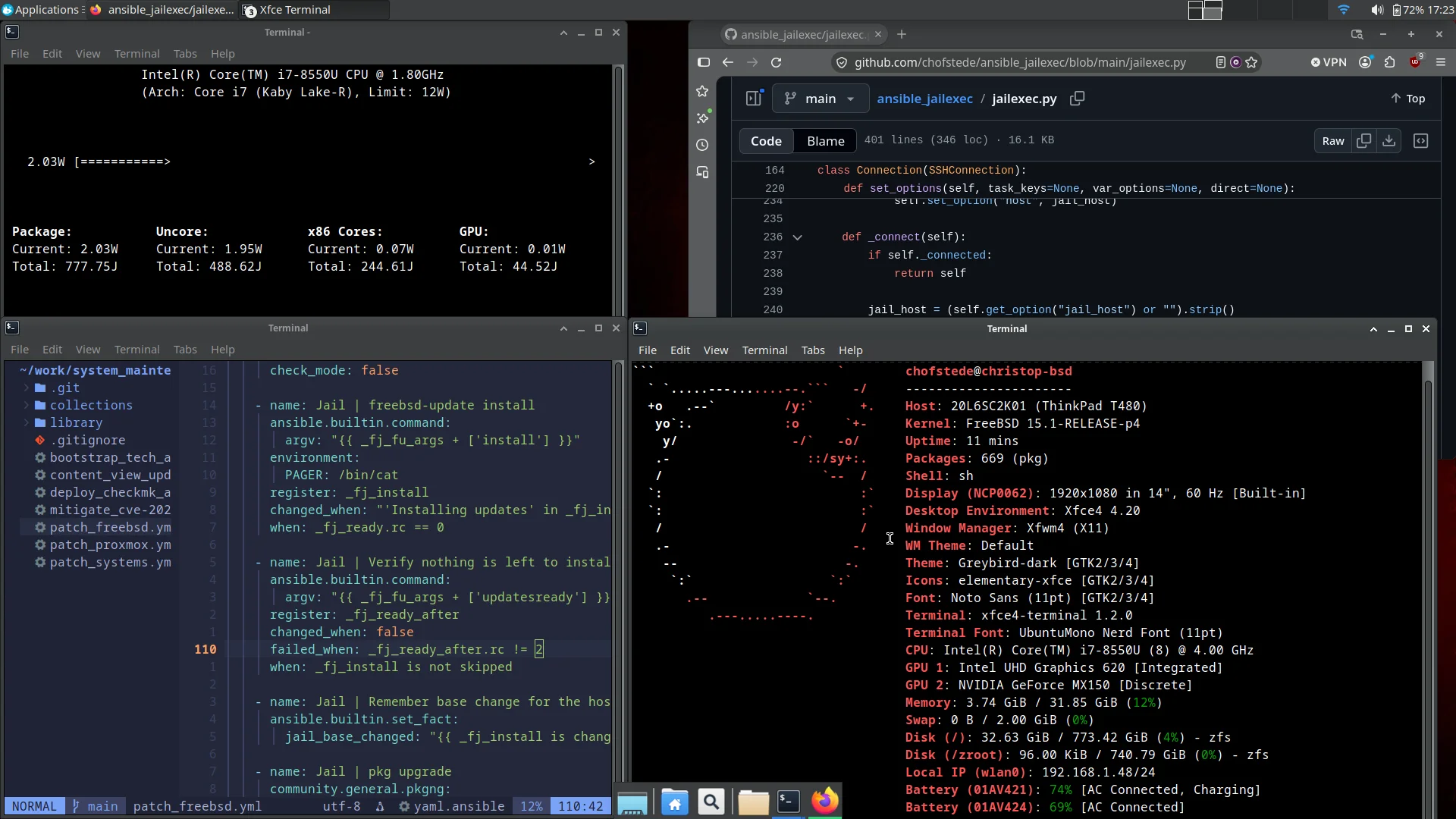
At idle, powermon shows me roughly 3 W for the CPU package, and the screenshot above catches an even lower reading. That is the CPU package only, not the whole laptop: the display, radios and everything else come on top. My older article measured at a different point in the configuration, so the two numbers are not a before-and-after comparison. The configuration also retains an Intel display workaround for reliability. I am not going to trade a working resume for a prettier idle number.
This machine currently uses Intel Speed Shift with an EPP of 50 and the Cmax idle policy. The resolved CPU idle level is C8. I disabled the older powerd service after checking that Speed Shift was already controlling frequency:
# /etc/rc.conf
powerd_enable="NO"
performance_cx_lowest="Cmax"
economy_cx_lowest="Cmax"
To see the current state rather than assume those lines had the intended effect:
sysctl dev.hwpstate_intel.0.epp hw.acpi.cpu.cx_lowest
sysctl hw.acpi.acline hw.acpi.battery.rate
hw.acpi.battery.rate only means something on battery, and only after the workload has settled.
ZFS, PF and a Private VM Network
The T480 boots from an NVMe SSD into ZFS. zroot currently uses lz4 compression and has atime off. FreeBSD’s stock daily scrub check is off by default. My /etc/periodic.conf turns it on for zroot with a 35-day threshold, but only when hw.acpi.acline says the laptop is on AC power. Since periodic.conf is just shell, that is a three-line if:
daily_scrub_zfs_enable="NO"
if [ "$(/sbin/sysctl -n hw.acpi.acline 2>/dev/null)" = "1" ]; then
    daily_scrub_zfs_enable="YES"
fi
A scrub that has already started keeps running if I unplug the laptop. A sleeping or powered-off laptop can miss that nightly cron run, so I still check zpool status myself. My /etc/sysctl.conf also requests 4 KiB minimum sectors for future ZFS vdev creation. That knob does not change the geometry of the existing pool.
The rest of that sysctl file is deliberately small: S3 for lid and sleep button, process visibility limited across user IDs and groups, randomized PIDs, and bridge-filter settings below. Those privacy settings can make an unprivileged service check look incomplete, so I use sudo when I need a full process view. I did not add a page of TCP or scheduler “optimizations” to achieve the idle reading.
I also keep a private bhyve network on bridge0, with dnsmasq serving guests and PF providing NAT through either Wi-Fi or Ethernet. That is why this workstation’s firewall is more involved than a laptop that only browses the web:
# /etc/rc.conf, abbreviated
cloned_interfaces="bridge0"
ifconfig_bridge0="inet 192.168.87.1 netmask 255.255.255.0"
gateway_enable="YES"
vm_enable="YES"
vm_dir="zfs:zroot/bhyve"
dnsmasq_enable="YES"
pf_enable="YES"
pflog_enable="YES"
dnsmasq binds to bridge0 and hands out addresses in 192.168.87.100 to .150, advertising 192.168.87.1 as router and DNS server. The key shape of /etc/pf.conf is:
uplinks = "{ wlan0 em0 }"
vm_net = "192.168.87.0/24"
set skip on lo0
nat on wlan0 inet from $vm_net to any -> (wlan0:0)
nat on em0 inet from $vm_net to any -> (em0:0)
block in log all
block in log quick on $uplinks inet from $vm_net to any
pass out all keep state
pass in quick on bridge0 all keep state
pass in on $uplinks inet proto udp from any port 67 to any port 68
pass in on $uplinks inet6 proto udp from any port 547 to any port 546
pass in inet proto icmp all
pass in inet6 proto ipv6-icmp all
PF blocks unsolicited inbound TCP and UDP connections on the physical interfaces, permits outbound traffic with state, trusts the VM bridge, and NATs that subnet on either wlan0 or em0. The DHCP and ICMP exceptions allow normal client networking, IPv6 neighbor discovery and path MTU discovery. The quick rule drops packets arriving from a physical uplink while claiming to originate in my private VM subnet. In /etc/sysctl.conf, bridge filtering is done on bridge0 rather than on every member as well:
net.link.bridge.pfil_bridge=1
net.link.bridge.pfil_member=0
This arrangement has consequences. sshd is enabled, but a new SSH connection from the physical LAN is blocked by PF unless I add a rule. The VM bridge is trusted, so guests can reach host services. It is not a guest-isolation design. If you do not run VMs, you do not need to copy this bridge, forwarding, DNS or NAT setup. If you do, read and validate your complete PF ruleset before loading it, especially while connected remotely.
Chezmoi: Familiar Dotfiles, FreeBSD-Specific Behavior
My chezmoi and Git article explains why I keep source state and machine state separate. On this laptop, chezmoi points to the freebsd-workstation branch of my dotfiles repository. It manages fish, Neovim, Git, SSH configuration, Atuin, the OpenPGP card-state file and other small parts of my home directory.
The branch is not a blind copy of my Linux setup. .chezmoiignore excludes systemd files, Linux shell startup files, Konsole state and other inappropriate paths when .chezmoi.os is freebsd. Templates select /usr/local program paths and the FreeBSD oct-git wrapper. The SSH template points my Git host at the card agent’s socket. The card-state template uses Pinentry on FreeBSD, rather than assuming a Linux keyring is present.
That is the practical value of a FreeBSD branch: I can share the preferences that make my shell and editor feel like mine without asking a FreeBSD machine to behave like Fedora. chezmoi diff, chezmoi status and chezmoi ignored are the useful commands when bringing that branch onto another installation.
A Rust OpenPGP Card Stack for SSH and Git
For card-backed operations I use three Rust tools from the OpenPGP Card project: oct to inspect and administer cards, oct-git to sign Git data, and openpgp-card-ssh-agent for SSH authentication. I wrote FreeBSD ports for those tools, but this laptop currently runs my existing FreeBSD binaries from ~/.cargo/bin. pcsc-lite and ccid provide the smart-card plumbing, with pcscd enabled at boot. My local pcscd runs with --disable-polkit. Think about that one before copying it.
The agent starts at Xfce login through a desktop entry. Its Exec points to a small wrapper, because .desktop files do not expand shell variables like $XDG_RUNTIME_DIR in that field. The wrapper creates a private directory, puts the pinentry helper on PATH and starts the agent on a Unix socket, unless this login already has one:
#!/bin/sh
set -eu

: "${XDG_RUNTIME_DIR:?XDG_RUNTIME_DIR must be set by the desktop session}"
socket_dir="$XDG_RUNTIME_DIR/openpgp-card"
socket="$socket_dir/ssh-agent.sock"
umask 077
mkdir -p "$socket_dir"
chmod 700 "$socket_dir"

# The Rust card tools look for an executable named pinentry on PATH.
PATH="$HOME/.local/libexec/openpgp-card:$PATH"
export PATH

# An existing socket means this login already runs an agent.
if [ -S "$socket" ]; then
    exit 0
fi
if [ -e "$socket" ]; then
    echo "Refusing to replace unexpected path: $socket" >&2
    exit 1
fi

exec "$HOME/.cargo/bin/openpgp-card-ssh-agent" -H "unix://$socket"
The runtime directory is fresh on every login, so an existing socket means the agent is already running in this session. The check stops a second launch from replacing it.
My SSH configuration selects that socket with IdentityAgent for the Git host. Git’s gpg.program points to a wrapper around oct-git that puts my GTK pinentry on PATH. The card-state configuration asks for the PIN through Pinentry. SSH to my Forgejo instance authenticates with the card, and signed commits carry a real PGP signature. Global commit.gpgsign is off: I sign when I ask for it.
One trap: GnuPG’s scdaemon can take exclusive control of the card. On this laptop, oct list found no card while scdaemon held it, then found it immediately after gpgconf --kill scdaemon. I keep GnuPG installed for other OpenPGP work, but use the Rust tools as the normal card SSH and Git path. If your own card seems to vanish, check the competing card daemon before reinstalling three Rust tools.
Agents on the Laptop
I do agentic development on this machine as well. I use Codex and Crush here, the latter with models through OpenRouter. The models run elsewhere. The laptop is my terminal, browser, editor and build environment for that work.
That workload is a useful test of the whole desktop. It touches SSH authentication, Git signing, browsers, editor configuration, network access and ordinary package tooling. All of those pieces work together here. The machine has stopped feeling like a FreeBSD demonstration and started feeling like a laptop again.
If You Are Setting Up Your Own T480
Use this as a map, not a file to paste wholesale. The order I would follow is:
- Get the Intel DRM driver and Xorg/Xfce session working, then confirm that
/dev/dri/renderD128exists. - Install firmware for the wireless adapter actually fitted to your T480, then check the negotiated band and mode with
ifconfig. - Check
vainfo, then check a real browser decoder. A capabilities page alone is insufficient. - Add Bluetooth audio only if you need it, and trace each hand-off from the paired device to
/dev/dsp*to the PulseAudio sink. - Measure power under repeatable conditions before copying loader or CPU settings from somebody else’s machine.
- Bring in dotfiles and card tooling after the basic desktop and PC/SC service are stable.
My old post described the work required to make this T480 viable. This one describes the result: a FreeBSD laptop with Wi-Fi, browsers, a webcam, a speaker, smart-card authentication, development tools and low idle CPU-package power, where I can open the lid and get on with the day. That is exactly what I wanted from it.
Comments
You can use your Mastodon or other ActivityPub account to comment on this article by replying to the associated post.
Search for the copied link on your Mastodon instance to reply.
Loading comments...