Table of Contents
- Table of Contents
- The Three States That Make Chezmoi Click
- Starting Small
- My Normal Edit, Review and Commit Loop
- One Repository, Different Machines
- Oopsie: I Edited the Real Config
- A Second Machine Without Surprises
- Secrets, Encryption and Private Repositories
- Sharp Edges Worth Remembering
- The Command Card I Actually Need
- Further Reading
My workstation configuration is not one file. It is fish functions and abbreviations, a Git configuration, Neovim Lua, GnuPG and SSH settings, and an Atuin configuration. It has grown over years, which is another way of saying that recreating it from memory would produce something incomplete and subtly annoying.
Putting all of it in Git solves the history and distribution problem. It does not solve the deployment problem. Git does not know that dot_gitconfig belongs at ~/.gitconfig, that ~/.ssh should not be world-readable, or that my work machine needs a different email address from a personal laptop. A repository full of symlinks can cover the first problem, and a sufficiently heroic shell script can cover the others, but at that point I have written a small and probably bad configuration manager.
Chezmoi is the small configuration manager I use instead. Git remains the versioned source of truth. Chezmoi understands how that source should become real files in my home directory, including permissions, templates, encryption, scripts and machine-specific differences.
The distinction matters: Git stores the source; chezmoi turns it into the right configuration for this machine.
The Three States That Make Chezmoi Click
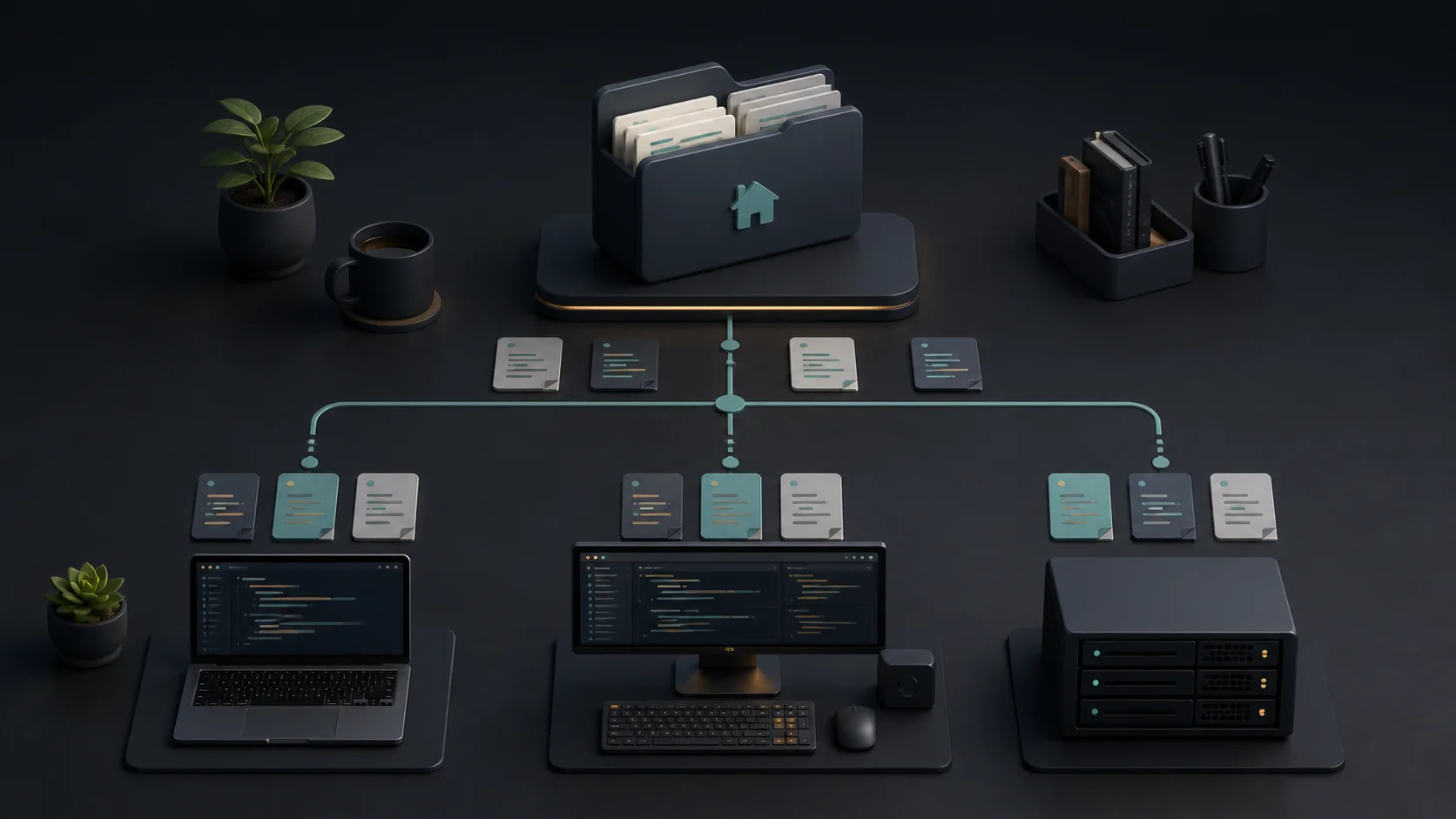
Chezmoi terminology can sound more complicated than the job, but its three-state model explains nearly every command:
| State | What it means |
|---|---|
| Source state | The files in ~/.local/share/chezmoi, normally a Git working tree. This is what I edit and commit. |
| Target state | What chezmoi calculates this machine should have after templates, local data and attributes have been evaluated. |
| Destination state | What is actually in my home directory right now. |
The target state is the useful extra layer. On one machine, dot_gitconfig.tmpl may render an address for work and a company signing key. On another, the same committed template can render my personal identity. Git sees one template. Each machine receives a valid ~/.gitconfig.
The everyday commands follow directly from that model:
home directory  --chezmoi add-->  source state
source state    --chezmoi apply-> home directory
source state    --Git-----------> other machines
chezmoi diff compares the calculated target with the current destination. In practical terms, it answers the question I care about before applying anything: what would this change in my home directory?
Starting Small
Chezmoi is available through many operating-system package managers and as a single binary; the installation page has the current choices. FreeBSD is covered too, either as sysutils/chezmoi in the ports tree or with pkg install chezmoi, which matters to me because the machines I manage this way are not all Linux. Once installed, this creates the source directory and initializes a Git repository inside it:
chezmoi init
I would not begin by feeding it the whole of ~/.config. That directory contains caches, databases, tokens, device identifiers and application state alongside actual configuration. Start with files whose purpose is clear:
chezmoi add ~/.config/fish/config.fish
chezmoi add ~/.gitconfig
chezmoi add ~/.config/nvim
chezmoi add ~/.gnupg/gpg.conf
chezmoi add ~/.gnupg/gpg-agent.conf
chezmoi add ~/.ssh/config
chezmoi add ~/.config/atuin/config.toml
Adding a directory is recursive by default, so the Neovim command above brings in everything currently below ~/.config/nvim. That deserves a review. Configuration modules and a plugin lock file belong in Git; downloaded plugins, swap files and generated state do not.
The same rule applies to the other tools:
- For fish, I manage configuration, functions and completions that I wrote.
fish_variablesholds universal variables that fish rewrites on its own, so I keep it out. Several of my fish functions are adaptations of the shell tricks I collected earlier. - For Git, I manage
.gitconfigand selected include files, never a credential store containing tokens. - For Neovim, I manage the Lua/Vim configuration and lock file, not plugins or caches downloaded from elsewhere. The crash course configuration is exactly the kind of thing worth carrying between machines.
- For GnuPG, I manage files such as
gpg.conf,gpg-agent.confanddirmngr.conf, not the private keyring, trust database, sockets or random seed. - For OpenSSH, I manage client configuration and perhaps public material. Private keys, host keys, control sockets and the constantly changing
known_hostsfile are separate concerns. - For Atuin, I manage
config.toml, not the history database, session material or encryption key.
This boundary is more important than whether the dotfiles repository is public or private. A private Git repository reduces exposure; it does not turn committed secrets into a good idea.
After adding the first files, I inspect what chezmoi created:
chezmoi cd
git status --short
find . -path ./.git -prune -o -type f -print | sort
Names in the source state encode attributes. dot_gitconfig becomes ~/.gitconfig; private_ removes group and world permissions; executable_ sets executable bits; .tmpl marks a template. The complete list is in the source-state attributes reference.
I let chezmoi change those attributes instead of hand-renaming files:
chezmoi chattr +private ~/.ssh
chezmoi chattr +private ~/.ssh/config
chezmoi chattr +private ~/.gnupg
chezmoi chattr +private ~/.gnupg/gpg.conf
chezmoi chattr +private ~/.gnupg/gpg-agent.conf
The corresponding source paths will look roughly like private_dot_ssh/private_config and private_dot_gnupg/private_gpg.conf. Git does not preserve all Unix permission bits; chezmoi’s attributes make the intended permissions portable and explicit.
My Normal Edit, Review and Commit Loop
For a managed file, this is the compact path:
chezmoi edit --apply ~/.config/fish/config.fish
chezmoi edit opens the source version. --apply updates the real file after the editor exits. I use the longer form when the change is larger or affects more than one file:
chezmoi edit ~/.gitconfig
chezmoi edit ~/.config/fish/config.fish

chezmoi status
chezmoi diff
chezmoi apply --dry-run --verbose
chezmoi apply --verbose
status is the short summary. diff shows content changes. The verbose dry run is the last sanity check for permissions, directories, scripts and removals. Applying only one file is also possible:
chezmoi apply ~/.gitconfig
Then I use ordinary Git in the source directory. I prefer this explicit review over automatic commits because a dotfiles repository is executable infrastructure for my user account:
chezmoi cd
git status --short
git diff
git add -A
git commit -S -m "update fish and neovim configuration"
git push
exit
Chezmoi can auto-commit and auto-push through the git.autoCommit and git.autoPush settings, both of which are off by default. The manual pause catches machine-local paths, accidental secrets and generated junk before they become every machine’s problem.
One Repository, Different Machines
The local chezmoi configuration normally lives at ~/.config/chezmoi/chezmoi.toml. It is specific to the current machine and can provide values to committed templates. For example:
[data]
    email = "me@example.net"
    gitSigningKey = "0123456789ABCDEF"
    work = false
I can turn an already managed .gitconfig into a template with:
chezmoi chattr +template ~/.gitconfig
chezmoi edit ~/.gitconfig
The source file is now dot_gitconfig.tmpl. A small example looks like this:
[user]
    name = Christian Hofstede
    email = {{ .email | quote }}
    signingkey = {{ .gitSigningKey | quote }}

[commit]
    gpgsign = true

{{- if .work }}
[include]
    path = ~/.gitconfig-work
{{- end }}
The signing key is a good example of why the template layer earns its place: the key ID differs per identity, while the smartcard that actually holds it is a machine-local concern that never belongs in the repository at all.
The literal Git configuration in my home directory contains no template syntax. Chezmoi renders it using the local data. Before applying it, I can inspect exactly what the template produces:
chezmoi data
chezmoi cat ~/.gitconfig
chezmoi diff ~/.gitconfig
Chezmoi also provides built-in facts including .chezmoi.os, .chezmoi.arch and .chezmoi.hostname. A fish template can contain a small operating-system difference:
set -gx EDITOR nvim

{{- if eq .chezmoi.os "darwin" }}
fish_add_path /opt/homebrew/bin
{{- else if eq .chezmoi.os "linux" }}
fish_add_path ~/.local/bin
{{- end }}
I prefer semantic local data such as work = true over scattering hostnames throughout templates. Hostname checks are useful for a genuinely unique machine; roles survive the day a laptop is replaced and receives a new name.
For entire files or directories that should exist only on some machines, .chezmoiignore is cleaner than wrapping all their contents in conditionals. It is itself a template. This example deploys a work-only Git include only when work is true:
{{- if not .work }}
.gitconfig-work
{{- end }}
The official guide covers these patterns in more depth under machine-to-machine differences. A .chezmoi.toml.tmpl in the repository can even prompt for machine-specific values during chezmoi init, which turns bringing up a new machine into a repeatable questionnaire rather than an editing scavenger hunt.
Oopsie: I Edited the Real Config
Sooner or later I open ~/.config/fish/config.fish directly, make the perfect fix, and only remember chezmoi afterwards. The change is not lost. The first step is to look:
chezmoi diff ~/.config/fish/config.fish
There is a command designed specifically for this situation:
chezmoi re-add ~/.config/fish/config.fish
chezmoi source-path ~/.config/fish/config.fish
source-path tells me exactly which file in the Git working tree was updated.
chezmoi re-add copies the destination back into the source state while preserving the encrypted_ attribute, and it deliberately refuses to overwrite templates. With no path it re-adds every modified managed file, which is convenient but broader than I normally want:
chezmoi re-add
A plain chezmoi add on an already-managed file does something similar, replacing its source state with the current destination, but it is the blunter instrument: it has no special handling for encrypted files, and with --force it will happily flatten a template. I reach for re-add and keep add for genuinely new files.
Either way, I then review the Git diff, because chezmoi diff should now be empty for that file:
chezmoi cd
git diff
Templates need more judgment, which is exactly why both commands refuse to touch them. The live .gitconfig is the rendered result, while the source contains conditionals and variables. Flattening the result back into the source would throw those away, and no amount of --force makes that a recovery.
Instead I use the destination diff as a guide and reproduce the intended change in the template:
chezmoi diff ~/.gitconfig
chezmoi edit --apply ~/.gitconfig
For a complicated conflict, this opens the configured three-way merge tool, vimdiff by default:
chezmoi merge ~/.gitconfig
The three inputs are the current destination, the source and the rendered target. That is precisely the context needed to preserve both the local fix and the template logic.
If the direct edit was a mistake and I want to discard it, the flow goes the other direction:
chezmoi diff ~/.config/fish/config.fish
chezmoi apply ~/.config/fish/config.fish
Chezmoi notices when a destination has changed since it last wrote it and prompts before overwriting. I still read the diff first. Configuration managers are wonderfully consistent, including when they consistently apply the wrong thing.
A Second Machine Without Surprises
Once the source repository has a remote, a second machine can clone it with:
chezmoi init ssh://git@example.net/user/dotfiles.git
I do not add --apply the first time. First I inspect the local data and rendered result:
chezmoi data
chezmoi doctor
chezmoi diff
chezmoi apply --dry-run --verbose
chezmoi apply --verbose
After I trust the repository and its initialization path, chezmoi init --apply ... is a useful shortcut for future machines. It should still be treated like running configuration code: templates can retrieve secrets and chezmoi source repositories can contain scripts.
To bring an established machine up to date, the convenient command is:
chezmoi update --verbose
By default, that pulls the Git repository with rebase and autostash, then applies it. When I want the pull and review as two separate steps, I use the safer, more talkative form from the daily operations guide:
chezmoi git pull -- --autostash --rebase
chezmoi diff
chezmoi apply --verbose
That review matters most when I have not used a machine for a while. Six months of accumulated shell, editor and SSH changes deserve more than an optimistic Enter key.
Secrets, Encryption and Private Repositories
Chezmoi can encrypt files with age, rage or GPG, and its templates can retrieve values from a long list of password managers. Those are useful capabilities, but I keep the default rule simple: if a file is really a database, keyring or machine identity rather than configuration, I do not add it merely because encryption is available.
When a configuration file genuinely must contain a secret, I prefer a password-manager template so the repository stores a reference rather than ciphertext that lives forever in Git history. Encrypted source files are appropriate when the whole file must travel and the decryption key lifecycle is already solved. The password-manager and encryption guides document both models.
private_ is not encryption. It controls permissions on the destination. A private_dot_ssh directory can correctly become mode 0700 while its contents remain plain text in Git. That is perfect for SSH client configuration and completely insufficient for a private key in a public repository.
Before every first commit of a newly added directory, I read the diff as though I were reviewing someone else’s pull request. Filenames alone often reveal trouble: credentials, token, history.db, key, known_hosts, trustdb.gpg, random_seed, socket, cache. If I am not sure what an application file contains, it does not get committed yet.
Sharp Edges Worth Remembering
Do Not Make ~/.config Exact by Accident
An exact_ directory tells chezmoi to remove destination entries that are not represented in the source. That can be valuable for a small directory that chezmoi owns completely. It is dangerous near broad shared parents.
In particular, chezmoi add --exact --recursive ~/.config/nvim sets the attribute on every directory it creates along the way. If ~/.config was not represented in the source state before, it arrives as exact_dot_config, and the next apply considers every unrelated application directory beside nvim to be surplus. The add reference calls this “predictable but surprising” and documents the fix: give the parent an ordinary source entry first, so the recursive add never has to invent one.
touch ~/.config/.keep
chezmoi add ~/.config/.keep
chezmoi add --recursive --exact ~/.config/nvim
Now dot_config exists without the exact attribute, and only dot_config/exact_nvim and its created descendants are strict. My simpler rule still applies: avoid --exact until I can explain the generated source tree and have inspected a verbose dry run.
Source Diff and Destination Diff Are Different
git diff shows uncommitted changes in the source repository. chezmoi diff shows what applying the calculated target would change in the home directory. Before applying a normal source-first edit I expect both to show something. After re-adding an accidental destination edit, I expect git diff to show it and chezmoi diff to be empty.
Remembering that distinction removes most of the apparent magic.
Updating Is Not Publishing
chezmoi apply changes the current machine. It does not commit or push. git push publishes the source change but does not update the other machines. chezmoi update on those machines pulls and applies it. The separation is a feature: every boundary has a diff and a place to stop.
Test the Rendered File, Not Only the Template
A template can be syntactically valid and still generate invalid application configuration. chezmoi cat shows the rendered file without writing it. After applying, use the application’s own checker when it has one:
chezmoi cat ~/.ssh/config
ssh -G example-host >/dev/null

git config --global --list --show-origin
fish --no-execute ~/.config/fish/config.fish
The exact checks depend on the application, but the principle is the same as any configuration deployment: rendering successfully is not the same as working correctly.
The Command Card I Actually Need
chezmoi add FILE             start managing a new file
chezmoi re-add FILE          capture a modified managed file; keep encryption
chezmoi edit FILE            edit the source version
chezmoi edit --apply FILE    edit the source and apply it immediately
chezmoi status               show a short destination-change summary
chezmoi diff [FILE]          show what apply would change
chezmoi cat FILE             print the rendered target without applying
chezmoi apply [FILE]         make the destination match the target
chezmoi merge FILE           reconcile destination, source and target
chezmoi source-path FILE     print the corresponding source path
chezmoi data                 show data available to templates
chezmoi doctor               check the setup for common problems
chezmoi cd                   enter the Git working tree
chezmoi update               pull and apply on an established machine
That is most of my daily interaction with chezmoi. The tool has scripts, externals, password-manager integrations and enough template functions to build something extremely elaborate. I try not to. A configuration repository should reduce surprise, not become the most surprising program in my home directory.
The payoff is pleasantly boring. A new machine gets the same fish functions, Git defaults, Neovim setup, SSH aliases, GnuPG preferences and Atuin behavior as the others. The differences are explicit data or reviewed template branches, not forgotten manual edits. Git tells me how the configuration changed over time; chezmoi tells me what that history means on the machine in front of me.
And when I inevitably edit the live file anyway, chezmoi re-add is there to forgive me.
Further Reading
- chezmoi user guide
- chezmoi concepts: the three states
- chezmoi source state attributes reference
- chezmoi command reference
- Managing machine-to-machine differences
- Daily operations
- Password manager integration
- Encryption with age, rage and GPG
- FreshPorts: sysutils/chezmoi
- Neovim Crash Course for Sysadmins
- Shell Tricks That Actually Make Life Easier
Comments
You can use your Mastodon or other ActivityPub account to comment on this article by replying to the associated post.
Search for the copied link on your Mastodon instance to reply.
Loading comments...