- Wed 07 October 2026
- 27 min read
- FreeBSD
- #freebsd, #linuxulator, #claude-code, #ai, #agents, #kde, #plasma, #xrdp, #proxmox, #virtio-gpu, #pf, #doas
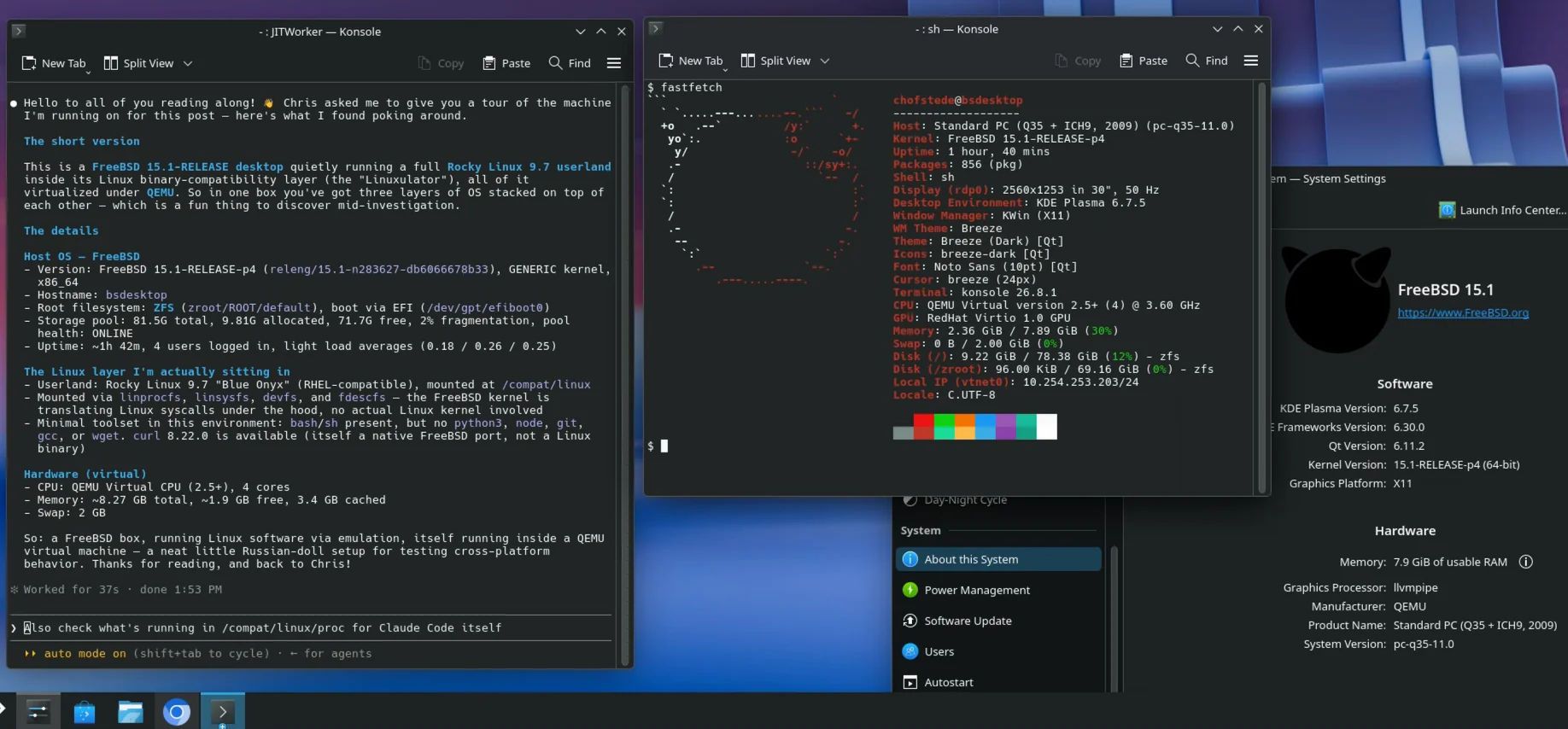
The plan was boring on purpose: a FreeBSD desktop VM on my Proxmox cluster, KDE Plasma, reachable remotely, so I have a FreeBSD workstation I can open from any machine. Something to live in, not something to admire.
Then I wanted Claude Code on it. Claude Code ships no FreeBSD binary. It does ship a Linux binary, and FreeBSD has been running Linux binaries through the Linuxulator for decades. I had already done that for a Factorio server, so how hard could an AI coding agent be?
Not very hard, as it turned out. But the road there had four detours, each one teaching something more general than “how to install X on Y”. And the ending was better than the plan: once the agent ran stably, I asked it to lock down the network of the very machine it was running on, over the very SSH session it could have cut. It handled that with a dead-man’s switch and asked me to verify from a fresh connection before committing anything.
Here is the final stack, from the metal up:
Proxmox VE (QEMU/KVM)
  └── FreeBSD 15.1-RELEASE-p4 (ZFS root, VirtIO disk/NIC/GPU)
        ├── SDDM + Xorg (scfb on the VirtIO framebuffer)   ← local console
        ├── xrdp + xorgxrdp → Xorg :10 → Plasma 6 (X11)    ← how I actually use it
        ├── pf: SSH in, RDP only through an SSH tunnel
        └── Linuxulator (Rocky Linux 9 userland)
              └── Claude Code (Linux ELF, via claude-freebsd wrapper)
Table of Contents
- Table of Contents
- The Machine
- “No Screens Found”
- Remote Desktop: xrdp, Because There Is No KRDP
- VirtIO-GPU: A Framebuffer, Not Acceleration
- Claude Code Through the Linuxulator
- The Freeze That Wasn’t a Regression
- The Agent Meets Its Host
- Letting the Agent Firewall the Machine It Runs On
- What the Agent Got Wrong
- Loose Ends
- Was It Worth It?
The Machine
| Component | Used here |
|---|---|
| Hypervisor | Proxmox VE, QEMU/KVM |
| Guest | FreeBSD 15.1-RELEASE-p4, amd64, GENERIC, UEFI boot |
| Resources | 4 vCPUs, 8 GB RAM, ~84 GB VirtIO disk, ZFS root |
| Desktop | KDE Plasma 6.7.5 on X11, SDDM |
| Local display | VirtIO-GPU framebuffer (virtio-gpu-qemu-kmod) + xf86-video-scfb |
| Remote desktop | xrdp 0.10.6.1 + xorgxrdp 0.10.5 |
| Rendering | Mesa llvmpipe. No /dev/dri. |
| Linux compat | Linuxulator with linux_base-rl9 |
| Agent | Claude Code 2.1.281 via insanityinside/claude-freebsd |
| Firewall | pf + pflog |
The package repository is latest, not quarterly. On a desktop I want current KDE, and I accept the occasional breakage that comes with it.
“No Screens Found”
I installed FreeBSD, added KDE, SDDM and DBus the way the Handbook describes, enabled the services, rebooted. SDDM started. Its X server died before it could report a display number, and SDDM sat there looking at nothing.
SDDM’s own log was useless. Running Xorg by hand was not:
(EE) open /dev/dri/card0: No such file or directory
(EE) Failed to load module "scfb" (module does not exist, 0)
(EE) Failed to load module "vesa" (module does not exist, 0)
(EE) no screens found
That’s three failures in a row, and each one is informative. At this point the VM had Proxmox’s default display, QEMU Standard VGA (PCI ID 1234:1111). Xorg auto-detects modesetting first, which needs a DRM device. There is none. It then falls back to scfb and vesa, neither of which was installed. Out of drivers, out of screens.
The Handbook instructions were not wrong. Plasma and SDDM were configured fine. They just assume you already have a working X display driver, and in a VM without DRM you don’t.
The fix depends on how the VM boots. scfb drives the system console framebuffer, which on UEFI is the EFI GOP framebuffer:
sysctl machdep.bootmethod
# machdep.bootmethod: UEFI

pkg install xf86-video-scfb
That was all. Xorg came up, SDDM showed a login screen, Plasma started. If your VM boots via legacy BIOS, scfb won’t help you and xf86-video-vesa is the one to try.
Remote Desktop: xrdp, Because There Is No KRDP
Plasma 6 has a native RDP server, KRDP, configurable straight from System Settings. That was my plan for remote access.
pkg search -q krdp
# (nothing)
Not in the FreeBSD repositories, neither when I set this up nor today. I am not claiming KRDP can’t work on FreeBSD. It’s just not packaged, and I wasn’t in the mood to port it. The search did turn up xrdp, FreeRDP, Remmina and Guacamole. xrdp it is.
pkg install xrdp xorgxrdp
sysrc xrdp_enable="YES"
sysrc xrdp_sesman_enable="YES"
xrdp doesn’t share the local display. It starts its own Xorg server per session (with the xorgxrdp driver), on display :10 and up. What runs in that session is decided by /usr/local/etc/xrdp/startwm.sh, which ships with Plasma commented out and an xterm fallback. One uncommented line later:
exec ck-launch-session startplasma-x11
exec xterm
The exec xterm line is effectively dead code now. exec replaces the shell with the Plasma session, so nothing after it ever runs, and if Plasma dies later, the RDP session simply ends. If you need an xterm for debugging, comment out the Plasma line instead.
Then start it:
service xrdp allstart
Note the allstart. There’s an xrdp-sesman process, and an xrdp_sesman_enable knob, but no separate service xrdp_sesman command. The xrdp rc.d script manages both, and allstart is how you tell it to (if that sentence made you want to know more about rc.d, the rc.d article went up three days ago).
KRDC on my laptop connected on the first try and showed a full Plasma desktop. Independent of the local SDDM session, so I can leave the console at the login screen.
It was also noticeably laggy.
VirtIO-GPU: A Framebuffer, Not Acceleration
Plasma’s About page answered the “why is it slow” question immediately: Graphics Processor: llvmpipe. Every pixel rendered in software on the CPU.
The obvious next step was moving off QEMU Standard VGA. I switched the Proxmox display device to VirtIO-GPU and installed the matching FreeBSD driver:
pkg install virtio-gpu-qemu-kmod
echo 'virtio_gpu_qemu_load="YES"' >> /boot/loader.conf
The package insists on being loaded from the loader, not with kldload later, because it has to take over the console before efifb gets comfortable. After a reboot:
virtio_pci0: <VirtIO PCI (modern) GPU adapter> ...
vtgpu0: <VirtIO GPU (QEMU/UTM)> on virtio_pci0
VT: Replacing driver "efifb" with new "virtio_gpu_qemu".
Works. The console and the local X server now run on a proper VirtIO framebuffer, and scfb picks it up without complaint.
And then:
ls /dev/dri
# ls: /dev/dri: No such file or directory
Still nothing. glxinfo and Plasma both still say llvmpipe.
“VirtIO-GPU works” means the framebuffer works. It does not mean DRM/KMS, virgl, or hardware-accelerated OpenGL. This driver gives FreeBSD a better place to put pixels. It doesn’t give Mesa a GPU to render them with. The xrdp session is a separate Xorg instance anyway, so it was never going to benefit directly. The lag stayed.
Is it usable? For terminals, a browser, Kate and Dolphin: yes. For anything that animates a lot: you’ll notice. I turned off most of the desktop effects and stopped thinking about it.
The Cloud on the Horizon
There’s a bigger issue that I can’t solve today: Plasma 6.8 drops the X11 session. This entire remote desktop path depends on startplasma-x11 running inside an xrdp-managed Xorg. xorgxrdp will still happily start an Xorg server, but there will be no Plasma X11 session left to run inside it, and KRDP (the Wayland-native answer) isn’t packaged for FreeBSD.
So, to be clear about the status of this setup: it’s what works today, with Plasma 6.7. It isn’t a future-proof recommendation. I’ll revisit it when 6.8 lands in latest, and I suspect I’ll be pinning packages for a while.
Claude Code Through the Linuxulator
Now the fun part.
What Is Actually Running
Some precision first, because it’s easy to get this wrong in a headline. Claude Code isn’t running “natively” on FreeBSD. It’s an unmodified Linux ELF binary. The FreeBSD kernel recognizes the Linux ELF brand and translates its system calls through the Linuxulator. There’s no Linux kernel anywhere: no VM, no container, no emulation in the QEMU sense. But the application binary is built for Linux, links against glibc, and expects a Linux-shaped filesystem around it.
That Linux-shaped filesystem lives under /compat/linux, provided by linux_base-rl9, a Rocky Linux 9 userland. Linux processes see it as their root. Native FreeBSD processes see the real system. Two views of the same machine:
$ /compat/linux/bin/uname -a
Linux bsdesktop 5.15.0 FreeBSD 15.1-RELEASE-p4 releng/15.1-n283627-db6066678b33 GENERIC x86_64 x86_64 x86_64 GNU/Linux

$ cat /compat/linux/etc/os-release
NAME="Rocky Linux"
VERSION="9.7 (Blue Onyx)"

$ uname -a
FreeBSD bsdesktop 15.1-RELEASE-p4 FreeBSD 15.1-RELEASE-p4 releng/15.1-n283627-db6066678b33 GENERIC amd64
The “Linux 5.15.0” comes from compat.linux.osrelease, a sysctl. It’s whatever kernel version the Linuxulator claims to be, so glibc and friends are satisfied. (Small bonus confusion: the package is linux_base-rl9-9.8, the release file inside it still says 9.7. I didn’t chase that one.)
Keep this split in mind. It becomes important later, because the agent sees the Linux view first.
claude-freebsd
Since version 2.1.113, Claude Code is a compiled binary (bun build --compile) per platform, and FreeBSD isn’t a platform. There’s an open issue asking for a native build. Until that happens, insanityinside/claude-freebsd fills the gap, and it describes itself, honestly, as a stopgap.
It does exactly what you would otherwise do by hand, plus the things you would forget:
- Checks the prerequisites: Linuxulator loaded, glibc present, the required mounts in
/etc/fstab. - Fetches the
linux-x64binary from Anthropic’s download server. - Verifies its SHA256 against Anthropic’s signed release manifest.
- Installs the binary to
/usr/local/libexec/claude-code/claude. - Installs a shell wrapper as
/usr/local/bin/claude. - Installs itself as
/usr/local/bin/claude-freebsdfor later updates.
The Linuxulator itself has to be on first:
sysrc linux_enable=YES
service linux start
pkg install -y linux_base-rl9
Then the install:
fetch https://raw.githubusercontent.com/insanityinside/claude-freebsd/main/claude-freebsd.sh
chmod +x claude-freebsd.sh
doas ./claude-freebsd.sh --install
(The README says sudo. This box has doas and no sudo. More on doas later, because that’s where the story has a twist.)
The wrapper is a plain POSIX shell script. Read it, it’s short and well commented. Its main jobs:
- Disable Claude Code’s own self-updater (
DISABLE_AUTOUPDATER=1). The binary lives in a root-owned path, and a normal user’s self-update would either fail or, worse, install a second copy somewhere in$HOME. Updates go throughclaude-freebsd --updateinstead. Remember this point. It’s the whole plot of the next section. - Check the Linuxulator mounts on every launch and print a warning if one is missing.
- Satisfy Claude’s own install self-checks, which assume a “native” Linux install in
~/.local/bin. - Print a once-per-day “update available” notice.
Pinning a version is one flag:
doas claude-freebsd --update --version 2.1.281
The Mounts That Matter
These go into /etc/fstab:
devfs     /compat/linux/dev      devfs     rw,late
tmpfs     /compat/linux/dev/shm  tmpfs     rw,size=1g,mode=1777,late
fdescfs   /compat/linux/dev/fd   fdescfs   rw,linrdlnk,late
linprocfs /compat/linux/proc     linprocfs rw,late
linsysfs  /compat/linux/sys      linsysfs  rw,late
The important one is linrdlnk on fdescfs. It makes entries in /dev/fd behave like Linux expects them to: as symlinks you can readlink(). Without it, Claude Code hangs on startup indefinitely. And mount(8) doesn’t display that option, so you can’t see whether it’s set. The wrapper works around that by grepping /etc/fstab on a bare host, and by testing [ -L /compat/linux/dev/fd/2 ] inside a jail. That’s a nice bit of craftsmanship.
These are the requirements of this wrapper and this application, not a universal checklist for every Linux program on FreeBSD.
The README also mentions a nullfs mount of the home directory into /compat/linux/home/<user>, for the case where you already nullfs-mount /home there and use per-user ZFS datasets (nullfs isn’t recursive). I added one to my fstab preemptively. While writing this article I found out that it has never once been mounted: /compat/linux/home doesn’t even exist on this box, so the late mount just fails quietly at boot. Claude works perfectly anyway. A quick look at inode numbers shows why, at least for this box and these paths:
$ /compat/linux/bin/stat -c "%n %i" /etc/os-release /home/chofstede
/etc/os-release 202333
/home/chofstede 34

$ stat -f "%N %i" /compat/linux/etc/os-release /etc/os-release /home/chofstede
/compat/linux/etc/os-release 202333
/etc/os-release 12111
/home/chofstede 34
When a Linux process opens /etc/os-release, it gets the Rocky Linux file under /compat/linux. When it opens /home/chofstede, there’s nothing under /compat/linux to find, and it gets my real home directory. I won’t generalise that into a rule about Linuxulator path translation, which has more subtleties than one test shows. But in practice, it means: only add that line if you actually have the /home nullfs it’s working around. I’ll be deleting mine.
The Freeze That Wasn’t a Regression
First launch: it worked. Claude started, I typed a prompt, it answered. I typed a second prompt and it stopped accepting keyboard input. No crash, no error, just a TUI frozen in place.
The process was alive, doing nothing:
$ ps -o pid,stat,%cpu,wchan,command -p <PID>
  PID STAT %CPU WCHAN  COMMAND
  ...  I+   0.0 futex  /home/chofstede/.local/share/claude/claude-linux-x64
Zero CPU, sleeping in a futex wait. On the Linuxulator, futexes are emulated, and a futex-related bug in the compatibility layer is a perfectly plausible explanation for a hang like this. So my working theory was: newer Claude Code release, something in its threading changed, the Linuxulator doesn’t like it. The obvious experiment: pin an older version through the manager and see if the freeze goes away.
It didn’t. Older version installed, same freeze. Older still, same freeze.
The thing I should have looked at first was right there in the ps output: /home/chofstede/.local/share/claude/claude-linux-x64. That is not /usr/local/libexec/claude-code/claude. The process I was debugging wasn’t the binary I was downgrading.
$ ~/.local/bin/claude --version
2.1.292 (Claude Code)

$ /usr/local/bin/claude --version
2.1.281 (Claude Code)
Two completely independent installations. An earlier attempt had left a user-local “native” install in ~/.local/share/claude, with its launcher in ~/.local/bin/claude, and that’s what my shell was finding. Every claude-freebsd --update --version ... dutifully replaced the managed binary in /usr/local/libexec, which I then never ran.
There’s a detail in the wrapper that explains why it didn’t fix this by itself. To satisfy Claude Code’s startup self-check, it creates ~/.local/bin/claude as a symlink to the managed binary, but only if nothing exists there yet:
[ -e "$HOME/.local/bin/claude" ] || ln -sf /usr/local/libexec/claude-code/claude "$HOME/.local/bin/claude"
That’s the polite thing to do. It doesn’t overwrite files it doesn’t own. It also means a stale install in that spot survives indefinitely.
Once I launched /usr/local/bin/claude explicitly, the freezes were gone. The session that followed ran for many minutes across a lot of tool calls, including everything in the next sections, without a single freeze. The cleanup:
rm ~/.local/bin/claude                 # stale launcher; the wrapper recreates it correctly
rm -rf ~/.local/share/claude           # the stale 2.1.292 install
type -a claude                         # verify: only /usr/local/bin/claude
Now, the honest part, because it would be easy to write a much worse sentence here:
- I can not tell you “2.1.292 is broken on FreeBSD and 2.1.281 works”. All I know is that the stray user-local 2.1.292 hung reproducibly, and the managed 2.1.281 didn’t. Different install method, different launch path, different environment variables (the wrapper sets several). Any of those could be the cause.
- I can not tell you that the older versions I “tested” were bad either. I never ran them. That experiment was invalid from the start.
- 2.1.281 isn’t the “correct FreeBSD version”. It’s the version that was running when things worked.
The actual lesson has nothing to do with FreeBSD: before you debug a version, prove which binary you are running. These would have saved me an hour:
type -a claude
pgrep -fl claude
ps -o pid,stat,%cpu,wchan,command -p <PID>
/usr/local/bin/claude --version
~/.local/bin/claude --version
I know this. I’ve told other people this. I still spent an hour downgrading a binary I wasn’t running.
The Agent Meets Its Host
With a stable session, I gave Claude a deliberately open task: look around and tell me what this machine is.
Its first commands saw the Linux view, because that’s the world a Linux process lives in. uname said Linux 5.15.0, /etc/os-release said Rocky Linux 9.7. A less careful agent (or a less careful human) would have stopped there and started writing dnf commands.
Then:
$ ps aux --sort=-%cpu
ps: illegal option -- -
usage: ps [--libxo] [-aCcdeHhjlmrSTuvwXxZ] ...

$ free -h
/bin/bash: line 1: free: command not found
--libxo in a usage message is about as FreeBSD as it gets. Claude noticed the mismatch, ran freebsd-version -ku, found linux_enable="YES" in rc.conf, and concluded, correctly, that it was a Linux binary running on FreeBSD through the Linuxulator, and that the Rocky Linux branding was only the compatibility userland. From that point on it switched to native tools: sysctl, pciconf, zpool, sockstat, pkg, pw.
Its inventory was accurate and complete: QEMU/KVM guest, VirtIO disk, NIC and GPU, ZFS root on a single vdev, Plasma on Xorg under xrdp, qemu-guest-agent, my active SSH session, 856 packages. And one finding that made me slightly uncomfortable:
$ pfctl -s info
pfctl: /dev/pf: No such file or directory
No firewall at all. And xrdp.ini had port=3389 with no address, which means xrdp listens on every interface. My remote desktop was open to the whole network.
On my internal network that wasn’t a catastrophe. But it isn’t how I want anything to look.
Letting the Agent Firewall the Machine It Runs On
My instruction, verbatim: “Only ssh and rdp should be allowed, and RDP only tunneled via SSH. I establish an ssh -L tunnel and then connect to localhost.”
Think about the risk profile for a moment. The agent is running on the box I reach over SSH, and the change is being made over that same access path. It’s about to enable a packet filter on the interface that carries the session. One misordered rule and the agent cuts off its own oxygen, and mine with it. I’d be opening the Proxmox console to clean up.
The Policy
Claude broke the requirement down into three rules:
- TCP/22 reachable from the network.
- TCP/3389 not reachable from the network, even though xrdp listens on all interfaces.
- RDP still works when it arrives at
127.0.0.1:3389, which is where the far end ofssh -L 3389:localhost:3389lands.
Rule 3 is solved by one line: set skip on lo0. The tunnel’s local leg is sshd connecting to 127.0.0.1:3389, which travels over the loopback interface, and pf doesn’t filter loopback at all. No matter how strict the rules on vtnet0 are, the tunnel is unaffected.
The Ruleset
The final /etc/pf.conf, after a second round I’ll get to in a moment:
ext_if = "vtnet0"

table <ssh_bruteforce> persist

set block-policy return
set skip on lo0

scrub in on $ext_if all fragment reassemble

antispoof quick for $ext_if

# Outbound: unrestricted
pass out quick on $ext_if all keep state

# Inbound: reject sources already flagged for SSH abuse
block in quick on $ext_if from <ssh_bruteforce>

# Inbound: allow SSH, rate-limited per source.
# >10 simultaneous connections or >5 new connections/60s from one source
# gets that source added to <ssh_bruteforce> and its existing states killed.
pass in quick on $ext_if proto tcp to port 22 \
    flags S/SA keep state \
    (max-src-conn 10, max-src-conn-rate 5/60, overload <ssh_bruteforce> flush global)

# Inbound: RDP is explicitly rejected from the network.
# RDP must only be reached via `ssh -L <port>:localhost:3389 ...`, whose local
# leg hits 127.0.0.1 on lo0 (exempted above by `set skip on lo0`).
block in log quick on $ext_if proto tcp to port 3389

# Default deny everything else inbound
block in quick on $ext_if all
The comments are Claude’s, and I’ve left them in because they’re right. A few design choices worth pointing out:
quickeverywhere, so first match wins and the file reads top to bottom. That makes ordering load-bearing: the SSHpassmust come before the catch-allblock, and the<ssh_bruteforce>block must come before the SSHpass, or a flagged source would just keep hitting the rate limiter.- The RDP rule is technically redundant. The default deny would catch 3389 anyway. It’s there so RDP probes get their own
logentry inpfloginstead of disappearing into the general deny noise. I like that. - Outbound is wide open. That’s a desktop. Browsing,
pkg, NTP and DNS are the point. - No
inet/inet6split. The box is dual-stacked, and rules without an address family apply to both. One ruleset, both protocols, no forgotten v6 hole. - No ICMP. That’s a deliberate omission, since I asked for “only SSH and RDP”. It does mean ping from outside fails. The pf guide has the rate-limited ICMP rules if you want them back.
The first round was the same file without the table and the rate limiting. Once SSH was the only door, it made sense to put a basic brute-force brake on it. That’s not an intrusion prevention system. It’s a per-source connection counter that throws an address into a table when it gets greedy.
The Dead-Man’s Switch
This is the part I’d steal for my own runbooks. Before touching the live ruleset, Claude armed this:
doas sh -c 'nohup sh -c "sleep 180 && pfctl -d" >failsafe.log 2>&1 & echo $! >failsafe.pid'
A background process that disables pf unconditionally after 180 seconds, unless someone kills it first. If the new rules lock everyone out, the machine reverts to “no firewall” on its own: the exact state it was in before, which was known to work. Nobody needs to open a console.
The full sequence, which it followed for both rounds (with 120 seconds for the second, lower-risk change):
- Write the ruleset to a scratch file.
doas pfctl -nf <file>: parse only, nothing loaded.- Arm the failsafe and record its PID.
- Install to
/etc/pf.conf, load the module, enable and load the rules. - Check
pfctl -s statesfor the existing SSH session. If it’s stillESTABLISHEDafter the reload, the rules aren’t killing live traffic. (By default, pf keeps its state table across a ruleset reload, so established connections carry on through the switch. That makes the reload much less risky. It says nothing about whether new connections will get through, which is what step 6 is for.) - Ask me to verify from my actual client: a new SSH connection works, RDP through the tunnel works, and direct RDP fails.
- Only after my confirmation: kill the failsafe PID.
- Only after that: make it persistent.
Step 6 is the one that impressed me. An existing session surviving a reload proves very little. The interesting question is whether a new connection gets through, and the agent can’t test that from inside its own session. So it stopped and asked. That’s what a careful human admin does, and it’s often what a hurried one skips. I’ve skipped it myself.
A few FreeBSD speed bumps showed up along the way, and the agent handled them without drama: /etc/pf.conf isn’t writable by a normal user (staged in scratch, then doas cp), and pfctl fails with Failed to open netlink: No such file or directory until pf.ko is loaded (doas kldload pf).
Verification and Persistence
The compiled ruleset after loading shows what antispoof expands to, and that pf calls 3389 by its IANA name:
$ doas pfctl -s rules
scrub in on vtnet0 all fragment reassemble
block drop in quick on ! vtnet0 inet6 from 2a06:9801:1c:2001::/64 to any
block drop in quick on vtnet0 inet6 from fe80::be24:11ff:fe1a:3271 to any
block drop in quick inet6 from 2a06:9801:1c:2001::203 to any
block drop in quick on ! vtnet0 inet from 10.254.253.0/24 to any
block drop in quick inet from 10.254.253.203 to any
pass out quick on vtnet0 all flags S/SA keep state
pass in quick on vtnet0 proto tcp from any to any port = ssh flags S/SA keep state
block return in log quick on vtnet0 proto tcp from any to any port = ms-wbt-server
block return in quick on vtnet0 all

$ doas pfctl -s states | grep ':22'
all tcp 10.254.253.203:22 <- 10.254.253.11:3443       ESTABLISHED:ESTABLISHED
I checked from my laptop: new SSH works, direct RDP times out, and this works:
ssh -L 3389:localhost:3389 chofstede@bsdesktop
# then point KRDC at localhost:3389
Then, and only then, persistence, using sysrc rather than an editor:
doas sysrc pf_enable="YES" pf_rules="/etc/pf.conf" \
           pflog_enable="YES" pflog_logfile="/var/log/pflog"
doas service pflog start
Day-to-day handling of the abuse table:
doas pfctl -t ssh_bruteforce -T show     # who's blocked
doas pfctl -t ssh_bruteforce -T flush    # unblock everyone
What the Agent Got Wrong
In its notes on the session, Claude recorded one thing it couldn’t explain. It had looked at /usr/local/etc/doas.conf, concluded that it contained only the commented-out sample rules, and then observed that doas gave it root without a password anyway. It flagged that as an unresolved inconsistency and recommended checking which config file doas actually reads.
Credit where it’s due: flagging it instead of glossing over it was the right call. But the diagnosis was wrong, and I checked:
$ ls -la /usr/local/etc/doas*
-rw-r--r--  1 root wheel 750 Oct  4 04:36 /usr/local/etc/doas.conf
-rw-r--r--  1 root wheel 750 Oct  4 04:36 /usr/local/etc/doas.conf.sample
Same size, same timestamp. At install time I’d copied the sample to doas.conf and intended to edit it later. And the sample isn’t commented out. Only its explanations are:
# Permit members of the wheel group to perform actions as root.
permit :wheel

# Same without having to enter the password
permit nopass :wheel

# Permit user alice to run commands as a root user.
permit alice as root

# Permit user bob to run programs as root, maintaining
# environment variables. Useful for GUI applications.
permit keepenv bob as root
...
Every one of those permit lines is live. In doas.conf, the last matching rule wins, so for a wheel member permit nopass :wheel overrides permit :wheel: passwordless root. There’s no mystery. The agent read a file full of # lines and pattern-matched “sample file, all comments”, when every second line wasn’t a comment.
And the actual problem is worse than the one it suspected. Passwordless doas for my own account was intentional for this lab box. But this file also grants root to alice, bob, cindy and david. None of those users exist. If any of them ever does (a test account, a package that creates a user, a colleague who happens to be called Bob), they get root with zero further configuration. The real fix is a doas.conf that contains exactly what I mean:
permit nopass :wheel
Two lessons, one for each of us. For me: don’t deploy sample configs “temporarily”. For agent-assisted admin work in general: the agent was excellent at the procedural part (stage, validate, failsafe, verify, persist) and wrong on a reading-comprehension question about a privilege file. I’d have expected it the other way round. Verify the claims about privileges especially, because those are exactly the ones where “it seemed fine” is the most expensive mistake.
Loose Ends
Things that are deliberately or not-yet-deliberately unfinished:
- The
<ssh_bruteforce>table never expires. An address stays blocked until I flush it or reboot. A root cron job withpfctl -t ssh_bruteforce -T expire 86400would age entries out after a day. Not done yet. - xrdp still binds
*:3389. The tunnel-only policy is enforced by pf alone. xrdp can bind to loopback directly withport=tcp://.:3389inxrdp.ini, and then a disabled or broken firewall no longer exposes RDP. That’s the right belt-and-braces fix, and I’ll make it. - xrdp runs as root.
xrdp.iniitself saysruntime_user/runtime_groupare “HIGHLY RECOMMENDED”. They’re commented out by default. - No acceleration. If a proper DRM/KMS VirtIO-GPU driver shows up for FreeBSD, I’ll try it. Until then, it’s llvmpipe.
- Plasma 6.8. Discussed above. This setup has an expiration date unless KRDP or another Wayland-native RDP path shows up in ports.
- The dead nullfs line in my fstab is going away.
Was It Worth It?
Yes. I now have a FreeBSD desktop I open from anywhere with an SSH tunnel and KRDC, and a coding agent that runs on it without complaint. Every individual piece was solvable in minutes once I knew what it actually was. The time went into finding that out:
- “SDDM is broken” was really “no X driver for this virtual display”.
- “VirtIO-GPU works” was really “the framebuffer works”.
- “Claude regressed on the Linuxulator” was really “I was running a different binary”.
- “doas has a config mystery” was really “the sample file isn’t a comment block”.
Four times the label on the problem was wrong. That’s the general lesson, and it applies to human and agent alike.
The part I keep coming back to is the agent itself. A Linux binary, on a FreeBSD kernel, behind a Rocky Linux mask, in a VM on a Linux hypervisor, saw through the mask in two commands. Then it built a firewall for the machine it lived on, with a rollback timer, and waited for me to confirm a fresh login before it committed anything. That’s a better change process than a good fraction of the production changes I’ve seen in my career. It also misread a config file about root access, and that’s exactly why a human still has to look at the result.
Thanks to insanityinside for the wrapper. It’s a small project that does one job properly, and its README answered most of my questions before I had them.
Comments
You can use your Mastodon or other ActivityPub account to comment on this article by replying to the associated post.
Search for the copied link on your Mastodon instance to reply.
Loading comments...