- Tue 13 October 2026
- 22 min read
- Open Source
- #artcraft, #rust, #ai, #agents, #freebsd, #linux, #desktop, #open-source, #photocraft, #wordcraft, #automation
There is a particular kind of software announcement I normally scroll past: somebody has rebuilt a large, mature application with AI, the screenshots look convincing, and apparently an entire industry is now over. Somewhere below the announcement, a user discovers that Save does not save.
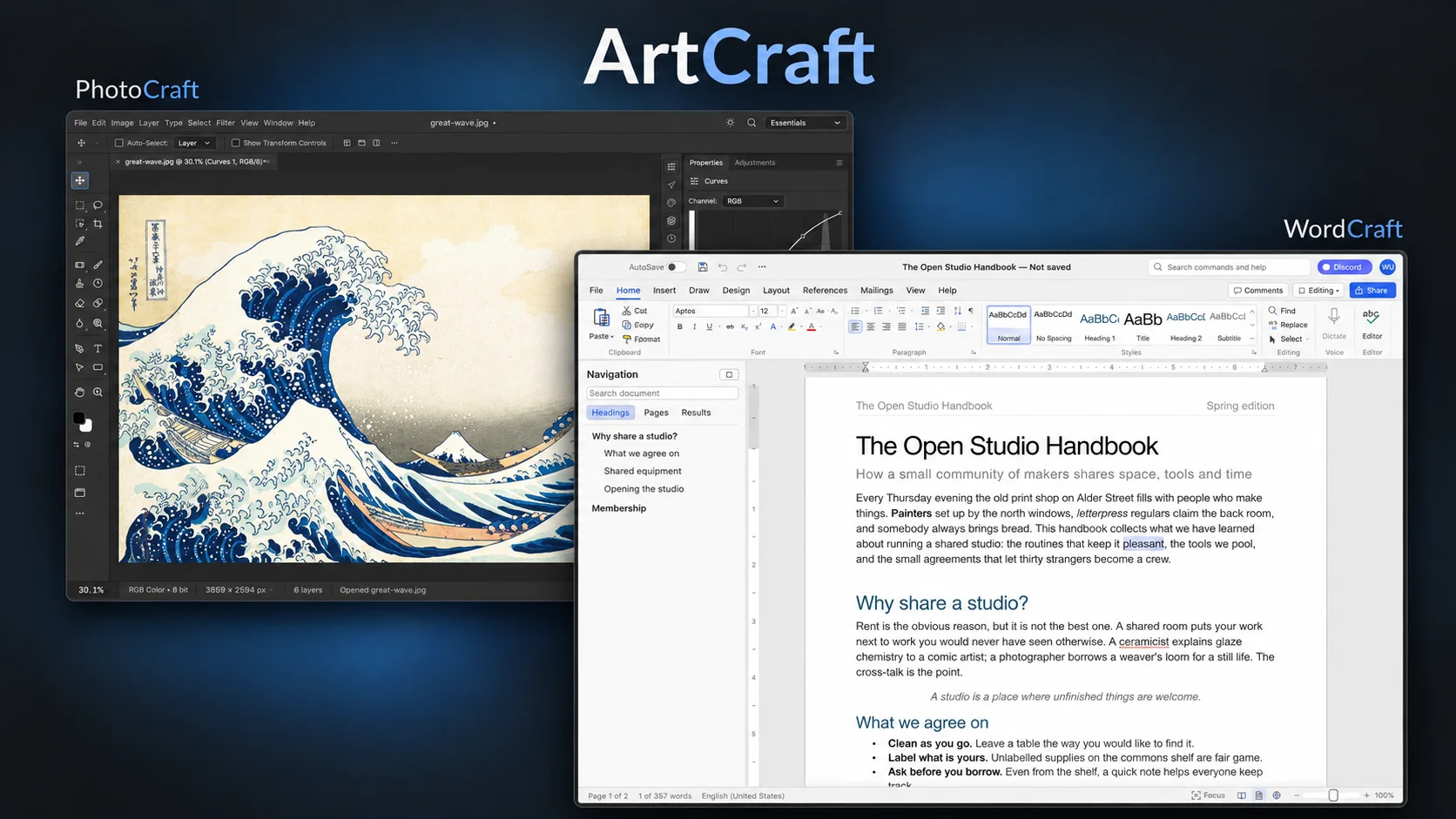
ArtCraft’s Crafting Apps initially looked like they might belong in that category. The project describes attempts to rebuild the workflows of Photoshop, Illustrator, Premiere, Lightroom, Acrobat, After Effects, and then Word, Excel and PowerPoint in Rust with AI coding agents. An ambitious afternoon, if nothing else.
Then I tried several of them.
They are unfinished. They also worked considerably better than I expected. PhotoCraft let me apply fairly complex filters to selected areas of an image, and it was perfectly usable for editing some video thumbnails. The applications started in roughly one or two seconds on my fairly average machine and felt remarkably snappy.
Then I noticed the FreeBSD downloads.
Native FreeBSD downloads. For an actively developed creative application. The word cross-platform usually stops just before the platform I am interested in, so an actual release artifact is a particularly welcome sight.
That combination made me curious enough to look more closely. A program can be useful for a thumbnail without coming particularly close to Photoshop across its full range of work. My tests establish the first point. They leave the second open.
I do not yet have enough evidence to recommend the suite as a replacement for its commercial counterparts. What I found instead is an interesting experiment, and the most interesting part of it is not the Photoshop-like interface. It is an architecture where the GUI, a command line and AI agents all drive the same engine, and a development pace that moves the hard problem from writing code to checking it.
Table of Contents
- Table of Contents
- At a Glance
- What ArtCraft Is Actually Building
- The Thumbnail Test
- Small Packages and a Limited Performance Impression
- Yes, Native FreeBSD
- An Architecture That Agents Can Work With
- Agents as Users, Not Only as Authors
- The Release Pace Moves the Bottleneck
- What the Clean-Room Claim Means Here
- The Unfinished Parts Are Substantial
- What the Press and Hacker News Found
- Good Enough Has to Mean Good Enough for Somebody
- Where This Could Lead
- Worth Examining, with the Verdict Still Open
At a Glance
- ArtCraft is attempting a family of free, open-source creative and productivity applications in Rust, using AI coding agents.
- My early builds were already useful for thumbnail editing, with quick startup and responsive interaction.
- Native FreeBSD builds exist. PhotoCraft also has a FreeBSD port.
- The applications are built so that the GUI, CLI and agent interfaces reach the same engine. Automation is a design property, not an afterthought.
- The project is moving quickly, but its own assessments describe significant gaps in reliability, compatibility and professional readiness.
- When implementation becomes cheap, verification becomes the limiting factor. ArtCraft is a live experiment in exactly that.
Research snapshot: 13 October 2026. My hands-on impressions concern the early builds I tried, around the 0.5 generation. During research, GitHub already listed PhotoCraft 0.8.2 and WordCraft 0.6.1, both released on 12 October. Each application has its own version sequence. The suite has no common maturity level.
What ArtCraft Is Actually Building
The catalogue already extends beyond the original Adobe-inspired applications. At the time of writing, the official lineup contains twelve:
| Application | Intended work | Project’s reference point |
|---|---|---|
| PhotoCraft | Layered image editing | Photoshop |
| VectorCraft | Vector illustration | Illustrator |
| FilmCraft | Nonlinear video editing | Premiere Pro |
| LightCraft | Photo library and RAW development | Lightroom |
| PdfCraft | PDF viewing and document work | Acrobat |
| EffectCraft | Motion graphics and compositing | After Effects |
| DesignCraft | Page layout and publishing | InDesign |
| WordCraft | Word processing | Word |
| GridCraft | Spreadsheets | Excel |
| DeckCraft | Presentations | PowerPoint |
| SoundCraft | Recording, editing and mixing audio | Pro Tools |
| CADCraft | Computer-aided drafting | AutoCAD |
The last two reference points come directly from the SoundCraft and CADCraft repositories. This is now a fairly expansive attempt to rebuild established desktop workflows, rather than only an Adobe alternative.
There is also a naming trap. The main ArtCraft site promotes an AI image and video studio, including commercial services. The Crafting Apps are a separate family of local desktop tools. Thomas explicitly makes that distinction in a Hacker News reply about subscriptions.
An image editor built with AI coding tools, an image editor that an AI agent can control, and an application that generates images with AI are three different things. Here, the first two are particularly relevant. You can use the desktop editor by hand on ordinary files.
The Thumbnail Test
My test was rather less ambitious than replacing a creative agency’s entire software estate.
I wanted to edit video thumbnails. PhotoCraft was usable for that. More interestingly, applying fairly complex filters to selections worked in my tests. That goes beyond displaying an image beneath a convincing menu bar: a selection has to constrain the operation, the filter has to produce a result, and the editor has to present something useful to the person doing the work.
I am not extrapolating from this to a magazine’s print production, a photographer’s entire RAW archive, or a studio exchanging complicated PSDs with clients. Those are different workloads. My result is narrower and, for my purposes, more useful: I had a real task, and this young application could do it.
The PhotoCraft repository describes layers, masks, adjustment layers, editable text, brushes, shapes, filters and PSD/PSB support. That is a substantial list of claimed capabilities. My test confirms that some of them connect into a usable editing workflow. It does not independently validate the list or establish that the filters behave like Photoshop’s equivalents.
A missing feature can be irrelevant to me and decisive to somebody else. That is why I find the blanket verdicts unhelpful. Calling it a finished Photoshop replacement is premature. Calling it useless does not explain the thumbnails I edited with it.
Small Packages and a Limited Performance Impression
The package sizes were another pleasant surprise. The launcher Flatpak I encountered was roughly 8 MB, and the WordCraft package was around 64 MB. Those are observations from the builds I tried, not fixed specifications for every version and packaging format.
Flatpak runtimes are accounted for separately, and download size, installed size and memory consumption are different measurements. Still, the applications themselves are refreshingly modest. There is a certain pleasure in downloading a word processor without wondering whether it has brought its own operating system.
The startup behaviour mattered more. Roughly one or two seconds, on an ordinary machine, followed by an interface that felt responsive. I have not turned this into a benchmark. It is the experience of opening the applications and using them.
There is a plausible technical explanation. PhotoCraft’s Cargo workspace declares Rust engine components, egui/eframe for the interface, and associated rendering dependencies. Its architecture documentation describes egui on wgpu, a GPU compositor, a CPU reference compositor, and pixel storage shared in tiles that are copied when modified. That last part helps avoid copying an entire image merely to preserve an undo state.
Rust is not a performance certificate. An inefficient algorithm remains inefficient after the borrow checker has approved it. The implementation choices are what make the language relevant here: native compilation, explicit data structures, GPU rendering, and an engine that can run independently of the interface.
Feeling fast in my small editing tasks is also not the same as meeting performance targets across heavy workloads. The project’s generated scorecard includes substantial misses against its own targets. Its committed performance baseline dates from 5 October and records a heavily loaded test machine, so I would not treat those figures as a clean comparison with my experience or a benchmark of today’s release. Both observations can stand: it felt fast to me, and there is performance work left.
Yes, Native FreeBSD
This was always going to get its own section.
PhotoCraft has published a FreeBSD x86-64 release tarball. The VectorCraft download page lists a FreeBSD 14 build, and WordCraft’s download documentation lists its own FreeBSD tarball. The launcher also documents native FreeBSD installation.
There is a ports-tree presence, too. FreshPorts lists graphics/photocraft, added on 9 October and updated to 0.7.0 on 11 October, maintained by Piotr Kubaj. Its installed files include both the graphical application and photocraft-cli. At this snapshot it is a new port on the current branch, absent from quarterly. A port entry does not mean every package mirror has a binary ready immediately.
That is concrete platform support, not a vague hint that somebody could probably make it compile.
I recently wrote about getting Claude Code running on a FreeBSD desktop through the Linuxulator. That arrangement is useful, but it also illustrates how often FreeBSD support becomes the user’s integration project. Here there are applications built for the operating system itself.
A published build still depends on the graphics stack, windowing libraries and hardware it encounters, and one native build does not demonstrate equal support across every app and architecture. FreeBSD being present this early is interesting to me. Dependable support over successive releases is something the project still has to demonstrate.
For Linux users, the projects also publish familiar packaging formats, including Flatpak, AppImage, Debian packages and RPMs, which makes the software easy to try.
An Architecture That Agents Can Work With
This is the part of the project I find most interesting, more so than any individual feature.
In PhotoCraft’s architecture, user-visible operations dispatch through command IDs. The interface, command-line tool and automation interfaces reach the same engine. Document data, undo operations, algorithms, rendering and file handling live in separate crates, with dependency layering checked by project tooling.
The workspace manifest shows those boundaries directly: document, operations, compositing, PSD, I/O, engine, automation and UI are distinct components. This provides something concrete to inspect beyond a screenshot that resembles Photoshop.
Most desktop applications are designed around mouse clicks, and an API is bolted on later, if at all. Here, automation is treated as a basic property of the application from the start. My inference is that this helps both automated development and long-term maintenance. A bounded change to a command or algorithm can be exercised independently of the window around it. The same operation can be reached from an automated test and from a user’s menu. That reduces the amount of behaviour which exists only as a side effect of clicking a widget.
That is a useful design property, but it does not establish correctness. Sharing an engine also means that the UI, CLI and agent can all reach the same incorrect implementation.
The testing question deserves particular attention in a project built with coding agents. Tests written alongside an implementation can repeat the same mistaken interpretation of a specification. Passing them establishes consistency with those expectations. Establishing equivalence with another application requires independent reference outputs, real files and users who know what the result should be. A compiler cannot check that a colour transform matches Photoshop or that a document paginates like Word.
The standalone components are worth watching too. A PSD parser or rendering component could become useful to other software, even if PhotoCraft itself never becomes my main editor, provided it proves correct and maintainable.
Agents as Users, Not Only as Authors
The applications can also be used by agents. That is a separate capability from using agents to write them.
PhotoCraft exposes a CLI, a JSON control channel and an MCP server. Its README documents headless editing and batch operations, while the control protocol describes inspecting UI state, executing operations and capturing screenshots of the running application. The desktop channel listens on loopback and requires authentication. It is an intentional automation interface.
This gives an agent something more precise than a sequence of mouse coordinates. It can ask an engine to perform an operation, inspect the result, and continue. Ordinary scripts can use the same machinery.
GridCraft makes the idea particularly concrete. Its MCP documentation in the README lists operations for reading and writing ranges, evaluating formulas, formatting cells, making tables and inserting charts. It also documents this CLI example:
gridcraft-cli eval '=XLOOKUP("b",{"a","b"},{1,2})'
The documented result is 2. This is an upstream usage example, rather than a command I ran as part of my tests.
For a thumbnail workflow, I can imagine an agent preparing variants from a template: changing text, applying a chosen adjustment, and exporting several sizes. I would still select the result and check that the text fits. The useful automation is the repetitive editing around the judgement.
Across applications, a script or agent could in principle organise source data in GridCraft, prepare a document in WordCraft, and assemble slides in DeckCraft. I have not tested that workflow, and exposing operations through MCP does not by itself demonstrate that the tools work together reliably.
There is a very Unix-shaped appeal to this: a capable engine, several ways to drive it, and files that can move between tools. Having an AI agent available does not make the shell obsolete. It makes a good command interface more valuable.
The important boundary is that the agent proposes or chooses operations. The software implements them. A formula evaluation or image filter should produce a defined result without asking a language model to invent it again on every run. There are still two things to validate: the engine’s result and the agent’s choice. Automating an incorrect operation only gets me the wrong answer faster.
The Release Pace Moves the Bottleneck
The release history provides better evidence of activity than counting excited social posts.
| PhotoCraft release | Published date, UTC |
|---|---|
| 0.5.0 | 8 October 2026 |
| 0.6.0 | 10 October 2026 |
| 0.7.0 | 11 October 2026 |
| 0.8.2 | 12 October 2026 |
Those releases contain changes to actual editing behaviour. The 0.5 notes include selection and transform interaction fixes, GPU fallback recovery and colour-picker improvements. The 0.6 notes include PSD export corrections. The 0.8.2 notes include moving save encoding off the UI thread and correcting transform and mask behaviour.
These are the kinds of changes an editor needs to become dependable. The release notes also credit many contributors, and the changes span algorithms, file handling, interaction and packaging. I have not independently checked the effectiveness of those fixes or the review behind them.
A release counter is not a quality metric. An update can remove a bug, introduce another, and improve a workflow I never use. What matters is whether the work converges: fewer regressions, dependable saves, consistent interaction, and bugs that stay fixed.
This is where I think ArtCraft is most interesting as an experiment, whether or not PhotoCraft ever replaces anything. Coding agents make implementation much cheaper. They do not make verification cheaper at the same rate.
For a long time, writing large amounts of working code was one of the main constraints on a project like this. Twelve desktop applications developed in parallel would be hard to imagine for a small traditional team. Producing the code for twelve applications now appears feasible. Keeping twelve applications correct is a completely different task. Somebody still has to check that a change does what it claims, that it does not break something that worked yesterday, and that the architecture remains understandable at this speed.
If that holds, coding agents change more than how quickly software gets written. They change which activity limits its development. The scarce resources become reference outputs, real-world test files, reviewers who know what the correct result looks like, and an architecture that lets those checks run without a human clicking through menus. That is also why the engine design described above matters more to me than the feature count.
The speed complicates reviews, too. A test of a browser build from last week and a test of today’s native release may be observations of materially different software. Versions, dates and workloads belong next to verdicts.
What the Clean-Room Claim Means Here
The author is Brandon Thomas, also known as echelon on Hacker News. PetaPixel’s reporting identifies him as ArtCraft’s founder and reports his use of Claude Opus 5.5 to build the applications in Rust.
His stated approach is quite explicit. In a Hacker News comment, Thomas says the project does not decompile binaries or inspect Adobe source, and disallows Ghidra. Another comment about the development tools says they use ordinary Claude Code.
PhotoCraft’s contribution rules require implementations based on public specifications and observation, prohibit copying proprietary code, shaders, profiles and assets, and require attribution for permitted assets. Its attribution file records the provenance and licences of non-code material.
The term needs some care. In software, clean room traditionally describes a specific process with organisationally separated teams: one studies the original and writes a specification, and another, which has never seen the original, implements from that specification. Avoiding decompiled binaries and proprietary source is not automatically the same thing. The project deliberately studies visible behaviour and familiar interface layouts, and uses public file-format documentation. PhotoCraft says its PSD implementation was written from Adobe’s public specification.
I can verify that these rules and statements exist. I cannot independently reconstruct the provenance of every generated line or the training history of the models involved. The less misleading description is an independent reimplementation based on public specifications and observed behaviour, with public contribution rules supporting that approach. That does not establish compatibility or settle every question about intellectual property.
More practically, the code is available for inspection and modification. PhotoCraft and WordCraft offer MIT or Apache-2.0 licensing. Their branding has separate terms. That permits independent work on the code. Whether enough people can understand, review and maintain it over time is another question.
The Unfinished Parts Are Substantial
The strongest counterweight to the marketing comes from the project itself.
PhotoCraft’s parity assessment, updated on 12 October but based on its 0.6-era assessment, distinguishes feature breadth, estimated at about 76%, from readiness for professional replacement, estimated at about 45%. For an essentials-only audience it estimates about 61%. These are the project’s own weighted assessments, not independently established percentages of Photoshop.
The document also records that an earlier estimate was too optimistic because it counted feature presence while users reported problems in those supposedly present features. I appreciate that correction. It is also a good reason to treat the current figures with some caution.
The roadmap identifies reliability of PSD exchange as a requirement for beta, alongside deeper interaction, performance and stability work. This matters more than a long list of menu entries. Reading a document, rendering it correctly, saving it without losing information, and having Photoshop accept the saved result are separate achievements.
Even strong corpus results have a boundary. PhotoCraft’s README describes successful preservation of rendered output across many test files, while explicitly distinguishing application-level re-saving from byte-identical output by the standalone PSD crate. None of those results guarantees correct treatment of an arbitrary client’s PSD.
The other apps bring their own hard problems:
- LightCraft: its status table documents RAW support alongside remaining camera-variant and calibration gaps. It also says subject and sky masking currently use classical heuristics. Decoding sensor data and reproducing a trusted photographic rendering are different levels of compatibility.
- FilmCraft: its codec documentation describes its own Rust codecs, tested against FFmpeg externally, rather than embedding FFmpeg. That is ambitious work. Real editing also requires dependable seeking, synchronisation, export and handling of the awkward files cameras produce.
- PdfCraft: its own assessment calls it alpha and lists weak Office conversion, limitations in editing existing text, and gaps in advanced print, accessibility and signature workflows. It also acknowledges a dependency on the
hayrorenderer while its own renderer develops. - WordCraft, GridCraft and DeckCraft: the repositories document DOCX and other document formats, XLSX and spreadsheet functions, and PPTX exchange. Those are useful starting points. Exact pagination, calculation edge cases and slide fidelity need workload-specific validation before somebody relies on them professionally.
I have not tested those workflows. A home user making a simple slide deck and a company exchanging years of templates are asking very different things of the same file extension.
What the Press and Hacker News Found
The public response is predictably split. The useful parts are more nuanced than the shouting.
PetaPixel reported the project on 7 October, describing Thomas’s AI-assisted development and the early-alpha status. Phoronix covered it the same day, highlighting Rust, rapid iteration and native platform builds, including FreeBSD. Those reports document the announcement and its context. Neither tests professional feature parity.
Ernie Smith’s 8 October Tedium article is especially useful because he actually tried the applications. He found small, quick applications and usable image manipulation, along with rough controls and inconsistencies. A DesignCraft update resolved a font-discovery problem while he was reviewing it. He also used PhotoCraft to produce the article’s header.
That account matches my own experience: useful work can coexist with very visible rough edges.
The main Hacker News discussion includes users reporting broken interaction, others finding later builds substantially more usable, and thoughtful objections about the feel of professional tools and the cost of switching. A separate photography comment describes disappointing RAW rendering compared with Lightroom. These are individual reports about early builds, not a controlled comparison of the current suite.
Thomas’s own enthusiasm contributed to the argument. The discussion quotes his claim to have rebuilt the “whole thing”. He subsequently acknowledges that near-complete parity will take time. I find the detailed parity documents much more useful than that headline-level confidence.
The criticism I take seriously identifies a file, an operation, a failure and a version. That gives a project something to fix. A successful thumbnail is similarly bounded evidence. What I have not found is a comprehensive independent comparison with the commercial applications.
Good Enough Has to Mean Good Enough for Somebody
My working hypothesis is still that complete parity may not be necessary for many content creators and home users. Whether these applications become dependable enough for those users is a separate question.
A person who edits thumbnails, assembles simple graphics, touches up family photographs, writes letters, maintains a household spreadsheet or makes an occasional presentation has a different requirement from a production studio. The comparison starts with the work they need to finish.
The familiar interface matters in that calculation. Moving to another editor can mean relearning where tools live, how selections behave, and which keyboard shortcuts produce the expected result. Even a technically capable alternative can have enough friction that the person gives up. ArtCraft is deliberately aiming at workflows people already recognise.
Price, local operation, startup time, package size and platform availability all matter when choosing an application. They could make a more limited tool attractive. They cannot compensate for incorrect results in the features somebody actually needs.
There is an important floor, though: good enough includes reliability. An editor can omit a specialist feature I never need. It cannot be casually allowed to lose my work. A spreadsheet can support fewer functions. The ones it supports need to calculate correctly. Exporting a finished result has to be dependable.
The difficulty with the usual “most people only use ten percent” argument is that people use different ten percents. My easy case does not establish somebody else’s. A growing set of dependable common tasks could make the apps useful to more people, but only if reliability keeps up with feature growth.
“Good enough” should describe a workflow someone has checked, rather than become a way to wave away unknowns.
Where This Could Lead
I do not know where this will lead. The release pace makes several outcomes conceivable, but it does not tell us which one is likely.
One possibility is a dependable core for a limited set of tasks. Opening a file, editing it, undoing changes, saving and reopening it, and exporting a usable result would give users a reason to return. The existing paths have to remain stable as new ones are added.
Another possibility is use in specific automation jobs. If the command interfaces remain consistent and their results can be validated, a Craft app might serve a batch operation alongside established tools, without being a general replacement.
Some components might prove more durable than the suite. The public craft-libs repository, referenced and pinned by PhotoCraft’s workspace, provides a place for shared Rust components. Reusable file handling, rendering or UI work could become useful elsewhere.
The project could also stall as the difficult work accumulates. Somebody still has to decide what belongs in the application, understand the implementation, reproduce bugs on real machines, and establish that an output is correct. Maintaining twelve applications is a considerable commitment, regardless of who types the code.
The signs I would look for are fairly mundane: recurring bugs disappearing, files surviving round trips, experienced users reporting repeatable successes, fewer regressions between releases, and platform builds remaining healthy. I would also like the project’s candid readiness assessments to stay current as the release pace continues.
Established open-source tools such as GIMP, Krita, Inkscape, LibreOffice and Kdenlive have spent years doing the hard work in these spaces. ArtCraft adds an experiment in familiar interfaces, agent-driven implementation and explicit automation. Its value will have to be assessed against actual work and sustained maintenance, including comparison with those existing alternatives.
Worth Examining, with the Verdict Still Open
PhotoCraft handled my thumbnails. The applications I tried opened quickly and felt responsive. There are documented interfaces for scripts and agents, and actual native FreeBSD builds. That is enough to make the project worth watching.
The question I will keep watching is not whether the feature list grows. It will. It is whether the project can verify its work as fast as it produces it.
A finished thumbnail is evidence that one task worked. It is a reasonable place to start being curious, and a poor place to declare the future of software settled.
Comments
You can use your Mastodon or other ActivityPub account to comment on this article by replying to the associated post.
Search for the copied link on your Mastodon instance to reply.
Loading comments...