- Sat 03 October 2026
- 16 min read
- Linux
- #ai, #llm, #self-hosting, #qwen, #runpod, #sglang, #nvidia, #blackwell, #data-sovereignty, #linux
For a long time, “self-hosted AI” meant one of two things to me. Either a small model on a laptop, slow enough to make coffee between answers, or a lot of money spent on a GPU that then spends most of its life idling under my desk.
Somewhere in the last few months, that changed. Open-weight models got good. Not “good for an open model”. Good.
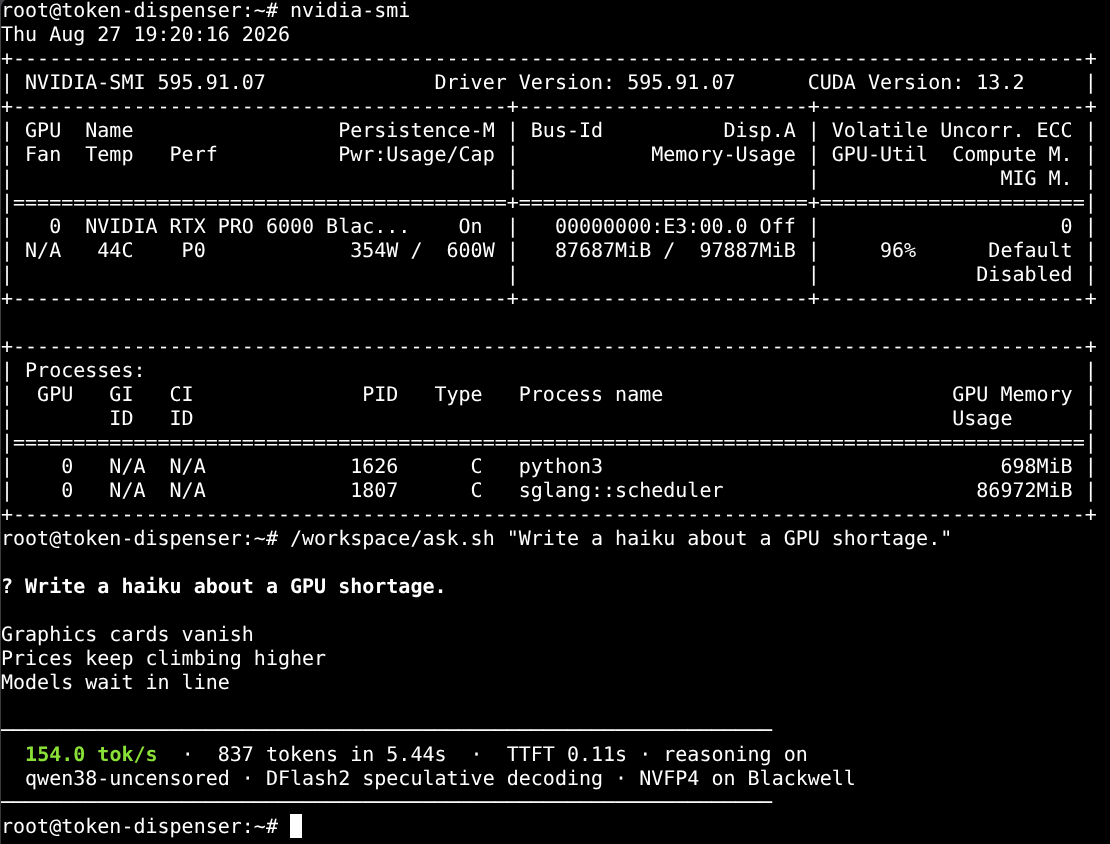
My current setup: Qwen 3.8 27B on a rented NVIDIA RTX PRO 6000 Blackwell at RunPod, started with one command, answering at around 150 tokens per second, and torn down again when I am done. The screenshot above is from a running pod. It wrote a haiku about the GPU shortage while occupying one of the GPUs in question.
Table of Contents
Good Enough Is Now Really Good
Let me get the opinion part out of the way first, because everything else depends on it.
After testing Qwen 3.8 on real work, my conclusion is: for the overwhelming majority of my everyday coding tasks, it is sufficient. Shell scripts, Ansible roles, Python tooling, refactoring, writing tests, explaining an unfamiliar codebase, fixing the thing that broke after a dependency update. That kind of work.
Today’s frontier models, such as Claude Opus 5.5 or GPT-6, still produce better results. I notice it on hard architectural questions, on long chains of reasoning across many files, and on problems where the first plausible answer is wrong. But for most of what I do on an ordinary Tuesday, the difference has stopped being relevant. The gap is real. It just no longer sits where most of my work happens.
That is a statement about my workload, not a benchmark. Your mileage will depend on what you build.
The Stack
I did not write this from scratch. The foundation is qwen38-runpod-stack by nicremo, MIT-licensed, which already solved most of the hard parts. I adapted it to my needs, more on that below.
The moving parts:
| Component | Choice |
|---|---|
| Model | Qwen3.8-27B, the huihui-ai abliterated variant, quantized to NVFP4 by sakamakismile |
| Inference server | SGLang, OpenAI-compatible API on port 8000 |
| Speculative decoding | DFlash2, using the incoai/Qwen3.8-27B-DFlash2 draft model |
| Context | 262,144 tokens |
| GPU | RTX PRO 6000 Blackwell Server Edition, 96 GB |
| Frontends | OpenWebUI on port 8080, or any OpenAI-compatible coding agent |
| Lifecycle | runpodctl, wrapped in a timer-enforcing shell script |
The base model is Apache 2.0. “Abliterated” means the weights were modified after training to suppress much of the model’s refusal behavior. The stack uses that build by default. If you prefer the stock alignment, --model accepts any NVFP4 checkpoint in the right format (see the trap below).
Why This Particular Card
Three things drive the GPU choice:
- NVFP4 needs Blackwell. The 4-bit floating point format runs on Blackwell’s FP4 tensor cores. An H100 or H200 does not have native FP4 tensor cores, so SGLang cannot use the Blackwell NVFP4 execution path and falls back to a different kernel path, no matter how expensive the card is per hour.
- 96 GB of VRAM. An RTX 5090 shares the same GB202 chip and similar memory bandwidth, but with 32 GB the context has to be cut down significantly. The PRO 6000 fits the full 262K context.
- It is the validated configuration. The SGLang cookbook for Qwen3.8-27B covers this card end to end.
In the screenshot, SGLang occupies about 87 GB of the 96 GB. Most of it is KV cache and state, reserved up front by --mem-fraction-static 0.85. The weights themselves are only about 20.6 GB, plus 3.8 GB for the draft model.
The Silent Trap: Mixed-Precision Checkpoints
This one is worth knowing even if you never touch RunPod. One commonly used abliterated NVFP4 build of this model uses the compressed-tensors format mixed-precision. SGLang loads such checkpoints completely unquantized, without a warning (sgl-project/sglang#32736). The model runs, the answers are fine, and the entire FP4 speedup is gone.
The stack therefore uses a uniform nvfp4-pack-quantized checkpoint. If your NVFP4 model feels as slow as BF16, check the format field in its config.json first.
One Command
Starting a session looks like this:
qwen38fast              # RTX PRO 6000, DFlash2, 4h window, OpenWebUI
qwen38fast 2h           # shorter window
qwen38fast --pi         # API only, no web UI, ready sooner
qwen38fast status       # what is running, current spend per hour
qwen38fast stop         # terminate everything
Under the hood, the script:
- Generates a random API key on the first run and stores it in
~/.runpod/qwen38.keywith mode0600. - Base64-encodes a bootstrap script and passes it, together with model ID, speculative decoding method, context length, and API key, as environment variables to a RunPod template.
- Creates the pod through
rp, arunpodctlwrapper that refuses to create a pod without a termination timer. - Waits until the API lists the model, then waits for OpenWebUI, then opens it in the browser.
Inside the pod, the bootstrap script downloads the weights from Hugging Face, writes an SGLang start script, and launches it:
exec /opt/sglang/bin/python3 -m sglang.launch_server \
  --model-path "$MODEL_PATH" \
  --served-model-name "$SERVED_NAME" \
  --context-length $MAX_LEN \
  --mem-fraction-static $MEM_FRAC \
  --attention-backend flashinfer \
  --reasoning-parser qwen3 \
  --tool-call-parser qwen3_coder \
  --mamba-full-memory-ratio $MAMBA_RATIO \
  --mamba-ssm-dtype float32 \
  --speculative-algorithm DFLASH \
  --speculative-draft-model-path incoai/Qwen3.8-27B-DFlash2 \
  --speculative-num-draft-tokens 8 \
  --api-key "$API_KEY" \
  --host 0.0.0.0 --port 8000
(Shortened. The real script assembles the speculative decoding flags depending on --spec.)
From qwen38fast to a usable model takes roughly 8 to 15 minutes. Most of that is the container image pull and 20 GB of weights. Not instant, but it fits comfortably into “start it, then read the ticket properly”.
How Fast Is Fast?
The numbers in the screenshot: 154 tokens per second, 837 tokens in 5.44 seconds, and 0.11 seconds to the first token, with reasoning enabled. Most of those 837 tokens were thinking. The haiku itself is short. It is also, I would argue, accurate.
The upstream project measured more systematically: an input of 8,192 tokens, 1,024 output tokens, a single stream, five runs after a warmup. The median was 150.7 tokens per second, with individual runs between 122 and 156.
For comparison, the same model on a MacBook Pro M2 Max manages around 14 tokens per second according to the upstream README. That is a perfectly usable chat speed. For an agent that reads twenty files, plans, edits, runs tests, and iterates, 14 tokens per second gets old quickly.
A substantial part of the speed comes from speculative decoding. A small draft model proposes several tokens ahead, and the large model verifies them in a single pass. The target model can verify several proposed tokens in a single step, and every accepted guess is a token it did not have to generate on its own. DFlash2 drafts eight tokens per step here. The draft model was trained on the base model, not on the abliterated one, so the accept rate is probably a bit below the cookbook figures. It is still the fastest of the three methods the stack supports.
At 150 tokens per second, the model is faster than I can read. In an agentic loop, the bottleneck shifts from token generation to everything else: running tests, waiting for compilers, and reading what the agent did.
Data Sovereignty: The Part I Care About Most
Speed is nice. Cost is nice. The real reason I bother with any of this is a different one.
When I run the inference server myself, I get to choose which infrastructure receives my data and which software handles it.
With a hosted model API, every prompt, every file the agent reads, and every snippet of proprietary code leaves infrastructure I operate the moment I press Enter. What happens next is governed by the provider’s terms of service, retention policies, abuse monitoring, and, depending on the plan, sometimes training opt-outs. Those may all be perfectly reasonable. But they are someone else’s decisions, enforced by someone else’s systems, and they can change.
With my own inference server, the picture changes:
- No separate model API provider sees my prompts. The infrastructure provider still sits underneath the workload, but there is no third-party inference API receiving, retaining, or moderating my requests.
- I choose the exact weights. The model is a specific checkpoint I selected. It does not get silently swapped, re-aligned, or deprecated overnight. If it behaves a certain way today, it behaves that way tomorrow.
- The lifecycle is mine. When I run
qwen38fast stop, the pod and its ephemeral container storage are deleted. I do not attach a persistent network volume, so OpenWebUI’s local chat history does not survive into my next session. - Access is mine. The API key is generated locally and only exists on my machine and in the pod.
- No dependency on a vendor’s API. No rate limits, no outage of a third-party API, no quota surprises halfway through a refactoring session.
A note on the elephant in the room, since Qwen comes from Alibaba: these are open weights. Running the model does not involve calling an Alibaba inference service. The checkpoint is just weights, loaded locally by SGLang on a GPU I rented. Like every model, Qwen reflects characteristics and biases of its training and alignment. For writing a systemd unit, I have not noticed any.
Where the Sovereignty Ends
I want to be honest here, because “self-hosted” on a rented GPU is not the same as self-hosted in my own rack.
RunPod is still the infrastructure provider. The pod runs on their platform, and anybody with root on the physical host could, in principle, inspect the container or GPU memory. I trust them more than I would trust an arbitrary endpoint. But I trust them as an infrastructure provider, not as a cryptographic guarantee.
The standard HTTPS endpoint goes through RunPod’s proxy. I access the service as https://<pod-id>-8000.proxy.runpod.net, so I do not treat that connection as end-to-end TLS terminating inside my container.
Community Cloud is not Secure Cloud. They have different infrastructure and compliance characteristics, and I treat Community Cloud as the less appropriate option for sensitive workloads. The script tries Community first because it is cheaper. Where policy permits the workload and its sensitivity warrants it, I select Secure Cloud explicitly:
RUNPOD_CLOUD=SECURE qwen38fast
The region is not pinned. The script currently takes whatever data center has a card available. For workloads that require EU data residency, pinning an EU data center would be the next step.
So I would place this setup on a ladder:
| Setup | Who sees your prompts | Effort | Cost model |
|---|---|---|---|
| Hosted model API | the API provider | none | per token |
| Rented GPU, own inference | the infrastructure provider, in principle | one script | per hour |
| Own hardware | no external infrastructure provider | considerable | upfront |
The middle rung is where I am. The point is not that RunPod becomes invisible. The point is that the questions about my data change from “what does this AI vendor do with my prompts?” to “do I trust this hosting provider?”. That is the same question I already answer for every VPS and cloud instance I run. I know how to evaluate it.
What It Costs
Prices from RunPod’s pricing page as of October 3, 2026, on-demand per hour:
| GPU | VRAM | Community Cloud | Secure Cloud |
|---|---|---|---|
| RTX 5090 | 32 GB | $0.69 | $0.99 |
| RTX PRO 6000 MIG slice | 48 GB | not offered | $1.09 |
| RTX PRO 6000 | 96 GB | $1.69 | $2.09 |
| B200 | 180 GB | $5.98 | $6.79 |
| B300 | 288 GB | $6.94 | $7.89 |
A typical four-hour session on the PRO 6000 costs $6.76 on Community Cloud or $8.36 on Secure Cloud. The 150 GB container disk adds a few cents at $0.10 per GB per month, prorated.
Running it eight hours a day, every working day, would add up to roughly $335 a month on Secure Cloud. That is not the point of this setup. I start it for focused coding sessions, and the timer ends it.
The half-card MIG slice at $1.09 per hour is the budget option I added. It offers roughly half the compute and half the memory bandwidth, so I expect a clearly lower decode speed, though not necessarily exactly half. The context is limited to 131,072 tokens because the KV cache for the full 262K does not fit next to the weights in 48 GB. I have not benchmarked it yet, but even half of 150 beats every laptop I own.
The Forgotten Pod Problem
Per-hour billing has one classic failure mode: the pod you forgot about. The upstream author learned it the hard way, with two idle pods running for 24 hours. The stack therefore has three layers:
--terminate-after: a server-side timer at RunPod. It fires even when my laptop is closed.rp: the wrapper that adds this timer to everypod create, and refuses to create a pod if it cannot calculate the deadline.runpod-reaper: a periodic job that terminates every pod older than one hour, unless its name starts withkeep-.rpadds that prefix automatically when the requested window is longer than one hour.
The third layer exists because the first one cannot be verified: runpodctl pod get does not show whether a termination timer was stored. Trust, but reap.
Frontier Architect, Open-Weight Builder
The workflow that has worked best for me combines both worlds.
A frontier model writes the specification. For a non-trivial change, I let Claude Opus 5.5 or a comparable model do what it is best at: understanding the problem, weighing the trade-offs, defining the architecture, and writing a precise spec with interfaces, edge cases, and acceptance criteria.
Qwen 3.8 implements it in an agentic loop. The spec goes to a coding agent backed by my own pod. It writes the code, runs the tests, reads the failures, and iterates until the acceptance criteria pass.
This works well for three reasons:
- The hard thinking happens once. The expensive model spends its tokens on the part where its advantage matters. The iterative grind of edit, test, fix, and repeat consumes most of the tokens in an agentic session, and that runs at a flat hourly rate.
- Speed compounds in loops. An agent makes many sequential calls. At 150 tokens per second with a 0.1 second time to first token, the iterations are short enough that I can watch the agent work instead of switching to something else.
- Less code leaves my environment. The frontier model sees the problem description and the parts of the codebase needed to design a solution. The full implementation loop, with every file the agent reads and every test output, stays on the pod. That is not zero exposure, but it is considerably less.
A good spec matters more here than with a frontier model doing the whole job. A 27B model executes a clear plan well. It is less good at noticing that the plan itself is wrong. That is precisely the division of labor.
What I Changed
Most of my work was not AI work at all. It was the familiar collection of portability bugs, lifecycle races, dependency collisions, and misleading diagnostics that appears whenever a useful prototype meets daily use. The upstream project is built for macOS, and I run Fedora. My changes, roughly in order of how much time they saved me:
Linux portability. BSD date -v +4H became GNU date -d "+4 hours" with a fallback, so the scripts work on both. open became xdg-open. The reaper runs as a systemd user timer instead of a LaunchAgent:
[Timer]
OnBootSec=5min
OnUnitActiveSec=10min
Persistent=true
A retry loop for scarce GPUs. Blackwell availability changes by the second. The same card type can be refused on one request and available on the next. The original script tried Community Cloud once, then Secure Cloud once, then gave up. Mine alternates between both for up to twelve attempts, 15 seconds apart, and suppresses the expected “no instances available” error message while it does.
Honest price output. The script used to print only the Community Cloud price. Since Community Cloud is exactly the pool that runs dry first, the price I actually paid was usually the Secure Cloud one. It now prints both.
The MIG option described above, --gpu mig48.
A bootstrap that does not depend on SSH. OpenWebUI caches the model list at startup, so it has to start after SGLang is ready. The original launcher solved that by connecting to the pod via SSH and restarting OpenWebUI. That never worked: the template overrides the container start command, so the image never started sshd, and the failed SSH call disappeared into /dev/null. The bootstrap script now waits for the API itself in a background subshell before starting OpenWebUI.
OpenWebUI in its own venv. Installing open-webui into SGLang’s Python environment pulls in dependencies that reinstall PyTorch and NCCL, which removed libnccl.so from underneath the running inference server. An isolated venv fixes that and allows OpenWebUI to install in parallel with the model download.
Faster downloads. hf_transfer is no longer used by current huggingface_hub versions, which only log a warning and fall back to the slow path. The bootstrap now uses hf_xet with HF_XET_HIGH_PERFORMANCE=1.
A network probe that measures the network. The original download check fetched config.json without following redirects and therefore measured the body of an HTTP 307 response. It reported 0.0 MB/s on perfectly healthy pods. The probe now requests a 20 MB range from the largest actual weight file and reports the HTTP status alongside the speed.
None of these are dramatic. Each one cost somewhere between ten minutes and an evening.
Conclusion
A year ago, I would have dismissed self-hosted models for serious coding. They were either too slow or too limited, usually both.
Today, a 27B open-weight model on a rented Blackwell GPU handles most of my daily work, at a speed faster than I can read, for the price of a decent lunch per session. And my prompts and my code go to infrastructure I selected and can reason about, instead of an API whose terms I merely accepted.
Frontier models still have their place, and I still use them. But “good enough” has quietly turned into “good”, and for a lot of my work, the question is no longer whether an open model can do it. The question is whether I want to send it somewhere else.
Mostly, I do not.