
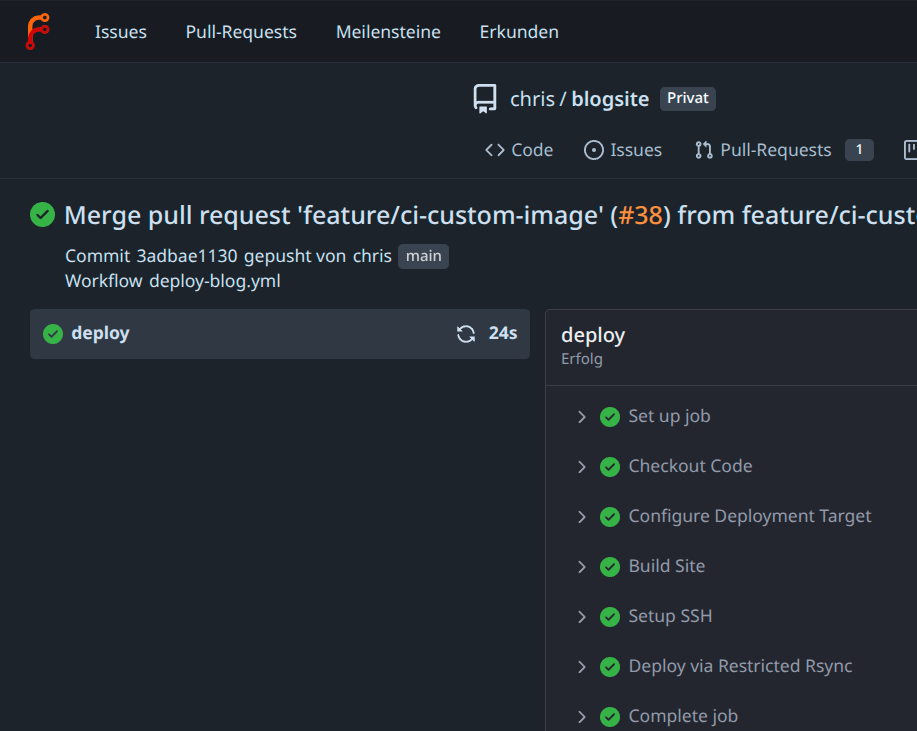
Every push to this blog triggers a Forgejo Actions pipeline that builds the site with Pelican, then deploys it via rsync. If you want the full picture of how this blog’s infrastructure works - Bastille jails, Caddy, the whole deployment chain - I covered that in an earlier article. The pipeline worked fine. But every single run started with the same ritual: apt-get update, install four system packages, pip install five Python packages. The actual build took seconds - the dependency installation took longer than the rest of the pipeline combined.
This is a solved problem in the container world. Instead of installing dependencies at runtime, bake them into the image. Here’s how I did it with Forgejo’s built-in container registry, keeping everything self-contained on a single Forgejo instance.
The Problem
My original workflow used python:3.11-slim as the CI container and installed everything from scratch on every run:
jobs:
  deploy:
    runs-on: docker
    container:
      image: python:3.11-slim
    steps:
      - name: Install Runtime Dependencies
        run: |
          apt-get update
          apt-get install -y nodejs rsync openssh-client git
          pip install pelican pelican-sitemap markdown typogrify
Every push - even a single typo fix - paid this tax. The install step alone accounted for the majority of the pipeline’s wall clock time.
The Fix: A Custom CI Image
The solution is a Containerfile that does the installation once, at image build time:
FROM python:3.11-slim

RUN apt-get update \
    && apt-get install -y --no-install-recommends \
       nodejs rsync openssh-client git \
    && rm -rf /var/lib/apt/lists/*

RUN pip install --no-cache-dir \
    pelican pelican-sitemap markdown typogrify
Nothing fancy. Same base image, same packages - just shifted from “every CI run” to “once, when I build the image”. The --no-install-recommends and --no-cache-dir flags keep the image lean.
Forgejo’s Built-in OCI Registry
Here’s the part that makes this particularly clean: Forgejo ships with a built-in OCI-compliant container registry. No need for Docker Hub, no need for a separate Harbor instance, no external dependency. Your CI images live right next to your code.
Build and push with Podman:
podman build -t git.example.com/youruser/yourrepo-ci:latest .
podman login git.example.com
podman push git.example.com/youruser/yourrepo-ci:latest
The image shows up under Packages in your Forgejo instance. Same authentication, same access control, same backup strategy as the rest of your Forgejo data.
Updating the Pipeline
With the image pushed, the workflow drops the install step entirely and pulls the pre-built image instead:
jobs:
  deploy:
    runs-on: docker
    container:
      image: git.example.com/youruser/yourrepo-ci:latest
      credentials:
        username: ${{ secrets.REGISTRY_USER }}
        password: ${{ secrets.REGISTRY_PASSWORD }}
    steps:
      - name: Checkout Code
        uses: actions/checkout@v3
        # ... rest of pipeline unchanged
The credentials block authenticates against the Forgejo registry. Store your registry username and an application token as repository secrets.
That’s the entire change. The install step is gone. The pipeline goes straight from image pull to checkout to build to deploy.
The Result
The dependency installation step disappeared completely. What used to be the slowest part of the pipeline is now a single container pull that Forgejo’s runner likely has cached locally after the first run. The actual build-and-deploy cycle is all that remains.
When to Rebuild
The trade-off is that you now maintain a container image. In practice, this is minimal overhead:
- Adding a Pelican plugin? Rebuild and push the image
- Upgrading Python packages? Rebuild and push
- System package update? Rebuild and push
For a blog pipeline, that’s maybe once a quarter. The ci-image/ directory lives in the same repository as the blog, so the Containerfile is versioned alongside everything else.
Takeaway
If your CI pipeline spends more time installing dependencies than doing actual work, build a custom image. If you’re already running Forgejo, you have a container registry sitting right there - use it. Two commits, one Containerfile, and the entire install step vanishes.
This is one of several small improvements I’ve been making to the blog over time. If you’re running a Pelican blog yourself, you might also be interested in how I added Fediverse-based comments without any server-side dependencies.
Comments
You can use your Mastodon or other ActivityPub account to comment on this article by replying to the associated post.
Search for the copied link on your Mastodon instance to reply.
Loading comments...