
- Sat 14 February 2026
- 7 min read
- Linux
- #linux, #rhel, #zfs, #rocky, #convert2rhel, #unsupported
Some experiments are born from necessity. Others from curiosity. This one was born from a Friday evening, a homelab VM with nothing to lose, and the thought: “I wonder if convert2rhel will just… let me do this.”
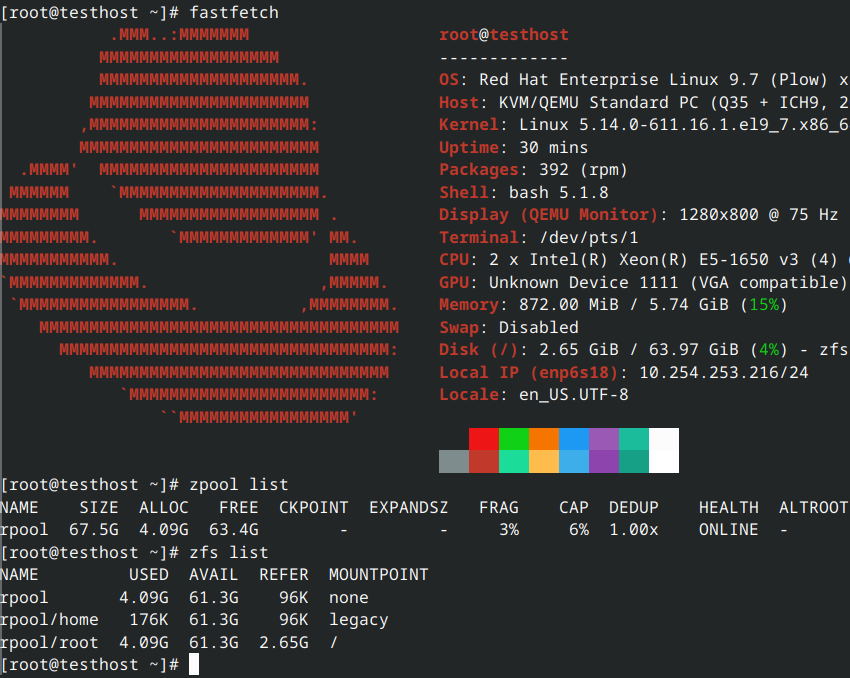
Let me be absolutely clear from the start: this is a terrible idea. Red Hat does not support ZFS on root. The supported solution in the RHEL ecosystem is Stratis. If you do this in production, you’re on your own. If you call Red Hat support with ZFS issues, they will politely suggest you reproduce the problem on a supported configuration before they even look at it.
This was purely an experiment for the lolz. Here’s what I did and why you shouldn’t.
The Proof It Works (For Now)
[root@testhost ~]# uname -a
Linux testhost 5.14.0-611.16.1.el9_7.x86_64 #1 SMP PREEMPT_DYNAMIC Sun Dec 7 05:52:24 EST 2025 x86_64 x86_64 x86_64 GNU/Linux

[root@testhost ~]# cat /etc/os-release
NAME="Red Hat Enterprise Linux"
VERSION="9.7 (Plow)"
ID="rhel"
ID_LIKE="fedora"
VERSION_ID="9.7"
PRETTY_NAME="Red Hat Enterprise Linux 9.7 (Plow)"

[root@testhost ~]# zpool list
NAME    SIZE  ALLOC   FREE  CKPOINT  EXPANDSZ   FRAG    CAP  DEDUP    HEALTH  ALTROOT
rpool  67.5G  4.09G  63.4G        -         -     3%     6%  1.00x    ONLINE  -

[root@testhost ~]# zfs list
NAME         USED  AVAIL  REFER  MOUNTPOINT
rpool       4.09G  61.3G    96K  none
rpool/home   176K  61.3G    96K  legacy
rpool/root  4.09G  61.3G  2.65G  /

[root@testhost ~]# lsmod | grep zfs
zfs                  7024640  8
spl                   217088  1 zfs

[root@testhost ~]# dmesg | grep zfs
[    1.466549] zfs: module license 'CDDL' taints kernel.
[    1.467131] zfs: module license taints kernel.
Yes, that’s genuine RHEL 9.7 running on a ZFS root pool. No, I don’t recommend it.
The How: A Tale of Two Bad Decisions
The path to this abomination was straightforward:
Step 1: Rocky Linux 9 on ZFS Root
Start with Rocky Linux 9 installed on ZFS root using the excellent OpenZFS documentation. This guide is well-maintained and produces a working system.
At this point, you have a perfectly functional Rocky Linux system with ZFS root. You could stop here. You should stop here. I did not stop here.
Step 2: Convert2RHEL (With Extreme Prejudice)
This is where things get cursed. Convert2RHEL is designed to convert CentOS, Rocky, or AlmaLinux systems to genuine RHEL. It performs extensive pre-flight checks to ensure the system is in a supported state before conversion.
ZFS root is very much not a supported state.
The tool correctly identified numerous problems:
- Non-standard bootloader configuration (rEFInd instead of GRUB in the usual location)
- Unexpected partition layout
- Missing dracut modules for standard setups
- Various “are you sure this is a real system?” sanity checks
The solution? Disable the checks. All of them. Every single one that stands between you and your bad decision.
convert2rhel --disable-submgr-checks --no-rpm-va \
    --disablerepo '*' --enablerepo rhel-9-for-x86_64-baseos-rpms \
    --enablerepo rhel-9-for-x86_64-appstream-rpms
That handles some of them. For the rest, I had to patch convert2rhel directly, commenting out validation functions that insisted on standard configurations. If you’ve ever edited a vendor tool’s source code to make it stop telling you “no,” you know the feeling. It’s the system administration equivalent of cutting the warning label off a mattress.
Step 3: Reboot and Pray
After the conversion completes, you need to manually clean up the remnants of the Rocky release packages. A few rpm -e invocations, some dnf distro-sync runs, and a quick check that the ZFS dracut modules are still intact in the initramfs. Nothing too dramatic.
Then comes the moment of truth. You type reboot, stare at the console, and wait.
The rEFInd menu appears. The kernel loads. ZFS imports the pool. Systemd starts doing its thing. And then - a login prompt. RHEL 9.7 on ZFS root, fully subscribed and receiving updates from Red Hat’s repositories. It actually worked.
I’m not going to pretend I wasn’t surprised.
Why This Is A Bad Idea
Let me count the ways:
No Support: Red Hat will not help you with ZFS issues. Period. The first thing support will ask is “can you reproduce this on a supported filesystem?”
Kernel Updates: ZFS is out-of-tree. Every kernel update triggers a DKMS rebuild of the ZFS modules. This usually works, but when it doesn’t, you’re debugging it yourself with no root filesystem.
Dracut Complexity: The initramfs needs ZFS modules and tools to mount the root pool. Any dracut configuration drift could leave you with an unbootable system.
Convert2RHEL Wasn’t Designed For This: By bypassing validation checks, you’re in uncharted territory. Future convert2rhel updates might break or refuse to run.
SELinux Contexts: ZFS supports xattrs (and xattr=sa is the default on Linux), so basic SELinux labeling works. But edge cases will bite you: dataset send/receive can lose security labels, full relabels are slow, and some ZFS operations don’t trigger the expected SELinux hooks. It mostly works, but “mostly” is doing a lot of heavy lifting in that sentence.
The Proper Solution: Stratis
If you want advanced storage features on RHEL, the supported path is Stratis. Stratis provides:
- Pool-based storage management
- Thin provisioning
- Snapshots
- Encryption support
- Full Red Hat support
Stratis uses device-mapper for thin provisioning and XFS as the filesystem layer, providing a modern storage management interface while staying within the supported stack. It’s what Red Hat engineers will recommend when you ask about advanced filesystem features.
To use Stratis on RHEL 9:
sudo dnf install stratisd stratis-cli
sudo systemctl enable --now stratisd
sudo stratis pool create mypool /dev/sdb
sudo stratis filesystem create mypool myfs
The resulting filesystem can then be added to /etc/fstab with the x-systemd.requires=stratisd.service mount option.
What Actually Works
Surprisingly, most things just work. Package updates from RHEL repositories install without complaint. Systemd services start and stop like they should. Networking, user management, firewalld - all blissfully unaware that they’re sitting on a filesystem Oracle has lawyers for. SELinux mostly cooperates too, since ZFS defaults to xattr=sa on Linux and handles standard labeling fine.
What Might Not Work
- Major version upgrades: Leapp (RHEL’s in-place upgrade tool) will absolutely not appreciate what you’ve done to this system. Going to RHEL 10 will require creative problem-solving, or more likely, a fresh install
- Rescue mode: RHEL’s rescue environments assume your root is on ext4 or XFS. Booting into rescue mode on a ZFS root system gives you a very unhelpful shell
- Automated diagnostics: Sosreport and friends expect
/to be on a filesystem they recognize. Some checks will simply fail or produce nonsense - Support tickets: “Can you reproduce this on a supported filesystem?” will be the response to every case you open
The Honest Assessment
This works because the Linux kernel doesn’t particularly care what filesystem holds /. As long as the initramfs can mount it and userspace can find its libraries, the system boots. ZFS is mature, well-tested software. It handles the filesystem layer just fine.
But “works” and “supported” are very different things. This configuration works today, will probably work tomorrow, and could break spectacularly on the next kernel update. I wouldn’t run anything I care about on it.
Conclusion
Red Hat Enterprise Linux on ZFS root is technically possible. It’s also a bad idea. I did it because I wanted to see if I could, and because Friday evenings in the homelab are for experiments that would get you fired if you tried them at work.
If you’re reading this thinking “I should try this” - do it on a VM you’re prepared to destroy. And maybe don’t mention it in your next job interview.
For everyone else: Stratis exists, it’s supported, and Red Hat engineers won’t quietly judge you for using it.
References
- OpenZFS: Root on ZFS for RHEL-based distros
- Convert2RHEL Documentation
- Stratis Storage Management
- Red Hat Stratis Documentation
My homelab VM didn’t deserve this treatment, but it got it anyway. The things we do for a blog post.
Comments
You can use your Mastodon or other ActivityPub account to comment on this article by replying to the associated post.
Search for the copied link on your Mastodon instance to reply.
Loading comments...