
- Mon 06 April 2026
- 17 min read
- FreeBSD
- #freebsd, #podman, #containers, #oci, #jails, #linuxulator, #docker
My previous article covered Podman in depth on Linux - Quadlets, systemd integration, secrets management, auto-updates. That article was explicitly a Linux story. But Podman also runs on FreeBSD, and the experience is different enough to deserve its own treatment.
FreeBSD’s Podman support has been maturing steadily. The FreeBSD port is current and actively maintained, with a dedicated port maintainer who participates in upstream Podman development. That said, the port is still labeled experimental and intended for evaluation and testing - so treat it as a powerful option with some rough edges rather than a drop-in Linux-equivalent experience. The absence of systemd changes the operational model fundamentally. There are no Quadlets, no systemd timers, no journald integration. What you get instead is Podman’s core container runtime integrated with FreeBSD’s own service management, and the ability to run both native FreeBSD containers and Linux containers side by side.
Table of Contents
Installing Podman on FreeBSD
Podman is available in the FreeBSD ports tree and as a binary package:
pkg install podman
There’s also a podman-suite meta package that pulls in additional tooling (Buildah, Skopeo) if you need a more complete container workflow.
This pulls in the Podman binary, its dependencies, and the necessary OCI runtime components. On FreeBSD, Podman relies on FreeBSD-specific runtime support, typically involving ocijail - a FreeBSD-native OCI runtime that leverages jails under the hood to provide the container isolation boundary, rather than runc or crun from the Linux world. Container data lives under /var/db/containers/ by default (not /var/lib/containers/ as on Linux).
Prerequisites
Before Podman will work, you need two things beyond the package itself: fdescfs and PF.
fdescfs - Podman’s container monitor (conmon) needs fdescfs(5) mounted on /dev/fd to properly support container restart policies. If it’s not already mounted:
mount -t fdescfs fdesc /dev/fd
Make it permanent in /etc/fstab:
fdesc /dev/fd fdescfs rw 0 0
PF firewall - Container networking relies on NAT to route container traffic out to the host’s network. This requires PF. The Podman package ships a sample configuration:
cp /usr/local/etc/containers/pf.conf.sample /etc/pf.conf
Edit /etc/pf.conf and set the v4egress_if and v6egress_if variables to your network interface(s), then enable PF:
sysrc pf_enable=YES
service pf start
To support port redirections from the host to services inside containers (e.g., podman run -p 8080:80), you also need the pf kernel module loaded and local filtering enabled:
echo 'pf_load="YES"' >> /boot/loader.conf
kldload pf
sysctl net.pf.filter_local=1
echo 'net.pf.filter_local=1' >> /etc/sysctl.conf.local
service pf restart
The sample PF configuration includes the necessary nat-anchor "cni-rdr/*" rule for redirect support. If you’re integrating into an existing PF ruleset rather than using the sample, make sure that anchor is present.
Storage - If your system uses ZFS (and it should), create a dedicated dataset for Podman:
zfs create -o mountpoint=/var/db/containers zroot/containers
If ZFS is not available, change the storage driver to vfs in /usr/local/etc/containers/storage.conf:
sed -I .bak -e 's/driver = "zfs"/driver = "vfs"/' /usr/local/etc/containers/storage.conf
Enabling the Service
The FreeBSD ports package includes rc.d integration for Podman and its API/socket service:
sysrc podman_enable=YES
service podman start
The API/socket service is particularly useful when you need Docker-compatible socket access or API-driven tooling (like Traefik’s Docker provider or CI runners). The daemonless-vs-service story on FreeBSD is less clean-cut than the usual Linux Podman model - the FreeBSD port exposes distinct service knobs like podman_enable and podman_service_enable, and the exact role of the service in local CLI operations depends on your configuration. When in doubt, enable it.
Verification
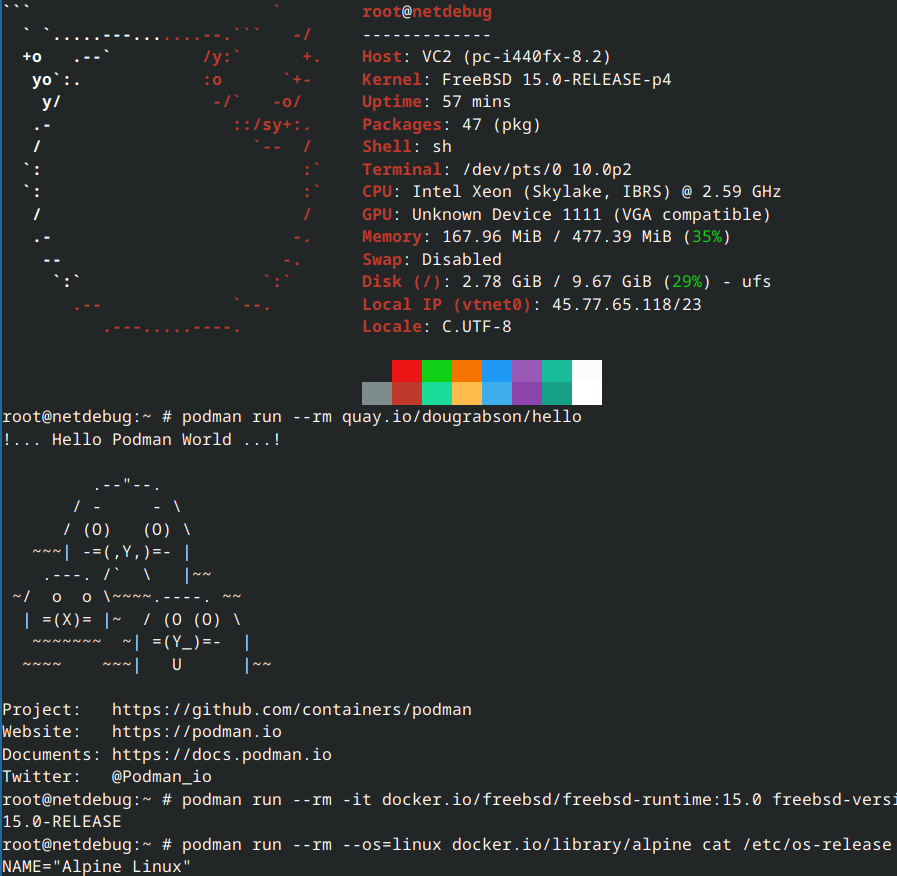
With everything in place, verify with the Podman hello-world image:
podman run --rm quay.io/dougrabson/hello
If you see the Podman mascot, you’re good.
Native FreeBSD OCI Containers
This is the part that surprises people: Podman on FreeBSD can run containers built from native FreeBSD base images. These aren’t Linux containers running through a compatibility layer - they’re actual FreeBSD userland processes running in jail-based isolation.
The FreeBSD community maintains OCI images specifically for this purpose:
$ podman run --rm -it docker.io/freebsd/freebsd-runtime:15.0 freebsd-version -u
15.0-RELEASE
Inside that container, you’re in FreeBSD userland - freebsd-version reports a real FreeBSD release, and standard FreeBSD tooling works as you’d expect from the image contents. You can build and run FreeBSD software natively, with OCI image packaging and distribution.
Available base images include:
freebsd/freebsd-runtime- minimal FreeBSD userland, suitable for running pre-built binariesfreebsd/freebsd- fuller base with development tools, suitable for building software inside the container
You can build your own FreeBSD OCI images with a standard Containerfile:
FROM docker.io/freebsd/freebsd-runtime:15.0

RUN pkg install -y nginx
COPY nginx.conf /usr/local/etc/nginx/nginx.conf
EXPOSE 80

CMD ["nginx", "-g", "daemon off;"]
Build and run it like any OCI image:
podman build -t my-freebsd-nginx .
podman run -d -p 8080:80 my-freebsd-nginx
This is native performance - no emulation, no translation layer. The container process runs as a FreeBSD process inside a jail, with OCI-standard image packaging on top.
Linux Containers via the Linuxulator
FreeBSD’s Linux binary compatibility layer (the Linuxulator) extends to Podman. With linux64.ko loaded, Podman can run Linux OCI images - the same images you’d pull from Docker Hub for any Linux-based deployment.
Prerequisites
Load the Linux kernel module on the host:
# Persistent across reboots
sysrc linux_enable=YES
echo 'linux64_load="YES"' >> /boot/loader.conf

# Load immediately
kldload linux64
If you’ve followed my Factorio on FreeBSD article, this is the same Linuxulator setup - just applied to OCI containers instead of standalone binaries.
Running Linux Images
With the Linuxulator loaded, pulling and running Linux images works as you’d expect:
$ podman run --rm --os=linux docker.io/library/alpine cat /etc/os-release | head -1
NAME="Alpine Linux"
The --os=linux flag tells Podman to select the Linux variant of a multi-platform image. Inside the container, the process sees a Linux environment - glibc calls work, Linux-specific syscalls are translated by the Linuxulator.
This means many Linux-oriented OCI images can run on FreeBSD without modification, especially userland-heavy workloads that don’t depend on Linux-specific kernel facilities. Your existing application server images, many database images, and standard web tooling are good candidates.
Limitations
One important practical difference from Linux is that current FreeBSD Podman deployments are typically run as root. Rootless Podman is not part of the FreeBSD workflow today, so the threat model is different from Linux setups where rootless operation is a major security feature.
The Linuxulator itself is remarkably complete, but it’s not perfect:
- Syscall coverage: The Linuxulator implements a large subset of Linux syscalls, but some less common ones may be missing. Most mainstream software works fine; highly Linux-specific tools (those that depend on cgroups v2 internals, eBPF, or kernel-specific
/procand/sysinterfaces) may not. - Performance: Native FreeBSD containers have zero translation overhead. Linux containers go through the Linuxulator’s syscall translation, which adds some overhead - negligible for I/O-bound workloads, potentially noticeable for syscall-heavy applications.
- Kernel features: Linux containers on FreeBSD don’t have access to Linux-specific kernel features like cgroups (FreeBSD uses its own resource limiting via
rctl), seccomp, or kernel namespaces. Isolation is provided by FreeBSD jails instead.
Container Lifecycle Without systemd
Here’s where the operational model diverges most from Linux. On Linux, Quadlets turn containers into systemd services with dependency management, restart policies, logging integration, and boot startup - all through the init system. FreeBSD doesn’t have systemd, so none of that exists.
Instead, you have two approaches.
Podman’s Built-in Restart Policy
The simplest method. Podman’s --restart flag works on FreeBSD just as it does on Linux:
podman run -d \
    --name my-app \
    --restart always \
    -p 8080:80 \
    docker.io/library/nginx:latest
With podman_enable=YES in /etc/rc.conf, the Podman service starts at boot, and containers with --restart=always are automatically restarted. This gives you basic lifecycle management without writing any service scripts.
The restart policies are the same as Docker’s:
| Policy | Behavior |
|---|---|
no |
Never restart (default) |
always |
Always restart, including at boot |
on-failure[:max] |
Restart on non-zero exit, optional retry limit |
unless-stopped |
Like always, but not if manually stopped |
For simple deployments, this is often sufficient. The container starts at boot, restarts on crash, and Podman handles the lifecycle.
rc.d Service Scripts
For more control - dependency ordering, custom health checks, integration with FreeBSD’s service framework - write an rc.d script. This is FreeBSD’s native equivalent of a systemd unit file:
#!/bin/sh

# PROVIDE: myapp
# REQUIRE: DAEMON podman
# KEYWORD: shutdown

. /etc/rc.subr

name="myapp"
rcvar=myapp_enable

load_rc_config $name

: ${myapp_enable:="NO"}
: ${myapp_image:="docker.io/library/nginx:latest"}
: ${myapp_name:="myapp"}

start_cmd="${name}_start"
stop_cmd="${name}_stop"
status_cmd="${name}_status"

myapp_start()
{
    echo "Starting ${name}."
    # Clean up any orphaned container from a dirty shutdown
    podman rm -f ${myapp_name} 2>/dev/null || true

    podman run -d \
        --name ${myapp_name} \
        --restart on-failure:5 \
        -p 8080:80 \
        ${myapp_image}
}

myapp_stop()
{
    echo "Stopping ${name}."
    podman stop ${myapp_name}
    podman rm ${myapp_name}
}

myapp_status()
{
    podman inspect --format '{{.State.Status}}' ${myapp_name} 2>/dev/null || \
        echo "${name} is not running."
}

run_rc_command "$1"
Save this as /usr/local/etc/rc.d/myapp, make it executable, and enable it:
chmod +x /usr/local/etc/rc.d/myapp
sysrc myapp_enable=YES
service myapp start
The # REQUIRE: DAEMON podman line ensures the Podman service is running before your container starts. You can chain dependencies between container services the same way:
# In your database service script
# PROVIDE: myapp_db
# REQUIRE: DAEMON podman

# In your application service script
# PROVIDE: myapp_web
# REQUIRE: myapp_db
This gives you explicit startup ordering through FreeBSD’s rcorder system - the same mechanism that orders every other service on the system.
What You Lose Without Quadlets
Let’s be direct about the trade-offs. Compared to the Quadlet workflow on Linux:
| Capability | Linux (Quadlets) | FreeBSD (rc.d / restart policy) |
|---|---|---|
| Declarative container definition | .container files |
podman run flags in scripts |
| Dependency management | systemd After=, Requires= |
rcorder REQUIRE: |
| Log integration | journald via journalctl -u |
stdout/stderr to files, or syslog |
| Auto-updates | podman auto-update with systemd timer |
Custom scripting (pull + recreate via cron) |
| Health checks driving restarts | HealthOnFailure=stop + systemd restart |
Custom scripting |
| Resource limits | systemd cgroup directives | rctl rules on the jail |
| Secrets injection | Secret= directive |
podman secret CLI (works the same) |
The Quadlet workflow is genuinely more ergonomic for complex multi-container deployments. FreeBSD’s approach requires more manual wiring. But it’s the same tools FreeBSD administrators already use for everything else on the system - rc.d, cron, rctl - so the operational patterns are familiar even if they’re less integrated.
Logging
Without journald, container logs go to Podman’s log driver. By default, Podman stores logs per container under its local container storage. You access them the usual way:
podman logs -f my-app
For centralized logging, configure the syslog log driver:
podman run -d \
    --log-driver syslog \
    --log-opt syslog-facility=local0 \
    --name my-app \
    docker.io/library/nginx:latest
This sends container output to FreeBSD’s syslogd, where it integrates with your existing log infrastructure - rotation via newsyslog.conf, forwarding to a central syslog server, or whatever your setup uses.
Image Updates
Podman’s documented auto-update workflow is systemd-centric - it’s designed for containers running inside systemd units, and after pulling a newer image it restarts the systemd unit managing the container. The timer that triggers the check is only one piece; the restart/recreation mechanism itself depends on systemd. That entire chain doesn’t exist on FreeBSD.
What you can do is script the image refresh and container recreation yourself. A cron job can check for newer images and log the results:
# /etc/cron.d/podman-image-refresh
0 4 * * * root /usr/local/sbin/podman-refresh.sh 2>&1 | logger -t podman-refresh
But unlike the Linux auto-update flow, you need to handle the restart and recreation step yourself - pulling the new image, stopping the old container, and starting a fresh one with the updated image. A simple approach:
#!/bin/sh
# /usr/local/sbin/podman-refresh.sh
for name in traefik myapp; do
    image=$(podman inspect --format '{{.ImageName}}' "$name" 2>/dev/null) || continue
    if podman pull "$image" | grep -q "Writing manifest"; then
        podman stop "$name"
        podman rm "$name"
        # Re-create via your rc.d script or however the container is defined
        service "$name" start
    fi
done
This is more manual than the Linux Quadlet auto-update experience, and it requires that your rc.d scripts or startup commands can fully recreate the container from scratch. It’s operational overhead worth acknowledging: on Linux, Podman and systemd handle this loop for you; on FreeBSD, you own it.
Podman and Jails: Complementary, Not Competing
This is the important framing. FreeBSD already has the most mature OS-level container technology in existence: Jails. They’ve been around since FreeBSD 4.0, they provide kernel-enforced isolation, and they’re deeply integrated with the rest of the operating system. So why would you want Podman?
The answer isn’t “Podman is better than Jails.” It’s that they solve different problems:
Jails are FreeBSD’s native isolation primitive. A jail is essentially a lightweight FreeBSD instance with its own filesystem, network stack, process space, and user database. Jails are ideal for:
- Long-lived services that you build and maintain yourself
- Workloads that benefit from direct access to FreeBSD’s kernel features (ZFS, PF,
rctl, DTrace) - Environments where you want full FreeBSD package management inside the isolated environment
- Multi-tenant hosting where each tenant gets a complete FreeBSD environment
Podman brings OCI container compatibility. It’s ideal for:
- Running third-party software distributed as OCI/Docker images without repackaging
- Linux-only applications that have no FreeBSD port (via the Linuxulator)
- Workflows that already use Dockerfiles and container registries
- CI/CD pipelines that produce OCI images as artifacts
- Development environments that need to match Linux production targets
The practical scenario: you run your core infrastructure - your reverse proxy, your databases, your custom applications - in Jails, managed by Bastille or your preferred jail manager, with ZFS snapshots, VNET networking, and PF firewall rules. Then a project requires a specific application that’s only distributed as a Docker image, or your CI pipeline produces OCI images that need to run somewhere. Instead of setting up a Linux VM or wrestling with ports and dependencies, you run that image with Podman. The Jail handles what Jails do best; Podman handles what the OCI ecosystem does best.
In theory, Podman-inside-a-Jail sounds attractive for defense in depth, but I would treat it as experimental at best rather than a recommended deployment pattern.
# Create a jail for container workloads
bastille create containers 14.3-RELEASE 10.254.252.50 bastille0

# Install Podman inside the jail
bastille pkg containers install podman

# Enable and start Podman inside the jail
bastille sysrc containers podman_enable=YES
bastille service containers podman start

# Run OCI containers inside the jail
bastille cmd containers podman run -d --name myapp docker.io/library/nginx:latest
This gives you defense-in-depth: the jail provides network isolation and resource limits at the FreeBSD kernel level, while Podman handles the OCI runtime inside.
Practical Tips
Networking
Podman networking on FreeBSD follows the same broad model as on Linux - user-defined networks, container name resolution, and host port publishing - but the backend may differ by port version and build configuration. Current FreeBSD ports have been observed using CNI rather than netavark. Check what your install is using with podman info:
podman info --format '{{.Host.NetworkBackend}}'
Regardless of backend, the operational patterns are the same:
# Create a network
podman network create mynet

# Run containers on that network
podman run -d --network mynet --name db postgres:17
podman run -d --network mynet --name app myapp:latest
DNS resolution between containers on the same network works by container name.
Remember that all of this depends on the PF setup from the installation section. Without PF doing NAT, container traffic has no route out of the container network. Port redirections (-p flag) flow through the cni-rdr PF anchors. If you’re already running PF with your own ruleset (and you probably are if you’ve read my PF guide), integrate the Podman anchors into your existing configuration rather than replacing it with the sample file.
Storage
With the ZFS dataset from the installation section in place, Podman automatically uses the ZFS storage driver. This is one area where Podman on FreeBSD genuinely outshines the Linux experience: instead of fighting with overlayfs quirks or fuse-overlayfs for rootless setups, Podman creates real ZFS datasets for container image layers. You get copy-on-write, compression, checksumming, and snapshot support for free, all backed by the same storage stack you’re already using for everything else on the system. You can snapshot the entire container storage tree, roll back after a bad update, or send it to another host with zfs send - all operations that feel natural on FreeBSD and awkward on Linux.
Secrets
Podman’s secret store works identically on FreeBSD:
pwgen -s 32 1 | tr -d '\n' | podman secret create db_password -
podman run -d --secret db_password,type=env,target=DB_PASS myapp:latest
No differences here - the secrets management story from the Linux article applies as-is.
When to Use What
| Scenario | Recommended approach |
|---|---|
| Custom FreeBSD service, full OS access needed | Jail |
| Third-party app only available as Docker image | Podman |
| Linux-only software with no FreeBSD port | Podman + Linuxulator |
| Multi-tenant isolation with independent networks | Jail (VNET) |
| CI/CD pipeline producing OCI artifacts | Podman |
| Database with ZFS snapshots for backup | Jail (direct ZFS access) |
| Development parity with Linux production | Podman + Linux containers |
| Mix of both needs | Podman inside a Jail |
Wrapping Up
Podman on FreeBSD isn’t trying to replace Jails. It’s filling a gap that Jails were never designed to fill: compatibility with the OCI container ecosystem. The ability to podman pull an image from Docker Hub and run it on FreeBSD - whether it’s a native FreeBSD image or a Linux image through the Linuxulator - means you don’t have to choose between FreeBSD’s operational model and the container ecosystem.
The operational workflow is less polished than on Linux. Without systemd, you lose Quadlets and the tight init-system integration that makes Podman on Linux so compelling. But what you get in return is Podman integrated with FreeBSD’s own tools: rc.d for service management, cron for scheduling, rctl for resource limits, PF for network policy, ZFS for storage. Different tools, same result.
If you’re running FreeBSD and you’ve been eyeing the OCI ecosystem from the outside, Podman is your bridge in.
References
- Podman Installation: FreeBSD - official installation guide
- Podman on FreeBSD - containers/podman Wiki
- FreeBSD OCI Images
- FreeBSD Handbook: Linux Binary Compatibility
- ocijail - FreeBSD OCI Runtime
- Podman in Production: Quadlets, Secrets, Auto-Updates, and Docker Compatibility - the Linux-focused companion article
- FreeBSD Foundationals: Jails - deep dive into FreeBSD’s native isolation
- Running Factorio on FreeBSD with the Linuxulator - another Linuxulator use case
Comments
You can use your Mastodon or other ActivityPub account to comment on this article by replying to the associated post.
Search for the copied link on your Mastodon instance to reply.
Loading comments...