
FreeBSD jails are elegant isolation containers, but managing them with Ansible has traditionally required either running SSH daemons inside each jail or using awkward workarounds. The jailexec connection plugin solves this by connecting to the jail host via SSH and using jexec to execute commands inside jails - just like you would manually.
The Problem with Jail Management
When automating FreeBSD jail infrastructure, you face a choice:
- Run SSH in every jail - Works, but defeats much of the security benefit of jails and adds management overhead
- Use the
jailconnection plugin - Requires Ansible to run directly on the jail host, limiting remote management - Manual jexec wrapper scripts - Brittle, hard to maintain, and doesn’t integrate cleanly with Ansible’s ecosystem
What I wanted was simple: SSH to my jail host, then use jexec to run commands inside any jail. That’s exactly what the jailexec plugin does.
How It Works
The plugin extends Ansible’s SSH connection to create a two-hop execution model:
[ Control Machine ] --SSH--> [ Jail Host ] --jexec--> [ Jail ]
When you run an Ansible task against a jail:
- The plugin establishes an SSH connection to the jail host
- Commands are wrapped with privilege escalation (
doasorsudo) andjexec - Output is captured and returned to Ansible as if running directly in the jail
- File transfers use a two-stage process: upload to the host, then move into the jail’s filesystem
This means your jails don’t need SSH or any additional services - just a working FreeBSD environment.
Installation
The plugin is a single Python file. Drop it into your Ansible plugins directory:
# User-specific installation
mkdir -p ~/.ansible/plugins/connection/
curl -o jailexec.py https://raw.githubusercontent.com/chofstede/ansible_jailexec/main/jailexec.py
mv jailexec.py ~/.ansible/plugins/connection/

# Or project-specific
mkdir -p connection_plugins/
cp jailexec.py connection_plugins/
For project-specific installation, add to your ansible.cfg:
[defaults]
connection_plugins = ./connection_plugins
Inventory Configuration
The key difference from standard Ansible inventory is specifying the jail host separately from the jail itself:
[freebsd_hosts]
jail-host.example.com ansible_connection=ssh ansible_user=ansible ansible_port=22

[freebsd_jails]
web-jail    ansible_connection=jailexec  ansible_jail_host=jail-host.example.com ansible_user=ansible
db-jail     ansible_connection=jailexec  ansible_jail_host=jail-host.example.com ansible_user=ansible
app-jail    ansible_connection=jailexec  ansible_jail_host=jail-host.example.com ansible_user=ansible
The inventory hostname becomes the jail name by default. SSH authentication settings are inherited from your SSH configuration or can be specified per-host.
Configuration Variables
| Variable | Default | Description |
|---|---|---|
ansible_jail_host |
(required) | FreeBSD host running the jails |
ansible_jail_name |
inventory_hostname | Override jail name |
ansible_jail_user |
root |
User for command execution in jail |
ansible_jail_privilege_escalation |
doas |
Privilege escalation method |
ansible_jail_remote_tmp |
/tmp/.ansible/tmp |
Temporary directory path |
Jail Host Setup
The SSH user on your jail host needs privilege escalation configured for jail management commands. I recommend doas for its simplicity:
# Install doas
pkg install doas

# Configure /usr/local/etc/doas.conf
permit nopass ansible as root cmd jls
permit nopass ansible as root cmd jexec
permit nopass ansible as root cmd mkdir
permit nopass ansible as root cmd mv
permit nopass ansible as root cmd rm
For sudo, the equivalent in /usr/local/etc/sudoers:
ansible ALL=(root) NOPASSWD: /usr/sbin/jls, /usr/sbin/jexec, /bin/mkdir, /bin/mv, /bin/rm
Basic Usage
Test connectivity:
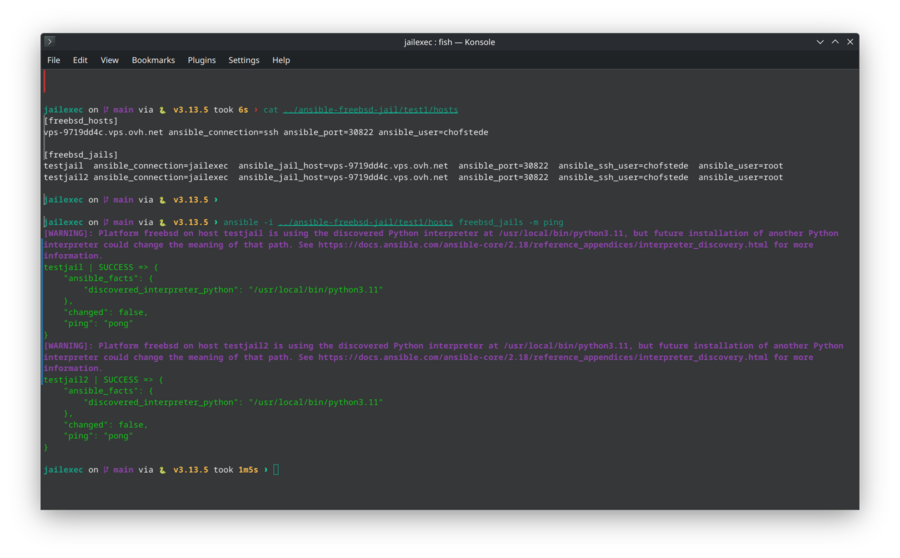
ansible -i hosts.ini freebsd_jails -m ping
Expected output:
web-jail | SUCCESS => {
    "changed": false,
    "ping": "pong"
}
Run commands inside jails:
# Check FreeBSD version in all jails
ansible -i hosts.ini freebsd_jails -m command -a "freebsd-version"

# Install packages
ansible -i hosts.ini freebsd_jails -m community.general.pkgng -a "name=nginx state=present"
Example Playbook
A typical playbook for configuring a web server jail:
---
- name: Configure web server jail
  hosts: web-jail
  connection: jailexec
  become: true

  tasks:
    - name: Install nginx
      community.general.pkgng:
        name: nginx
        state: present

    - name: Copy nginx configuration
      ansible.builtin.copy:
        src: files/nginx.conf
        dest: /usr/local/etc/nginx/nginx.conf
        owner: root
        group: wheel
        mode: '0644'
      notify: restart nginx

    - name: Enable and start nginx
      ansible.builtin.service:
        name: nginx
        state: started
        enabled: true

  handlers:
    - name: restart nginx
      ansible.builtin.service:
        name: nginx
        state: restarted
Multi-Environment Inventory
For more complex setups with multiple jail hosts:
[production_jails]
prod-web-01   ansible_connection=jailexec  ansible_jail_host=prod-host-01.example.com
prod-web-02   ansible_connection=jailexec  ansible_jail_host=prod-host-02.example.com
prod-db-01    ansible_connection=jailexec  ansible_jail_host=prod-host-01.example.com  ansible_jail_user=postgres

[staging_jails]
stage-web     ansible_connection=jailexec  ansible_jail_host=stage-host.example.com
stage-db      ansible_connection=jailexec  ansible_jail_host=stage-host.example.com

[all_jails:children]
production_jails
staging_jails
Security Design
The plugin implements several security measures:
Input validation: Jail names are validated against FreeBSD naming conventions. Path traversal attempts (..) and shell injection patterns are blocked.
Two-stage file transfers: Files are first uploaded to a temporary location the SSH user can access, then moved into the jail using privilege escalation. This prevents direct writes to privileged paths.
Secure temporary files: Temporary files use mode 600 and are cleaned up on failure.
Connection reuse: SSH connections are pooled, reducing authentication overhead and exposure.
Privilege escalation control: You choose between doas or sudo, and can lock down exactly which commands are permitted.
Troubleshooting
Enable verbose output for debugging:
# Maximum verbosity
ansible -vvv -i hosts.ini freebsd_jails -m ping

# With Ansible debugging
ANSIBLE_DEBUG=1 ansible -vvv -i hosts.ini freebsd_jails -m ping
Common Issues
“No jail host specified” Add ansible_jail_host=your-host.example.com to your inventory.
“Permission denied accessing jail” Verify doas/sudo configuration. Test manually on the jail host:
doas jls
doas jexec web-jail /bin/sh -c "id"
“Jail ‘name’ not found” Check that the jail is running:
jls
service jail onestart web-jail
File transfer failures
Verify the SSH user can write to /tmp on the jail host and that disk space is available.
Future Development
The plugin is actively maintained. Potential future additions:
- Ansible Collection packaging for easier distribution
- Support for jail templates and cloning operations
- Parallel execution optimizations
Contributions are welcome on GitHub or Codeberg.
Conclusion
The jailexec plugin fills a gap in FreeBSD automation tooling. It brings proper Ansible support to jail management without compromising the security benefits of running minimal jail environments.
If you’re managing FreeBSD jails at any scale, this plugin lets you treat them as first-class Ansible targets - the same playbooks, roles, and patterns you use everywhere else, now working seamlessly with FreeBSD’s native containerization.