
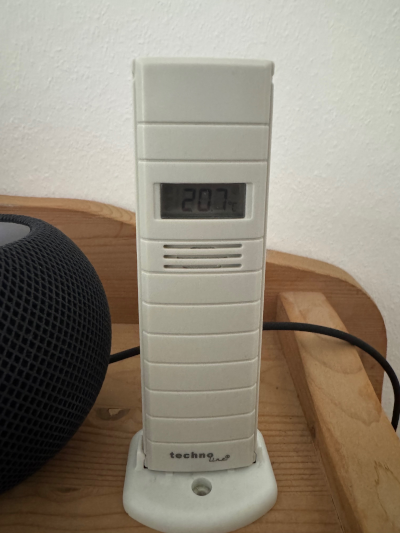
Home Assistant runs great inside a bhyve VM on FreeBSD, but USB passthrough into bhyve is not straightforward. When I needed to integrate a ConBee II Zigbee dongle, the solution was to run zigbee2mqtt inside a FreeBSD jail - where USB devices can be exposed via devfs rules - and forward everything over MQTT. This same pattern turns out to work perfectly for other USB receivers, like the JeeLink with its legacy LaCrosse temperature and humidity sensors.
The JeeLink is a small USB stick with an RFM12B radio module running the LaCrosseITPlusReader sketch. It picks up transmissions from LaCrosse TX-series sensors on 868 MHz, decodes them, and outputs the raw data over a serial port. All we need is a small bridge script that reads the serial data and publishes it to MQTT.
The Stack
[ LaCrosse TX sensors ]
        |  868 MHz
        v
[ JeeLink USB (FT232R) ] --> /dev/cuaU1
        |
        v
[ FreeBSD Jail ]
  lacrosse2mqtt.py
        |  MQTT
        v
[ Mosquitto Broker ]
        |
        v
[ Home Assistant (bhyve VM) ]
The jail already exists for zigbee2mqtt, so adding a second serial device and a Python script is minimal additional overhead.
Identifying the Device
FreeBSD recognizes the JeeLink’s FTDI chip out of the box:
usbconfig list
ugen0.4: <FT232 Serial (UART) IC Future Technology Devices International, Ltd> at usbus0
The kernel attaches it via the uftdi driver, which maps to a /dev/cuaU* serial device. If you already have another USB serial device (like a Zigbee dongle on /dev/cuaU0), the JeeLink will appear as /dev/cuaU1.
Passing the Device into the Jail
In /etc/devfs.rules, extend the jail’s ruleset to include the new serial port:
[devfsrules_jail_z2m=10]
add include $devfsrules_hide_all
add include $devfsrules_unhide_login
add path 'cuaU0' unhide
add path 'cuaU1' unhide
add path 'ugen*' unhide
The jail configuration in /etc/jail.conf references this ruleset:
z2m {
    # ... other settings ...
    devfs_ruleset = 10;
    enforce_statfs = 1;
    allow.mount.devfs;
}
Restart the jail for the new device to appear inside it.
Verifying the Serial Connection
Inside the jail, use cu to confirm the JeeLink is transmitting and the baud rate is correct. The LaCrosseITPlusReader sketch runs at 57600 baud:
cu -l /dev/cuaU1 -s 57600
If everything is working, you’ll see a header line followed by sensor readings:
[LaCrosseITPlusReader.10.1s (RFM12B f:868300 r:17241)]
OK 9 8 1 4 22 106
OK 9 44 129 4 182 52
Exit cu with ~. and move on. If you see garbage, double-check the baud rate - this was by far the most common cause of confusion during my setup.
Decoding the Data Format
Each OK 9 line from the JeeLink represents a sensor reading:
OK 9 <ID> <flags> <temp_high> <temp_low> <humidity>
Temperature is a 16-bit value divided by 10, offset by 100:
temp = (temp_high * 256 + temp_low) / 10.0 - 100.0
For example, bytes 4 182 decode to (4 * 256 + 182) / 10.0 - 100.0 = 20.6°C.
Humidity is the raw byte value in percent. A value of 52 means 52% relative humidity.
Flags encode battery status: bit 7 (0x80) indicates a new battery was just inserted, bit 0 (0x01) signals a weak battery.
The Bridge Script
Install the dependencies inside the jail:
pkg install py311-serial py311-paho-mqtt
Then create /usr/local/bin/lacrosse2mqtt.py:
#!/usr/bin/env python3
import serial
import paho.mqtt.client as mqtt
import time
import logging

logging.basicConfig(level=logging.INFO, format='%(asctime)s %(message)s')

SERIAL_PORT = "/dev/cuaU1"
BAUD        = 57600
MQTT_HOST   = "127.0.0.1"
MQTT_PORT   = 1883
MQTT_USER   = "your_mqtt_user"
MQTT_PASS   = "your_mqtt_password"
SENSOR_IDS  = [44]               # whitelist: only your own sensor IDs

client = mqtt.Client(mqtt.CallbackAPIVersion.VERSION2)
client.username_pw_set(MQTT_USER, MQTT_PASS)
client.connect(MQTT_HOST, MQTT_PORT)
client.loop_start()

ser = serial.Serial(SERIAL_PORT, BAUD, timeout=30)
logging.info("Connected to JeeLink on %s", SERIAL_PORT)

while True:
    try:
        line = ser.readline().decode("utf-8", errors="ignore").strip()

        if not line.startswith("OK 9"):
            continue

        parts = line.split()
        if len(parts) < 7:
            continue

        sensor_id = int(parts[2])

        if sensor_id not in SENSOR_IDS:
            continue

        flags     = int(parts[3])
        temp      = (int(parts[4]) * 256 + int(parts[5])) / 10.0 - 100.0
        humidity  = int(parts[6])
        new_batt  = bool(flags & 0x80)
        weak_batt = bool(flags & 0x01)

        logging.info("Sensor %d: %.1f°C, %d%% rH (new_batt=%s weak_batt=%s)",
                     sensor_id, temp, humidity, new_batt, weak_batt)

        topic = f"lacrosse/{sensor_id}"
        client.publish(f"{topic}/temperature", round(temp, 1), retain=True)
        client.publish(f"{topic}/humidity", humidity, retain=True)
        client.publish(f"{topic}/battery_low", int(weak_batt), retain=True)

    except Exception as e:
        logging.error("Error: %s", e)
        time.sleep(5)
The SENSOR_IDS whitelist is important. The 868 MHz band is shared, and you will pick up sensors from neighboring households. Temporarily remove the filter to discover your sensor’s ID - cross-reference it against the physical display or move the sensor around to identify which readings are yours.
The retain=True flag on every publish call is equally important. Without it, Home Assistant will show the entity as unavailable after a restart, because the broker has no stored value to replay to new subscribers.
Running as a Service
Create an rc script at /usr/local/etc/rc.d/lacrosse2mqtt:
#!/bin/sh
# PROVIDE: lacrosse2mqtt
# REQUIRE: NETWORKING
# KEYWORD: shutdown

. /etc/rc.subr

name="lacrosse2mqtt"
rcvar="lacrosse2mqtt_enable"
command="/usr/local/bin/python3"
command_args="/usr/local/bin/lacrosse2mqtt.py"
pidfile="/var/run/${name}.pid"
logfile="/var/log/${name}.log"

start_cmd="${name}_start"

lacrosse2mqtt_start()
{
    echo "Starting ${name}..."
    /usr/sbin/daemon -p ${pidfile} -o ${logfile} \
        ${command} ${command_args}
}

load_rc_config $name
: ${lacrosse2mqtt_enable:=NO}

run_rc_command "$1"
Enable and start it:
chmod +x /usr/local/etc/rc.d/lacrosse2mqtt
echo 'lacrosse2mqtt_enable="YES"' >> /etc/rc.conf
service lacrosse2mqtt start
Verify with service lacrosse2mqtt status and tail -f /var/log/lacrosse2mqtt.log.
Verifying MQTT
Before touching Home Assistant, confirm messages are arriving at the broker:
mosquitto_sub -h 127.0.0.1 -u your_mqtt_user -P your_mqtt_password -t "lacrosse/#" -v
lacrosse/44/temperature 20.7
lacrosse/44/humidity 51
lacrosse/44/battery_low 0
If nothing shows up, check the log file and make sure the MQTT credentials are correct.
Home Assistant Configuration
Add the sensors to configuration.yaml:
mqtt:
  sensor:
    - name: "Living Room Temperature"
      unique_id: "lacrosse_44_temperature"
      state_topic: "lacrosse/44/temperature"
      unit_of_measurement: "°C"
      device_class: temperature
      state_class: measurement

    - name: "Living Room Humidity"
      unique_id: "lacrosse_44_humidity"
      state_topic: "lacrosse/44/humidity"
      unit_of_measurement: "%"
      device_class: humidity
      state_class: measurement

    - name: "Living Room Sensor Battery"
      unique_id: "lacrosse_44_battery"
      state_topic: "lacrosse/44/battery_low"
      device_class: battery
Check the configuration under Developer Tools, restart Home Assistant, and the entities will appear under Settings > Devices & Services > Entities. You can also verify MQTT messages are arriving inside HA at Settings > Devices & Services > MQTT > Configure using the “Listen to a topic” field with lacrosse/#.
Adding More Sensors
When you add a new LaCrosse sensor:
- Insert fresh batteries and let it transmit for a minute
- Watch the log (
tail -f /var/log/lacrosse2mqtt.log) for the new sensor ID - Add the ID to
SENSOR_IDSin the Python script - Restart the service (
service lacrosse2mqtt restart) - Add the corresponding MQTT sensors to
configuration.yaml
Troubleshooting
Garbage output from the serial port: Wrong baud rate. The JeeLink with LaCrosseITPlusReader uses 57600. Verify interactively with cu before anything else.
Sensor IDs from neighbors: Expected on the shared 868 MHz band. Use the SENSOR_IDS whitelist.
new_batt=True after battery change: Normal. The sensor sets this flag temporarily after a battery insertion. It clears on its own.
Entity shows “—” in Home Assistant: MQTT messages are not being retained. Check that retain=True is set in all client.publish() calls.
MQTT connection refused: Your broker likely requires authentication. Add credentials via client.username_pw_set() in the script.
Conclusion
| Component | Value |
|---|---|
| Serial device | /dev/cuaU1 |
| Baud rate | 57600 |
| JeeLink sketch | LaCrosseITPlusReader 10.1s |
| MQTT topic structure | lacrosse/<sensor_id>/temperature etc. |
| Temperature formula | (high * 256 + low) / 10.0 - 100.0 |
| Humidity | Direct byte value |
The pattern here - USB device in a FreeBSD jail, data bridged over MQTT - generalizes well beyond LaCrosse sensors. Any USB-based RF receiver that can’t be passed directly into a bhyve VM can be handled this way. If you’re already running zigbee2mqtt in a jail, adding another serial device is just a few lines in your devfs rules and a small Python script away.
Comments
You can use your Mastodon or other ActivityPub account to comment on this article by replying to the associated post.
Search for the copied link on your Mastodon instance to reply.
Loading comments...